

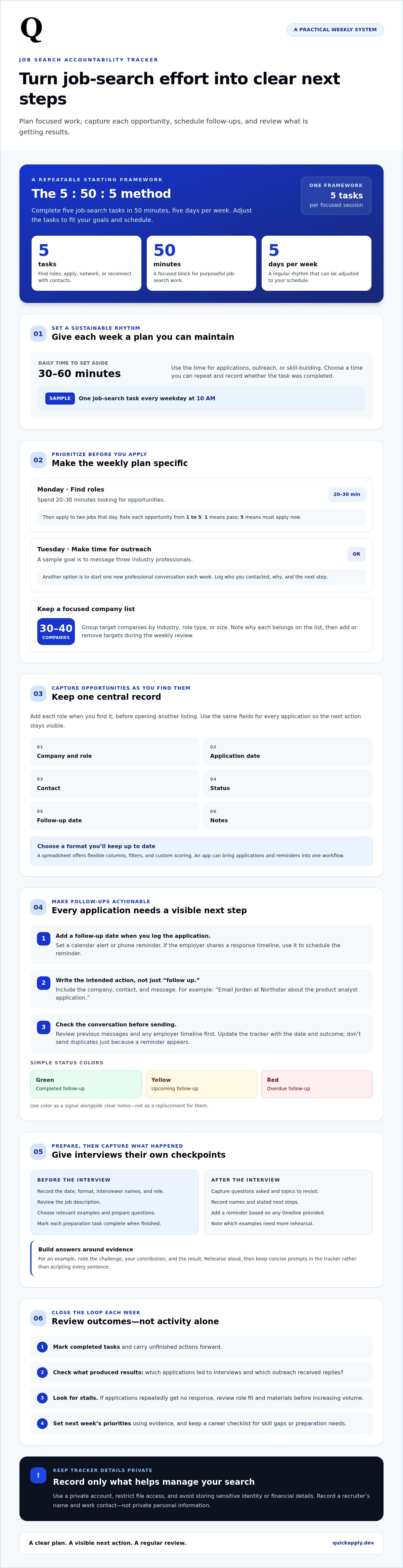
More applications won’t fix a search that has no system. A job search accountability tracker helps you plan focused work, log applications, schedule follow-ups, and review what’s getting results. One workable routine is five job-search tasks in 50 minutes a day, five days a week, paired with regular progress reviews.
It’s easy to lose momentum when applications, recruiter conversations, and interview preparation are scattered across different places. A job search accountability tracker turns each into a next action, so you can see what’s done and what needs attention. This guide shows you how to set a weekly plan, capture application details, schedule follow-ups, prepare for interviews, and use outcomes to refine your strategy. The result is a practical system for consistent effort that distinguishes progress from activity.
Key Takeaways
- Pair a realistic weekly plan with regular reviews so effort stays focused on roles and actions that fit your goals.
- Record follow-up dates and interview-preparation steps alongside each application to keep the next action visible.
- Capture job details as soon as you find a role, then update its status as it moves through the hiring process.
- Review interviews, offers, and rejections to spot patterns and refine your search strategy.
- Use fields such as company, role, application date, contact, status, follow-up date, and notes to make your tracker useful at a glance.
1. Combining accountability with job-search strategy
A job search accountability tracker works best when it measures purposeful action, not activity alone. Set a weekly target, assign time to each task, and review the outcomes. A long application list means little if the roles don’t match your skills or priorities.
Choose a format you’ll update consistently. A spreadsheet offers flexible columns, filters, and custom scoring. An app can bring applications and reminders into one workflow. Pick a system you can maintain, then use the same fields for every application.
Protect personal information by recording only what helps you manage your search. Use a private account, restrict file access, and avoid storing sensitive identity or financial details. For example, note a recruiter’s name and work contact, not private personal information.
Build the routine around available time. Set aside 30-60 minutes per day for applications, outreach, or skill-building. A sample schedule assigns one job-search task every weekday at 10 AM. Choose a time you can repeat, then record whether you completed the task.
Try the 5:50:5 method: complete five job-search tasks in 50 minutes, five days per week. Tasks can include finding roles, applying, networking, and reconnecting with contacts. Treat the method as a framework, then adjust tasks to fit your goals and schedule.
Make the weekly plan specific. A sample plan spends 20-30 minutes finding roles on Monday, then applies to two jobs that day. Rate each opportunity from 1 to 5: 1 means pass, while 5 means must apply now. This filter helps prioritize fit before effort.
Set aside a regular time for outreach. For example, message three industry professionals on Tuesday, or aim to start one new professional conversation each week. Log the person, your reason for reaching out, and the next step, such as sharing a portfolio or scheduling a conversation.
A target list of 30-40 companies can reduce scattered searching. Group companies by industry, role type, or size, then note why each belongs on your list. At the weekly review, add or remove targets based on the roles you find and the conversations you have.
Pair every activity goal with a strategy check. Ask which applications led to interviews, which outreach messages received replies, and which tasks stalled. If applications repeatedly get no response, review role fit and application materials before increasing volume. A tailored cover letter can help make a submission more focused.
Close each week with a brief review. Mark completed tasks, carry forward unfinished actions, and set priorities for the coming week. Keep a career checklist alongside your tracker to identify skill gaps or preparation needs. Recognize completed milestones, then adjust your plan based on evidence, not guesswork.
2. Follow-up reminders and interview preparation
A follow-up date turns a submitted application into a trackable next action. Add the date when you log the application, then set a calendar alert or phone reminder. This keeps employer check-ins visible alongside your other commitments. If the employer gives a response timeline, use it to schedule the reminder. Otherwise, choose a reasonable follow-up date and note why you chose it.
Make each reminder actionable. Instead of writing “follow up,” note the company, contact, and intended message. For example: “Email Jordan at Northstar about the product analyst application.” Add the application status and last contact date, too. This context saves you from searching old email threads before reaching out.
Use a simple color system to scan the tracker. Mark completed follow-ups green, upcoming ones yellow, and overdue ones red. Review the colors whenever you check the tracker. A red entry should prompt a decision: send the planned message, update the date, or note why the next step changed. Color is a signal, not a substitute for clear notes.
Keep reminders professional and specific. A follow-up can briefly name the role, restate your interest, and ask whether the employer needs anything else. Don’t send duplicate messages just because a reminder appears. First review the conversation history and any timeline the employer provided. Then update the tracker with the date and outcome.
Interviews need their own checkpoints, not just a calendar event. When an interview is scheduled, record its date, format, interviewer names, and role. Add preparation tasks such as reviewing the job description, choosing relevant examples, and preparing questions. Mark each task complete as you finish it. This makes interview preparation visible and manageable.
Build answers around evidence. For a product role, prepare an example of how you identified a user problem and responded. Note the challenge, your contribution, and the result. Rehearse aloud, then tighten any answer that wanders. Keep concise prompts in your tracker instead of scripting every sentence.
After each interview, capture your notes while the details are fresh. Record the questions asked, topics to revisit, names, and stated next steps. If the employer gives a follow-up timeline, add a reminder based on it. These notes help you prepare for another conversation without relying on memory alone.
For focused rehearsal, practice interview answers against likely role-specific questions. Then use your tracker to log which examples you rehearsed and what needs refinement. This links preparation to a concrete next step, while keeping employer follow-ups and interview tasks in one workflow.
3. Job application tracking across websites
Applications can be scattered across company career pages, job boards, and email. Use one central record as your source of truth. Add each role as soon as you find it, before opening another listing. This quick capture keeps promising opportunities from disappearing among browser tabs.
A spreadsheet template is easy to customize for a focused search, while an app can consolidate application details in a dedicated workflow. Compare how quickly you can add a role, find its status, and record the next step. To start simply, create a spreadsheet with the fields you use, then add columns only when they solve a recurring problem.
For each opportunity, record the job title, company, application date, and job-description link. Add the application status, follow-up date, contact person, and useful notes. Include the job location and your salary expectations to compare roles without reopening other websites. Keep the original listing link, since postings can change or expire.
Use consistent status labels across every source. For example, mark an application “saved,” “submitted,” “interviewing,” “offer,” or “closed.” Update the status whenever the employer responds or you complete an action. Consistent labels make filtering useful, while dated notes preserve context, such as “phone screen scheduled” or “role filled.”
Update the tracker whenever an application detail changes, and add new roles immediately. Review active entries during your regular job-search check. This routine catches missing dates and outdated statuses before they disrupt your next action. Waiting until the end of the week can leave you reconstructing details from multiple websites and email threads.
To track applications, interviews, and follow-ups together, connect each milestone to the same company and role record. When an invitation arrives, add the interview date and a preparation note. Record a follow-up date after submitting or interviewing, then update the status after sending the message. This creates a clear timeline without splitting one opportunity across disconnected notes.
Use filters to turn a long list into a useful view. Filter by status to find active applications, or by company to review every role there. Sort by follow-up date to surface the next action. If location or salary expectations affect your decision, filter by those fields before spending time on an application.
Keep the system readable with short notes, consistent statuses, and working links. Check for duplicate company or role entries before adding a record. A tracker stays useful when each row represents one opportunity and shows its current state at a glance.
Use a clear format for recording details and add a brief note about the next action. Enter job details as soon as you find a role, so an opportunity isn’t lost while you move between listings. Keep each record current as you learn more about the position or employer. Update the status regularly to reflect changes rather than relying on memory. Reviewing the status alongside the role details keeps the next action visible and highlights opportunities that still need attention.
4. Job search analytics
Use tracker data to decide what to change, not simply to count activity. People spend an average of 11 hours a week searching for jobs. Review where that time goes, then compare effort with outcomes. If applications take most of your time but rarely lead to interviews, inspect role fit and application quality before adding more submissions.
Start with a weekly snapshot. Count applications submitted, interviews received, offers, and rejections. Compare outcomes over the same period, then note which roles or channels produced responses. For example, if referrals lead to interviews but broad job-board applications don’t, shift some search time toward relevant connections.
Rates make comparisons clearer. Divide interviews by submitted applications to calculate an interview rate, then compare periods or role categories. Use consistent date ranges and count only submitted applications. A saved listing isn’t a submission, and a recruiter conversation isn’t an interview. Clear definitions keep your dashboard useful.
Segment results by role, industry, company size, or application source. Suppose software roles lead to interviews while adjacent operations roles receive no replies. That pattern may point to a fit issue, a resume mismatch, or a need to target different employers. Review the job descriptions before deciding which factor to address.
Track outcomes beyond the first response. Record whether an interview advanced, ended in rejection, or led to an offer. Add notes about interview topics and employer feedback. If several interviews stall at the same stage, compare your preparation notes and answers. A recurring pattern can identify a specific area to practice.
Measure the process you control separately from employer decisions. Useful inputs include targeted applications, networking conversations, and completed interview preparation. Outcomes include interviews, offers, and rejections. If activity rises but outcomes stay the same, refine your targeting or materials. More output alone doesn’t prove the strategy is working.
Review trends across comparable periods instead of reacting to one rejection. A single outcome may reflect timing or an employer’s needs. Repeated results across similar applications offer stronger direction. Note what changed, such as a revised resume or a new role category, so you can connect later responses to the adjustment.
Turn each review into one experiment. For example, tailor your resume for a specific role type, then track the next applications separately. Keep other parts of your approach stable where practical. This makes the comparison easier to interpret and helps distinguish a useful change from random variation.
End the review with a short decision log: continue, stop, or test. Continue channels that produce relevant interviews. Pause tactics that consume time without useful responses. Test one adjustment, then review the results. A clear log makes next week’s plan evidence-led rather than reactive.
5. What fields should a job search tracker include?
Build your tracker around decisions and next actions. Andrew Phillips recommends a spreadsheet for job-search finances, applications, contacts, and ideas. Start with fields that identify each opportunity and show its current status. Add extra columns only when they help you compare roles or act on useful information.
Use core application fields: job title, company name, application date, job-description link, application status, follow-up date, contact person, and notes. These details connect each role to its timeline. For example, a saved job-description link lets you revisit the original requirements while preparing your application materials.
Give each field a clear purpose. The title and company identify the opportunity. The application date records when you acted, and the status shows its current stage. A follow-up date flags a pending action, while the contact field identifies whom you spoke with. Use notes for details that don’t fit elsewhere, such as a referral or an employer’s stated timeline.
Add salary expectations and job location when comparing opportunities. These fields help distinguish roles that look similar in a listing but differ in practical fit. Keep entries consistent: use the same location format and record salary expectations the same way. Consistency makes sorting and comparison more useful.
Make categories useful for your search. Group listings by industry, role type, or company size to see where your applications are concentrated. For example, filtering by role type can show whether you’re targeting product, engineering, or operations positions. Use the pattern to check whether your effort matches your priorities.
Record connections at companies where you apply. Note each person’s name, your relationship, and any relevant conversation. This gives networking efforts context and helps you avoid sending outreach without a clear reason. If a contact refers you, update the application notes to connect the referral to that role.
Use a separate finance field or tab if job-search costs matter to your planning. Record the expense, date, and purpose, such as travel for an interview. Include only financial details that support your planning. Don’t put sensitive account information in an application record.
Keep the layout scannable. Freeze or pin identifying fields, use filters for status and category, and make notes concise. A row should answer three questions quickly: which role, what stage, and what next? Set up an application tracker to keep those details organized as your search moves across websites.
Categories are most useful when they inform a decision. Group listings by industry, role type, or company size to identify where to focus and how to tailor applications. Consistent labels make it easier to see where your applications are concentrated and compare opportunities. Use those groupings to focus on roles that fit your search.
A connection field keeps networking information tied to the relevant company. Note your connections at companies where you’re applying, then use that information to plan outreach. Keeping these details alongside the opportunity makes it easier to decide whom to contact and how each connection relates to your search. Update the field as relationships develop so it remains useful when planning future outreach.
QuickApply: Resume Tailoring
QuickApply helps turn your tracker’s next application into a focused submission. Its Resume Tailoring and Cover Letter Generation adapt application materials to specific job descriptions. Use these tools when a role fits your goals but customizing each document takes time. The Application Tracker helps organize your search, and Interview Practice supports preparation after an employer responds. QuickApply also provides a match score to help identify fitting opportunities. These tools connect role selection, application materials, and preparation in one workflow, while your tracker helps you review outcomes and decide what to improve. Visit quickapply.dev to explore how QuickApply can support your job search.
Turn your next application into a clear next step
Your next move doesn’t require overhauling your entire search. Choose one change your tracker points to, such as presenting a relevant project more clearly or preparing a stronger interview example. Apply that adjustment to the next opportunity and record what you learn. A job search accountability tracker is most useful when each review leads to a deliberate action, not more busywork.
When tailoring application materials is the bottleneck, QuickApply can help with Resume Tailoring and Cover Letter Generation. If an employer responds, Interview Practice can help you prepare for the conversation. Use the support that fits your next step while keeping your priorities and progress visible.
Contact QuickApply for job search support and choose a practical next step for your search. Keep refining your process, stay focused on roles that fit, and move forward with purpose.
Frequently Asked Questions
What is a job search accountability tracker?
A job search accountability tracker is a personal system for turning career goals into visible actions and reviewing whether you followed through. Unlike a folder of saved job ads, it connects each goal to evidence, such as a completed networking message or a revised portfolio sample. Use it to spot unfinished commitments and decide what to change. It can be a spreadsheet, an app, or any format you’ll maintain.
Best free job search accountability tracker templates or apps
A customizable spreadsheet is a simple starting point, while an app can bring application details and reminders together. Choose the setup you can maintain consistently.


