

What if the smartest resume strategy isn’t rewriting everything, but changing only what proves you fit the role? If you’re asking, “is it worth rewriting your resume for every application,” the answer is usually no. Starting from scratch takes time, while sending the same generic version can bury the experience an employer needs to see.
You don’t need a brand-new resume for every job. You need a strong master version and focused edits that bring the most relevant skills, achievements, and language forward. That keeps each application specific without turning your job search into a repetitive editing loop. This guide explains which roles deserve meaningful tailoring, what to adjust, and how to keep every claim accurate. You’ll also learn how AI can speed up a first draft while leaving the final judgment and voice to you.
Key Takeaways
- Wondering “is it worth rewriting your resume for every application”? Reserve a full rewrite for times when your experience or target direction has changed substantially.
- Scan the job description for recurring requirements, then connect them to relevant skills and achievements you can support with evidence.
- Use role fit to decide how much effort to invest. Prioritize jobs that align with your demonstrated strengths and accomplishments.
- Before submitting, check that edits are accurate, clear, and written in your own voice rather than copied from the posting.
- QuickApply creates a job-description-based resume draft in about 30 seconds and reports a 94% ATS match score after tailoring. Review the draft for accuracy and use your own judgment.
Is it worth rewriting your resume for every application? Start with the real trade-off
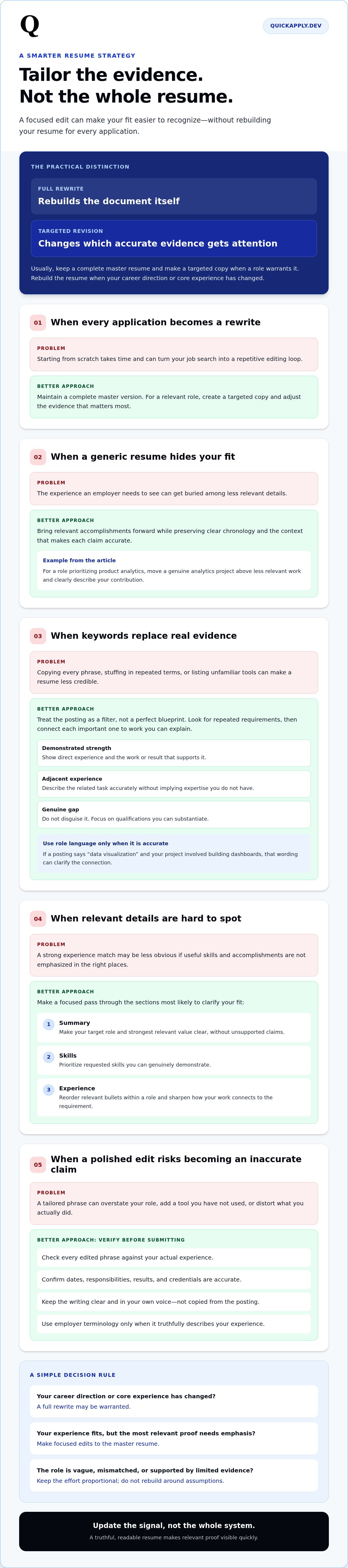
Usually, no. Rebuild your resume only when your career direction or core experience has changed. For each application, tailor the evidence: select the most relevant truthful details, put them where they’ll be noticed, and explain how they connect to the role. That improves relevance without turning every application into a document redesign.
The trade-off is straightforward. A focused edit can make your fit easier to recognize, while excessive revision takes time away from evaluating roles, preparing applications, or checking your work. Treat your resume as a well-maintained source file, not a fresh project for every job. Keep a complete master version, then create a targeted copy when a position warrants it.
A targeted revision changes which accurate evidence gets attention; a full rewrite rebuilds the document itself. That distinction is the practical answer to “is it worth rewriting your resume for every application?” Most of the time, update the signal, not the whole system.
What does tailoring a resume actually mean?
Tailoring means adjusting emphasis, wording, and bullet order so relevant experience is easier to spot. If a role prioritizes product analytics, for example, move a genuine analytics project above less relevant work and describe your contribution in clear, job-related terms. Don’t add tools you haven’t used or inflate your role. Keep dates, responsibilities, results, and credentials accurate. You’re adapting a master resume for a specific role, not inventing a new professional history. For context on how resumes function as career-marketing documents, see The History and Purpose of a Résumé.
Why do experts disagree about customizing every application?
The disagreement often comes down to how much trust to place in a job posting. CNBC’s argument is that descriptions don’t always capture the hiring manager’s real priorities; compensation teams may shape the listing, so line-by-line customization can waste effort. Indeed makes the case for editing each resume to improve relevance, highlight skills and examples, remove unnecessary details, and catch errors. Both perspectives can be useful. The posting is a guide, not a perfect blueprint, and a relevant edit doesn’t have to mean a full rewrite.
Use the description as a filter, then apply your judgment. Focus on requirements supported by your actual experience, especially repeated skills and responsibilities that align with work you’ve done. Don’t mirror every phrase or force unrelated accomplishments into the document to match more words. If the role fits your target and you have strong evidence for its core needs, make focused edits. If the posting seems vague or mismatched, keep your effort proportional rather than rebuilding your resume around assumptions.
That middle ground resolves the apparent conflict: customize when it helps a reader understand your fit, but don’t treat every listing as a command to start over. The goal is a truthful, readable account of your experience that makes relevant proof visible quickly.
What should you change when tailoring a resume to a job description?
Start with evidence, not keywords. Scan the posting for skills, responsibilities, and outcomes that appear more than once, then find truthful examples in your resume that demonstrate them. A repeated requirement is a useful signal, not a reason to copy every phrase. The goal is to make your strongest relevant evidence easy to recognize.
How do you map job requirements to resume evidence?
Sort the role’s main requirements into three groups: demonstrated strengths, adjacent experience, and genuine gaps. For each important requirement, connect it to a specific project, result, tool, or responsibility you can explain. For example, if a posting emphasizes deployment monitoring, identify an actual monitoring task or project you’ve done. If you don’t have direct experience, don’t claim the skill just because it’s listed.
- Demonstrated strength: Show direct experience and the work or result that supports it.
- Adjacent experience: Describe the related task accurately, without implying expertise you don’t have.
- Genuine gap: Don’t disguise it. Focus on the qualifications you can substantiate.
This map also keeps ATS keywords in perspective. Use the employer’s terminology when it accurately describes your experience. If the posting says “data visualization” and your project involved building dashboards, that wording may clarify the connection. But stuffing in repeated terms or listing unfamiliar tools can make the resume less credible. A match is useful only when the evidence behind it is real.
Which resume sections are usually worth adjusting?
Check your summary, skills, and most relevant experience bullets first. Bring role-aligned accomplishments forward, but preserve clear chronology and the context that makes each claim accurate. Keep formatting consistent, then verify every edited phrase, date, metric, and credential before submitting. A more detailed guide to tailoring a resume to a job description can help you build a repeatable workflow.
Use this focused pass:
- Summary: Make your target role and strongest relevant value clear, without adding unsupported claims.
- Skills: Prioritize skills requested in the posting that you can genuinely demonstrate.
- Experience: Reorder relevant bullets within a role and sharpen descriptions to show the connection between your work and the requirement.
- Final check: Confirm the edits still reflect what you did, when you did it, and what the outcome was.
Keep your base resume intact and save each application-specific version separately. This makes it easier to tailor without losing your original facts or carrying edits from one role into another. To speed up the first-draft process, use QuickApply’s resume-tailoring workflow, then review the output for accuracy and your own voice before applying.
Rewrite every resume or make targeted edits? Compare the effort and value
Not every application deserves the same editing depth. A closely related role may need only a quick review, while a major career pivot can call for a substantial restructure. Choose based on how much the role differs from your current resume, how clearly your existing evidence fits, and how much time the application merits. No approach guarantees a response; the goal is to balance relevance with effort and accuracy.
| Approach | Time | Relevance | Accuracy risk | Best fit |
|---|---|---|---|---|
| Full rewrite | Highest | Can be strong if it reorganizes relevant proof for a different target | More edits create more chances for errors or distorted context | A major career pivot or substantially different role |
| Focused tailoring | Moderate | Highlights the closest matching evidence | Manageable with a careful fact-check | Related roles with overlapping core requirements |
| Unchanged resume | Lowest | Depends on how closely the existing version already matches | Low editing risk, but may leave relevant evidence buried | A strong, directly matched opportunity where the resume is already clear |
The practical rule: invest more effort when the role requires a different story, not simply because you’re submitting another application. Job descriptions can be imperfect signals of what a hiring team values. Avoid rebuilding your document around every listed phrase, but don’t overlook clear opportunities to make relevant qualifications easier to find. Generic, AI-generated wording can also weaken an application’s distinctiveness, as explained in why generic ChatGPT resumes can fall short.
When is a full resume rewrite justified?
Consider a deeper restructure if you’re moving from software engineering into product management, or targeting a role that relies on a different mix of projects and responsibilities. Reorganize the document so relevant proof leads. Don’t rewrite your employment history to make the pivot look cleaner than it was. Keep a complete master resume as your verified source, and build each version from facts you can stand behind.
When are small edits enough?
For related roles with similar qualifications, adjust emphasis, terminology, and selected bullets rather than editing every section. An unchanged resume can be reasonable if it already foregrounds the right skills and accomplishments, uses relevant language, and contains no distracting errors. Do a quick review first. “Unchanged” should be a deliberate decision, not an assumption that every version works for every posting.
Save your effort for applications where a change will make your fit clearer. If repetitive edits slow you down, QuickApply’s resume-tailoring workflow can generate a role-specific draft for you to review. Verify that the final version preserves your facts, context, and voice.
How can you decide how much to tailor each application? Use this quick framework
Choose an editing depth based on two signals: how closely the role fits your experience and how much relevant evidence your resume already contains. A strong match with clear proof calls for focused edits. A different target role may need deeper restructuring. If the experience isn’t there, extensive rewriting can’t manufacture it.
Use this four-step workflow:
- Assess role fit. Compare the role’s core responsibilities with work you’ve actually done. Look for meaningful overlap, not just matching words.
- Select evidence. Choose the achievements, projects, skills, or responsibilities that best demonstrate that overlap. Keep each claim verifiable.
- Make focused edits. Adjust the summary, skills, or relevant bullets to clarify your fit. Reorganize more substantially only when the target role calls for a different story.
- Proofread. Check facts, dates, formatting, and readability. Remove awkward phrasing, unsupported claims, and keywords that don’t reflect your experience.
Set a time boundary that fits your search volume and the importance of the opportunity. If you’re applying to several closely related roles, a repeatable light-edit process may be more practical than treating each one like a major project. For a priority role that closely matches your accomplishments, spend more time reviewing and refining the strongest evidence. There’s no universal minute limit. Set one you can sustain without skipping the final accuracy check.
Which applications deserve deeper tailoring?
Prioritize roles where the responsibilities align with skills you’ve demonstrated and accomplishments you can explain. A close match may need only a targeted pass to bring the best proof forward. Give a career pivot or a position with distinct core responsibilities more thought, since the order and context of your evidence may need to change. Don’t spend extensive editing time trying to force a fit when the role’s central requirements don’t match your experience.
Decision rule: The closer the role matches your experience and the stronger your evidence, the lighter your edits can be. The bigger the gap between your current resume and the role’s core responsibilities, the more carefully you should reconsider the structure and fit.
How do you keep tailored versions accurate and consistent?
Keep one master document as your source of truth. Maintain verified dates, achievements, metrics, responsibilities, and skills there, then compare each tailored version against it. Before submitting, read the resume aloud or scan it as a hiring manager would. Check that keywords fit naturally, AI-assisted phrasing sounds like you, and no edit has changed the meaning of your work.
To streamline the repeatable parts of this process, try QuickApply’s resume-tailoring workflow, then review every draft for accuracy and personal voice.
How QuickApply helps you tailor resumes faster without starting over
Efficient tailoring doesn’t mean sending the same document everywhere or letting software make your career decisions. QuickApply uses a job description to create a tailored resume draft from your existing experience, helping reduce repetitive editing while keeping the application role-specific. It’s a faster starting point, not an automatic hiring advantage. You decide which evidence belongs in the final version and confirm that every claim is accurate.
QuickApply states that resume tailoring takes about 30 seconds and reports a 94% ATS match score after tailoring. Treat the score as a way to review alignment, not a prediction of interviews or hiring outcomes. A strong match still depends on whether the resume represents your actual qualifications and communicates them clearly.
What does an efficient QuickApply workflow look like?
Start with a current resume and the specific job description. Generate a tailored draft, then compare it with your real work history. Check that the skills, responsibilities, and accomplishments accurately describe what you’ve done. Remove suggestions that overstate your experience, add claims you can support, and adjust wording that doesn’t sound natural in your voice.
After you apply, use QuickApply’s application tracker to organize applications and their tailored resume versions. That record helps you keep each document associated with the right role, rather than accidentally reusing edits intended for another posting. The workflow stays repeatable: use the draft to save editing time, apply your judgment, then track the version you submitted.
How can you save time without sending generic applications?
Use automation for the repetitive first pass, then reserve your attention for the decisions that need your experience: which accomplishments matter, whether the language is truthful, and whether the resume clearly fits the role. QuickApply states that total application time is about 90 seconds. Treat that as the platform’s stated figure, not a promise that every application will take the same time or produce a particular result.
The platform provides 30 tailored resumes and 30 personalized cover letters per month. This makes it possible to prepare role-specific drafts across multiple applications while still reviewing each one individually. Resist the temptation to submit automatically. A quick factual and voice check separates efficient assistance from generic output.
If you’re still asking, “is it worth rewriting your resume for every application,” use technology to speed up focused tailoring, not to replace your judgment or rebuild your work history. You can Try QuickApply free for three days, with no credit card required, and test a workflow that keeps the edits targeted and under your control.
Make your next application a focused one
Don’t let resume editing become a project that delays applying. For your next opportunity, identify the role’s core needs, choose the experience that genuinely proves your fit, and make only the changes that help that evidence stand out. Then move forward. A clear, accurate application is more useful than an endlessly polished draft.
So, is it worth rewriting your resume for every application? Usually, it’s worth tailoring your strongest evidence, not starting over. Use that distinction to protect your time and keep your job search moving. You can try QuickApply free for three days, with no credit card required, and put a focused workflow into practice.
Your experience is already the foundation. Make its relevance clear, trust the facts, and take the next step with confidence.
Frequently Asked Questions
Is it worth rewriting your resume for every job application?
Usually, no. It’s worth making an application-specific version when the role calls for different evidence or terminology, but a complete rewrite for every posting is rarely necessary. For example, two backend engineering roles may share core requirements, while a move from engineering to technical product management may need a different structure. Decide based on what the employer needs to see and whether your current resume already makes that evidence clear.
How much should you tailor your resume for each application?
Tailor enough to make your qualifications easy to connect to the role, then stop before edits become cosmetic. A practical test: can a reader quickly find relevant skills, projects, and outcomes? If yes, a brief review may be sufficient. If a strong accomplishment is buried or your summary points toward a different role, spend more time adjusting the document. Let the opportunity and your evidence guide the effort.
Can you use the same resume for similar jobs?
Yes, if the roles genuinely share responsibilities and your resume already presents the right qualifications. A data analyst applying to two roles focused on SQL reporting, for instance, might use one core version. Still, check each posting for differences such as stakeholder communication, dashboard ownership, or a particular analytics tool. Save a separate copy if you change anything, so you can track which version went with each application.
What should you change on your resume for each job?
Review the parts most likely to shape a recruiter’s first impression: your headline or summary, skills list, and the most visible experience bullets. If a role emphasizes cross-functional delivery, bring forward a real example of working with design or engineering partners. Keep the original scope and outcome intact. Don’t alter job titles, dates, or results to make your experience appear closer to the posting.
Does tailoring a resume help it pass an applicant tracking system?
Tailoring can make relevant terminology easier for an applicant tracking system to identify, especially if you use accurate terms that also appear in the posting. It can’t guarantee that a resume will pass screening or reach a recruiter. Keep the document readable and use conventional section labels, such as “Experience” and “Education.” Avoid placing essential information in complex graphics or repeating keywords where they don’t make sense.
Can AI tailor a resume without making it sound generic?
Yes, if you treat AI output as editable draft material, not ready-to-submit copy. Keep concrete details that only you can verify, such as the system you built, the problem it solved, or your specific contribution. Replace broad claims like “results-driven team player” with precise evidence from your work. Read the final version aloud; if a sentence sounds unlike you or exaggerates your role, revise it.
How do you tailor a resume quickly without making mistakes?
Work from a verified source document and make a copy for each application. Compare the copy with the posting, edit only relevant sections, then check every changed skill, date, title, and result against the source. Search for leftover wording from another application and remove unsupported claims. A final read in plain text can also reveal awkward formatting or repeated phrases that are easy to miss while editing.


