

Generic interview drills won’t prepare you for technical questions tied to a specific role. An AI mock interview tool for tech jobs can turn a job description into targeted practice questions and help you rehearse by speaking or typing.
Knowing you need practice doesn’t stop you from wasting time on questions that don’t match the job. Make each session relevant: use the role’s requirements to shape the questions, answer as you would in an interview, and review feedback against the job description, question, and response.
This guide shows you how to practice with AI, generate role-specific questions from a job description, and use feedback to identify where your answers need more clarity or detail. It also explains how AI practice fits alongside other mock interview options, so you can choose a focused routine.
Key Takeaways
- Turn a job description into focused practice questions that reflect the role’s technical and behavioral demands.
- Review each answer for relevance, clarity, and supporting detail, then use the feedback to sharpen your next attempt.
- Build a repeatable practice routine that works for your experience level, whether you’re changing careers or advancing in tech.
- Choose the mock interview format that fits your needs and use QuickApply’s Interview Practice to prepare with more focus.
Generating role-specific questions from a job description
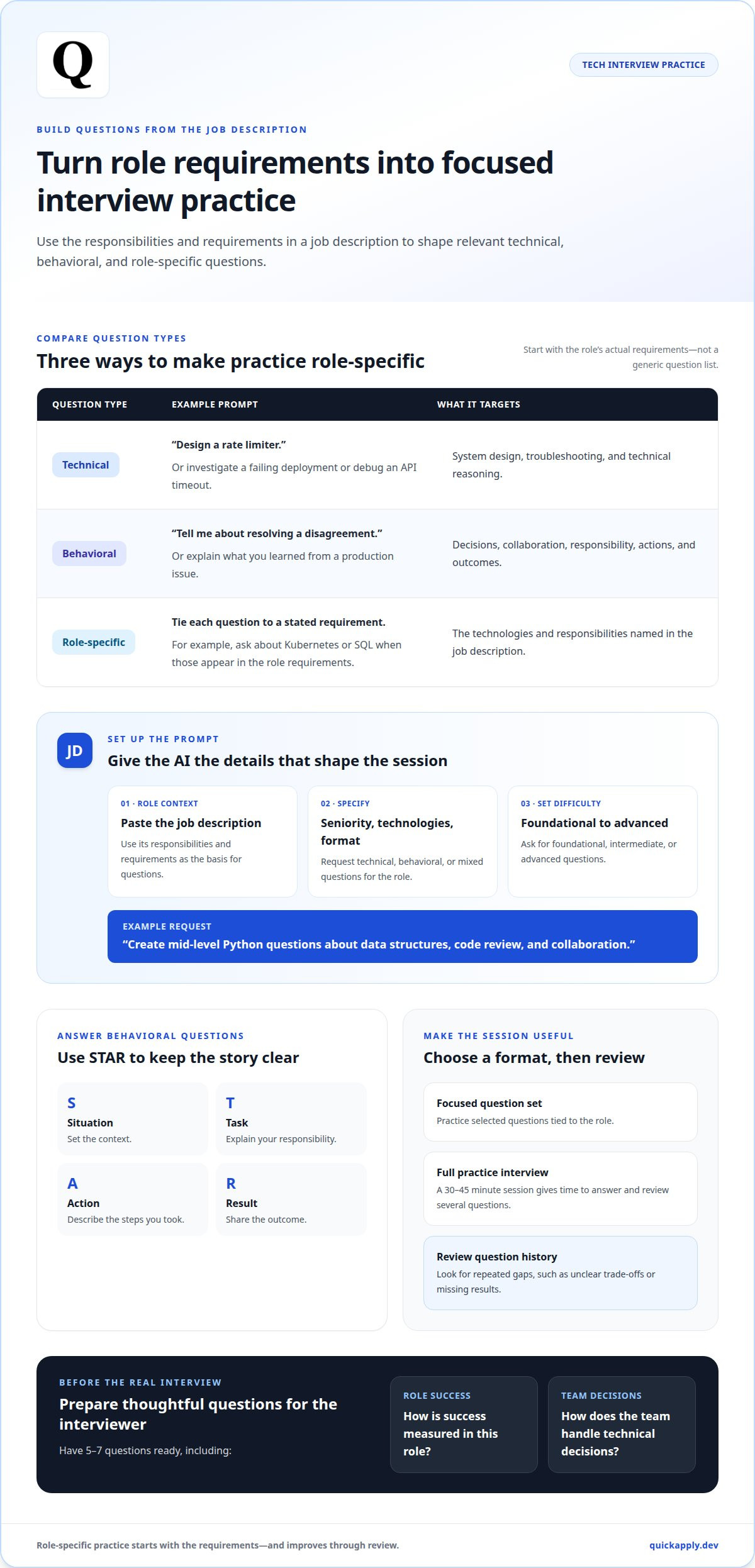
Start with the job description, not a generic list of interview questions. An AI interview tool can use its responsibilities and requirements to generate role-specific prompts. Paste the description and request technical, behavioral, or mixed questions. For a software engineer role, “design a rate limiter” tests system design, while “debug this API timeout” targets troubleshooting.
Make the prompt precise. Specify the seniority level, core technologies, and interview format. For example, request mid-level Python questions about data structures, code review, and collaboration. Set the difficulty by asking for foundational, intermediate, or advanced questions. This guides the session without assuming the tool has a separate difficulty control.
- Technical: Ask how you would scale a service or investigate a failing deployment.
- Behavioral: Ask about resolving a disagreement or learning from a production issue.
- Role-specific: Tie each question to a requirement, such as Kubernetes or SQL.
For behavioral questions, structure your answers with STAR: Situation, Task, Action, and Result. Keep each part distinct. If asked about a difficult production incident, explain its impact, your responsibility, the steps you took, and the outcome. Use a concrete example rather than a broad claim about being adaptable.
Control the session length by choosing a focused question set or a full practice interview. A practice session of 30-45 minutes gives job seekers time to answer and review several questions. Afterward, use the question history to identify repeated gaps, such as unclear trade-offs or missing results. Before the real interview, prepare 5-7 thoughtful questions for the interviewer, including how success is measured in the role and how the team handles technical decisions.
Performance feedback and interview review
AI interview feedback can assess your performance using the job description, question, and recorded answer. Tools that support spoken or typed practice give you a response to review, not just a pass-or-fail verdict.
Answer Scores and Score Breakdowns
A platform’s score is most useful when its breakdown identifies specific features of your answer. Check whether feedback addresses relevance to the role, clarity of reasoning, and evidence for your claims. For a system-design answer, look for discussion of trade-offs, scalability, and how clearly you explained your decisions.
Treat a single score as a signal, not a hiring prediction. Compare sessions using the same framework: identify one strength, one gap, and one change to test next. If your response scores poorly because it misses a job requirement, revise that answer instead of memorizing a generic script.
Personalized Interview Feedback
Useful feedback connects your response to the exact question and role. If asked about an outage, check whether your answer explains the incident, your responsibility, your actions, and the result. This structure helps you see whether you answered the prompt or drifted into unrelated resume details.
Turn each review into a small iteration. Note the feedback, rewrite the weakest part, then answer again without reading. Track recurring issues, such as vague ownership or missing outcomes. Reviewing these patterns makes progress visible and helps you identify which edits improved your answer.
Communication and Technical Skill Analysis
Separate technical reasoning from delivery. For a coding question, check whether your explanation states assumptions, walks through the approach, and addresses edge cases. For communication, listen for a clear opening, logical transitions, and a direct conclusion. A recording lets you review both what you said and how you organized it.
Use feedback as a diagnostic, not a substitute for technical judgment. If your answer needs more detail, add a concrete project example and explain the decision and its impact. If your explanation is unclear, break the solution into steps and practice stating each one plainly.
Use structured interview practice to review answers and turn feedback into your next focused attempt.
How do I practice a mock interview with AI?
Build interview practice around the role, your career stage, and the gaps you need to close. A repeatable routine helps career changers connect transferable experience to technical requirements, while experienced professionals can sharpen examples from recent projects.
Start with company research. Spend 2-3 hours reviewing the employer’s products, customers, engineering blog, and role description. Then ask the AI to simulate questions about the team’s stack and likely challenges. Prepare a 60-90 second response to “Tell me about yourself,” linking your background to the position.
For career changers, translate prior work into engineering-relevant evidence. A project manager moving into software might explain how they mapped dependencies, resolved delivery risks, or worked with developers. University students can draw from coursework, internships, research, or a team project. Prepare 5-7 detailed stories that show decisions, collaboration, and results.
Use technical practice to demonstrate reasoning, not just recall. For a coding prompt, explain assumptions, outline an approach, test edge cases, and discuss complexity. For system design, state the requirements before proposing components. Ask the AI to challenge your response with a follow-up, such as how the design handles a traffic spike.
Practice at least 5-10 mock interviews before the actual interview, with each session lasting 30-45 minutes. After each run, choose one weak response and try again with a clearer structure. Also prepare 3-4 specific reasons for wanting to work at that employer, plus a question about success during the first 90 days.
Privacy depends on the platform’s policies and controls. Submitted job descriptions, recordings, or typed answers may be processed to generate feedback. Review the platform’s privacy terms, and avoid including confidential project details or personal information in practice responses.
Mock interview options, including AI-powered tools
Choose between solo rehearsal, practice with another person, and AI-powered sessions. The right option depends on whether you need repetition, live interaction, or targeted feedback.
During a real interview, use AI tools only if the employer explicitly permits them. Follow the employer’s stated rules and keep mock practice separate from the actual hiring conversation.
AI-Powered Mock Interview Options
AI tools can ask questions, accept spoken or typed responses, and provide feedback to review. Use them to rehearse “Tell me about yourself,” explain a software design, or answer behavioral questions about a production issue. Saved interview history can help you revisit earlier attempts and track revised answers.
Compare formats by the practice they support: role-specific prompts, spoken responses, typed responses, and reviewable session history. A software engineer may need follow-up questions on system design, while a marketing candidate might practice explaining campaign results. Choose a format that targets the demands of your next interview.
Prices and Free Plans
Free plans and prices vary by platform, so there’s no single standard cost. A free tier may limit sessions, detailed feedback, or saved history; paid access depends on the features included. Compare the specific limits and tools you’ll use instead of choosing by the word “free” alone.
Start by identifying what your interview preparation requires: question generation, spoken practice, or answer review. If a free option supports those needs, use it to test your routine. If it restricts a feature you need, weigh the plan’s terms against how often you’ll practice.
For a focused routine, practice aloud, review one response, then repeat it with a specific improvement. Practice tech interview answers with role-focused prompts before your next employer conversation.
QuickApply: Interview Practice
QuickApply’s Interview Practice helps tech candidates turn preparation into focused rehearsal. Use it to practice explaining technical decisions, refining behavioral responses, or building a clearer story around your experience.
Tie each practice run to the role you’re pursuing. Review the requirements, rehearse relevant answers, and choose examples that show how your skills match the position. QuickApply’s Resume Tailoring and Cover Letter Generation also help align application materials with specific opportunities, while its Application Tracker helps you organize your job search.
Choose Interview Practice when you’re ready to move from reading advice to rehearsing your answers. Contact QuickApply to learn more.
Make your next application more intentional
Your next interview is a chance to communicate your fit, not deliver a flawless script. Use an AI mock interview tool for tech jobs to make practice a repeatable part of your application workflow. Focus on one improvement at a time, then carry that clearer message into your application materials and employer conversations.
QuickApply brings together Interview Practice, Resume Tailoring, and Cover Letter Generation to support your preparation. Choose the step that matches your current goal, whether you’re refining an answer or aligning your application with a specific role.
Contact QuickApply to get started and take your next step with a focused plan. You’ve got a practical way to prepare; now put it to work on the opportunity you want.
Frequently Asked Questions
What are the best AI mock interview tools for tech jobs in 2026?
The best fit is a tool that matches your target role and practice format. A backend candidate may prioritize technical prompts, while a product manager may need stakeholder scenarios. Compare whether the tool can use a job description, support spoken or typed answers, and provide actionable feedback. No practice score alone predicts how an employer will evaluate you.
How do AI interview practice tools work for software engineering roles?
AI mock interview tools let candidates rehearse role-related questions and review their responses. For example, a software engineer can practice explaining a database migration, including rollout risks, backward compatibility, and recovery steps. Use the feedback to spot missing reasoning, then answer again without notes. AI practice supports preparation, but it doesn’t replace verifying technical details or solving code independently.
Which AI mock interview tools support coding interviews and live coding?
Capabilities vary: some tools focus on interview questions and answer feedback, while coding practice may require an interactive editor. Before a session, identify whether you need to write executable code, explain an algorithm aloud, or both. For a debugging prompt, practice narrating how you isolate the failure, test a hypothesis, and explain the fix, even without a live coding interface.
How do popular AI interview tools compare on features, accuracy, and ease of use?
Compare tools by the tasks they support, the specificity of their feedback, and how easily you can repeat practice. A score alone makes accuracy difficult to judge: check whether the feedback addresses the prompt and cites evidence in your response. A clear note about a missing assumption is more useful than a high-level rating without an explanation.
Can AI mock interview tools simulate behavioral and system design interviews?
Yes. Ask for behavioral prompts about collaboration, conflict, or ownership, then practice with a specific project example. For system design, request a scenario such as designing a notification service and explaining its requirements, components, and trade-offs. The simulation helps you rehearse your reasoning and delivery, but doesn’t reproduce every employer’s follow-up questions or evaluation style.
How can job seekers use an AI mock interview tool effectively?
Use each practice run to diagnose a specific gap, not to collect polished scripts. If you struggle to explain a project’s impact, rehearse a concise account of the problem, your contribution, and what changed. Then practice the same idea in a different question format. Keep your wording natural and make sure each answer reflects work you can discuss in detail.


