

Silence isn’t an automatic rejection. If you’re wondering what to do when you hear nothing back after applying, wait about one to two weeks before sending a polite follow-up, unless the job posting gives a different timeline. Then keep your search moving instead of letting one unanswered application stall your next step.
It’s frustrating to spend time on an application and hear nothing. Hiring can take time, though, and a quiet inbox doesn’t explain why a decision is delayed or whether the role is still open.
This guide outlines a practical follow-up timeline, gives you wording for checking in, and sets a clear point to move on. You’ll also find ways to stay organized and motivated while you wait, so one unanswered application doesn’t derail your search.
Key Takeaways
- Use the employer’s stated hiring timeline to guide your follow-up, and keep your message brief, polite, and specific.
- Understand why a quiet inbox isn’t always a clear signal, so you can respond thoughtfully instead of assuming the worst.
- Keep your search active while you wait by tracking applications and setting small, repeatable job-search goals.
- Review your approach if applications aren’t leading to responses, and focus your next steps on roles that match your experience.
1. Employer communication and candidate feedback
If an employer never responds, it may mean the role is filled, paused, or still under review. Silence alone doesn’t explain the decision. Interested employers may respond within 1-2 weeks, but hiring timelines vary. A company handling 1,000 applications might send only a form email, leaving applicants without individual feedback.
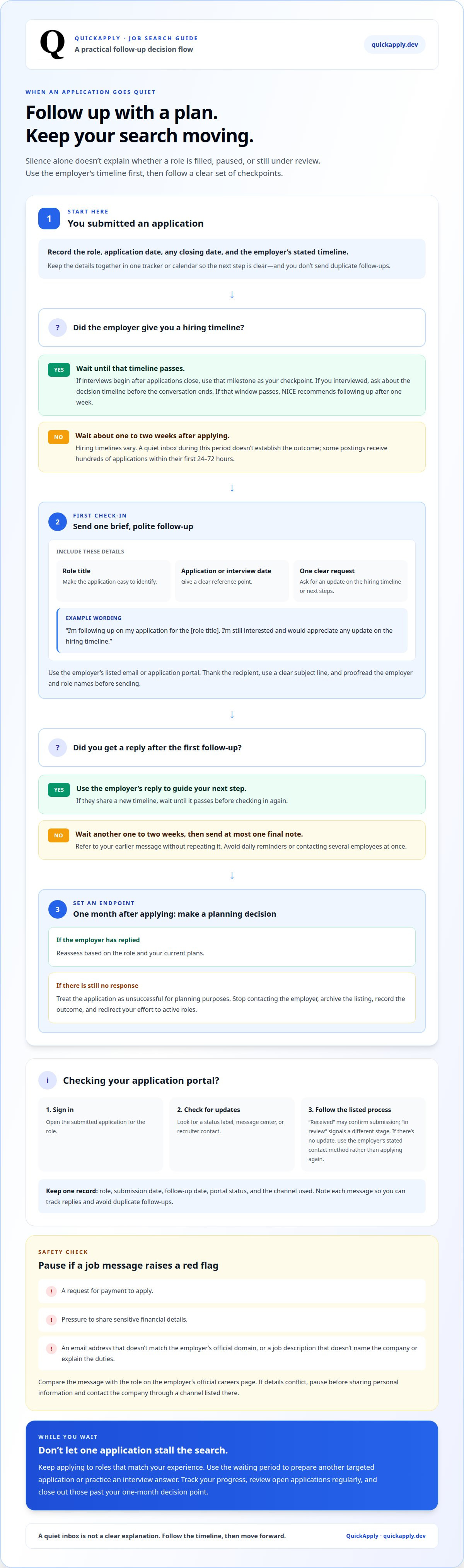
Warning signs of a job scam include a request for payment to apply, pressure to share sensitive financial details, or messages from an email address that doesn’t match the employer’s official domain. Be cautious if a job description doesn’t name the company or explain the duties. Pause before sharing personal information. Compare the message with the role on the employer’s official careers page, and contact the company through a channel listed there if details conflict.
Separate application status from interview feedback. An automated confirmation only shows that a system received your application; it doesn’t confirm that a recruiter reviewed it. If you interviewed, ask about the decision timeline before the conversation ends. If that window passes, the National Initiative for Cybersecurity Education (NICE) recommends following up after one week to ask about the next round or decision.
Make each follow-up easy to process. Include the role title, the date you applied or interviewed, and one clear request. For example: “I’m following up on my application for the data analyst role. I’m still interested and would appreciate any update on the hiring timeline.” Keep your tone professional, even if the employer hasn’t replied. Don’t send repeated messages through several channels; that can create noise without giving you useful information. Record the date and channel of each message, then focus on other active applications. A concise record helps you track replies and avoid accidental duplicate follow-ups.
2. Following up after applying
If a job posting gives no timeline, send a polite follow-up 1-2 weeks after applying. Use the email address or application portal listed by the employer. Keep your message brief and focused on your continued interest. A hiring team may be managing a large applicant pool, so make your role and request easy to identify. If you already received a timeline, wait until it passes before checking in.
What should you say in a follow-up email after applying? Include the job title, your application date, and a concise question about the hiring timeline. For example: “I applied for the marketing coordinator role on May 6 and remain interested. Could you share any update on the next steps?” Thank the recipient, use a clear subject line, and proofread the employer and role names before sending.
How often should you follow up? If your first message gets no response, wait another one to two weeks before sending one final, courteous note. Refer to your earlier email without repeating the whole message. Avoid daily reminders or contacting several employees at once. After the second follow-up, keep applying elsewhere rather than treating silence as an active conversation.
How can you check a job application’s status online? Sign in to the employer’s application portal and open your submitted application. Look for a status label, message center, or recruiter contact for the role. Status terms vary: “received” may confirm submission, while “in review” signals a different stage. If the portal has no update, use the employer’s stated contact method instead of submitting a duplicate application.
Track the role, submission date, follow-up date, and portal status in one place. An application tracker for managing job applications can make those next steps easier to organize, especially when you’re applying to several roles.
3. How long to wait and when to follow up
Use the employer’s stated timeline as your first checkpoint. If interviews begin after applications close, wait until that milestone passes before checking in. Without a schedule, plan a follow-up about one week after applying. Hiring can still take weeks, so a quiet inbox during that period doesn’t establish the outcome. Some postings receive hundreds of applications within their first 24-72 hours, which can slow review.
How many times should you follow up before moving on? Send one polite follow-up, then at most one final message if another one to two weeks pass without a reply. After that, stop contacting the employer and keep your search active. Two concise messages give the employer a chance to respond without turning your application into a stream of reminders.
Set a decision point one month after applying. If no response arrives by then, treat the application as unsuccessful for planning purposes. Archive the listing, record the outcome, and redirect your effort to active roles. This gives each application a clear endpoint instead of leaving it open indefinitely. If the employer replies later, reassess based on the role and your current plans.
Track the application date, any closing date, and your follow-up date on one calendar. If a posting closes after you apply, for example, plan your next step around the employer’s stated process rather than checking your inbox every day. If the posting disappears, note the change, but don’t assume it confirms a hiring decision. A removed listing doesn’t tell you whether the employer selected someone, paused hiring, or simply stopped accepting applications.
Keep applying while you wait for a response. After sending a follow-up, use the waiting period to prepare another targeted application or practice an interview answer. This parallel approach protects your momentum, so one employer’s timeline doesn’t control your entire search. Review open applications regularly and close out those past your one-month decision point.
4. Maintaining motivation during a job search
An unanswered application can make your whole search feel like a verdict. Treat it as one data point, not a judgment of your ability. Set a weekly process goal you can control, such as tailoring applications to roles that match your experience. Record each submission and its next action. You’ll have a visible record of progress even while employers stay quiet.
Build a repeatable routine instead of checking your inbox all day. Set aside one block to find roles, another to prepare applications, and a brief period to review replies. Keep a short list of completed tasks, such as updating your resume or practicing an interview response. These checkpoints show progress without depending on an employer’s decision.
Use response patterns to decide when your strategy needs adjustment. After 30-40 thoughtful, targeted applications with no responses, review your approach. Check whether each resume reflects the role’s requirements, whether your experience is clear, and whether you’re applying to suitable openings. Change one part at a time, then observe whether the next applications produce different results. This turns frustration into a practical feedback loop.
For a focused reset, the one-week action plan recommends sending 10-15 tailored applications to genuinely suitable roles during Day 4-5. Protect time for other parts of your life, too. Choose a finish time for job-search tasks and step away afterward. A clear stop point can help prevent unanswered messages from taking over every hour. If a rejection arrives, note any useful feedback, then return to your plan rather than rebuilding it from scratch.
Streamline your application workflow so you can spend less time managing repetitive tasks and keep your search moving.
QuickApply
QuickApply helps you organize your job search while you wait for employer responses. Its resume tailoring and cover letter generation help you customize applications for specific roles. The application tracker keeps your search progress in one place, while interview practice helps you prepare for an employer’s response. Use these tools to maintain a steady workflow instead of letting one unanswered application hold up your next move.
If preparing applications and tracking follow-ups are taking too much time, QuickApply can streamline those tasks. Focus on relevant opportunities, clear application materials, and readiness for the next conversation. Try QuickApply to make your job search easier to manage.
Turn your next application into forward motion
Knowing what to do when you hear nothing back after applying gives you a process, but your next opportunity still deserves focused effort. Use the waiting period to sharpen how you present your experience and prepare for the conversations that may follow. Each application is a chance to make your strengths clearer and build momentum beyond one employer’s decision.
QuickApply supports your next step with Resume Tailoring, Cover Letter Generation, and Interview Practice. Use these tools to prepare materials for relevant roles and get ready for employer responses. They can streamline application tasks while you decide which opportunities fit your goals.
Contact QuickApply for application help and put a more organized workflow behind your search. Keep moving, keep refining your approach, and give your next opportunity your best attention.
Frequently Asked Questions
How long should I wait to hear back from an employer before I worry?
Follow the timeline in the job posting or confirmation email before drawing conclusions. Knowing what to do when you hear nothing back after applying starts with checking that timeline, then keeping other applications moving. A delayed reply can reflect scheduling, approvals, or a busy hiring team rather than your fit. Set a reminder to review the role later so one employer’s response time doesn’t become your only measure of progress.
Am I applying to the wrong jobs for my background and experience level?
Possibly, if your applications repeatedly require experience or credentials you don’t have. Compare each posting’s core responsibilities with projects, skills, and results you can demonstrate. A role can still be worth pursuing if you meet about 70-80% of its qualifications and can explain how you’d handle the remaining requirements. Prioritize jobs where your evidence maps clearly to the work.
Am I not hearing back because I’m not actually qualified for the roles?
Not necessarily. A lack of replies doesn’t reveal whether an employer rejected your application because of your qualifications, timing, or another reason. Review the role’s essential requirements, then connect each one to a concrete example from work, study, or a project. If you can’t make that connection, target a closer-fit opening or build relevant experience before applying again.
Could a generic resume and cover letter be killing my applications?
A generic application can make it harder for an employer to see why you fit a specific role. When deciding what to do when you hear nothing back after applying, review whether your resume and cover letter address the role’s priorities. For instance, a project manager applying for a software role should foreground relevant technical projects, not unrelated coordination duties. Keep every claim accurate and explain your interest in that position.
How many applications should I send before I rethink my strategy?
Use response patterns, not your raw application total, to decide whether to adjust your approach. If suitable roles produce no screening calls, review your resume alignment, role level, and application timing. If you get interviews but no offers, focus on interview preparation instead. Change one part of your process, then track what happens with your next applications. That makes each adjustment deliberate rather than reactive.
Is my resume getting rejected by ATS before a human ever sees it?
It’s possible, but silence alone can’t tell you whether an applicant tracking system filtered your resume. Use a clear, simple format with familiar section labels, such as “Experience” and “Education.” Keep essential details out of graphics and complex layouts. Include relevant terms from the posting only when they accurately describe your skills, and make sure your work history is easy to scan.


