

The best ai interview practice tool isn’t the one that writes the slickest answer. It’s the one that helps you build a stronger response in your own voice. When you compare options, it’s easy to focus on feature lists and wonder whether AI feedback will help or make you sound rehearsed.
That concern is fair. Practice tools can help you prepare, but they’re not live interview copilots, and no tool can replace your judgment. Use AI to spot gaps, test your answers, and sharpen your examples, not to memorize a script.
This guide compares the criteria that matter, including practice experience, feedback, and fit with your preparation needs. You’ll also find a practical routine for preparing across multiple interviews without turning prep into another full-time job. The goal is to rehearse with purpose, improve one answer at a time, and show up sounding prepared, not programmed.
Key Takeaways
- Choose an ai interview practice tool by checking role relevance, flexibility, feedback clarity, privacy, and accessibility, not just ratings.
- Use AI feedback to identify gaps, then shape answers in your own words instead of memorizing generated scripts.
- Build a flexible practice schedule around your interview date, role, and preparation gaps. Keep each session focused and realistic.
- QuickApply offers interview practice tools alongside resume tailoring, cover-letter generation, and application tracking.
- Check each tool’s current features and access details before making it part of your preparation routine.
What an AI interview practice tool does and what it cannot do
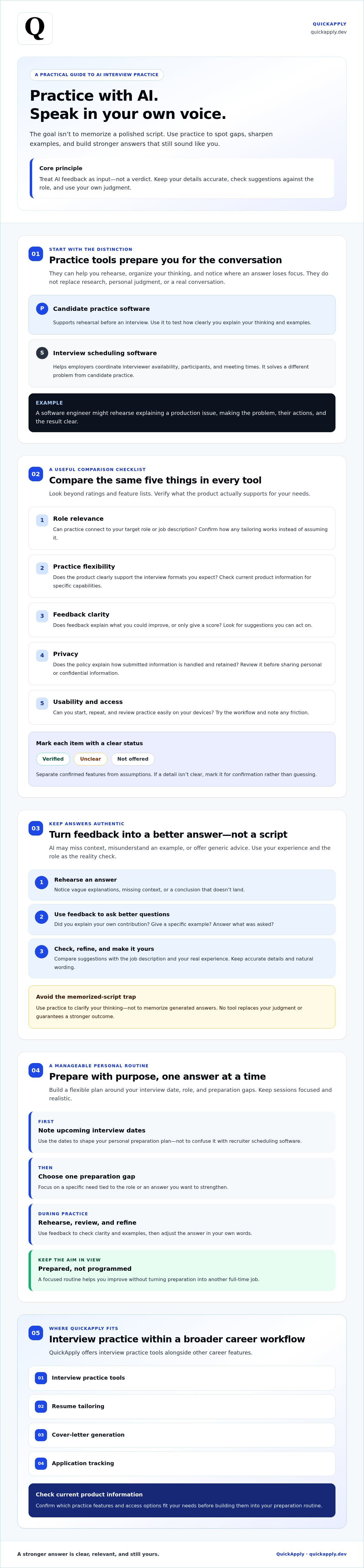
An ai interview practice tool helps candidates rehearse answers before a real conversation. Depending on the software, you may respond to prompts and review feedback. Use that process to organize your thinking, notice where an answer loses focus, and decide what to refine. A practice tool isn’t a hiring decision, a substitute for researching the role, or a guarantee of a stronger outcome.
Keep the category clear when comparing options. Candidate practice software supports rehearsal. Interview scheduling software helps employers coordinate interviewer availability, participants, and meeting times. They solve different problems. Here, a “practice schedule” means your personal preparation plan, not a recruiter’s calendar.
How AI interview practice differs from calendar scheduling software
Scheduling systems manage interview logistics. Practice tools help you prepare for the conversation itself. For example, a software engineer could rehearse explaining a production issue, then check whether the answer clearly covers the problem, their actions, and the result. This is a useful way to structure practice, not a claim that every tool supports a particular question format or feedback feature.
Keep your routine manageable: note upcoming interview dates, choose one preparation gap to work on, and set aside a focused session. This personal plan helps you prepare without confusing practice software with tools used by hiring teams.
What AI can contribute to interview preparation
Rehearsal lets you test an answer before you need it. Repeating a response can reveal vague explanations, missing context, or a conclusion that doesn’t quite land. AI feedback may prompt useful questions: Did you explain your own contribution? Did you give a specific example? Did you answer what was asked?
Treat feedback as input, not a verdict. AI may miss the role’s context, misunderstand your example, or offer generic advice that doesn’t fit the question. Check suggestions against the job description and your experience. Keep details accurate and use words that sound natural to you.
Human judgment still matters. Research the role, understand the skills it calls for, and choose authentic examples that show how you work. Use practice to clarify your thinking, not to memorize polished wording. QuickApply offers interview practice tools as part of its career platform, alongside resume tailoring, cover-letter generation, and application tracking. Review its current product information to confirm which practice features and access options fit your needs.
How to evaluate AI interview practice tools before choosing one
Compare options against the same criteria instead of relying on a polished homepage or star rating. A tool may look impressive but offer little relevance to your role, feedback you can’t act on, or a cumbersome practice experience. Make a simple comparison matrix and label each item verified, unclear, or not offered. This makes it easier to separate confirmed features from assumptions.
- Role relevance: Can you make practice relevant to your target role or job description?
- Practice flexibility: Does the product clearly support the interview formats you expect?
- Feedback clarity: Does it explain what you might improve, or only provide a score?
- Privacy: Does its policy explain how submitted information is handled and retained?
- Usability and access: Can you start, repeat, and review practice easily on your devices?
Which practice and feedback options matter most?
Start with the interview you’re preparing for. If you expect a technical discussion, check whether the tool’s stated capabilities match that need. Don’t assume it supports coding questions, behavioral practice, or role-specific prompts unless current product information confirms it. The same goes for job-description customization: look for a clear explanation of how practice can be tailored before counting it as a feature.
Useful feedback gives you something specific to try. A score alone may not show whether your answer needs clearer context, a more direct response, or a stronger example. Treat an automated assessment as one perspective, then judge its suggestions against the role and your actual experience.
How to compare usability, privacy, and value
Test each option with the same workflow: find the practice entry point, complete a session, and locate the feedback or settings you need. Note any friction, such as unclear setup steps or difficulty using the experience on your device. Before entering personal details or confidential employer information, review the provider’s privacy and data-retention information. If it isn’t clear, mark it for confirmation rather than guessing.
Compare pricing and features only after checking current product information. Plans and capabilities can change, so don’t treat an unclear detail as a confirmed benefit or limitation. For another perspective on a related category, read this AI interview copilot overview. Copilots and practice tools serve different purposes, so make sure you’re comparing the right type of product.
QuickApply offers interview practice tools as part of its career platform. If you’re considering it, assess its current details alongside your comparison matrix, starting with QuickApply’s interview practice.
Does AI interview practice create robotic answers? How to keep it authentic
It can, if you treat generated wording as a script. Memorized answers can sound stiff and leave little room to respond naturally to a follow-up or adjust to the conversation. Use an ai interview practice tool to test and refine your thinking, not to outsource your voice. AI feedback may also be incomplete, generic, or mismatched to the role, so evaluate suggestions rather than accepting them automatically.
Refine the answer, not the script. Keep the real experience and your own language. Use feedback to make your point clearer.
Use feedback to sharpen examples, not replace them
Start with a real example from work, study, or a personal project. For a question about resolving a technical issue, you could explain the problem, the options you considered, what you did, and what you learned. Then rehearse the story and notice where the explanation gets vague, skips your contribution, or drifts away from the question.
Keep improvements grounded in facts. If a suggestion adds a metric, leadership role, or technical skill you can’t substantiate, remove it. A polished answer isn’t better if it misrepresents what happened. Keep phrases that sound like you, and use a structure as a guide so you can recall the key points without reciting a fixed paragraph.
Where AI rehearsal has limits
A simulated prompt can help you practice, but it can’t fully recreate a specific interviewer’s style, priorities, or follow-up questions. In a technical interview, someone may ask you to explain a trade-off, reconsider an assumption, or go deeper on one part of your answer. Practice the reasoning behind your example so you can adapt instead of repeating a memorized response.
Verify technical explanations against reliable documentation and company details against primary sources, such as the employer’s own site or published materials. An AI-generated suggestion may sound confident without being accurate or relevant to the role.
Where available, combine solo practice with feedback from someone you trust. Ask whether your answer is clear, credible, and responsive, then compare their observations with the tool’s suggestions. Use your judgment to decide what to keep. The goal isn’t to sound perfectly rehearsed. It’s to explain your experience clearly, accurately, and in your own voice.
How to build a practical AI interview practice schedule
A useful plan starts with the interview, not a preset number of practice hours. Work backward from the date, the role, and the areas where you feel least prepared. A focused session on explaining a recent project may be more valuable than repeating answers you already know well. Leave time for research, revision, breaks, and a final review.
Turn the interview date into a preparation plan
First, list the interview stages you know about and the competencies each may test. A technical screen may call for reviewing core concepts, while a behavioral conversation may require clear examples of collaboration or problem-solving. Check the job description and reliable company information for relevant topics. Mark unfamiliar or weaker areas, then prioritize them over answers you already feel comfortable giving.
Next, assign focused rehearsal blocks that fit your schedule. Keep each block narrow: one topic, a few questions, and time to review or revise notes. If the interview is close, focus on the highest-priority gaps instead of trying to cover everything. If you have more time, spread practice out and revisit topics after a break. Leave room for rest so preparation doesn’t become a string of rushed sessions.
Reserve a final review for the day before or the day of the interview, depending on your schedule. Revisit key technical concepts and questions you want to ask. Avoid cramming new material at the last minute.
Run a simple practice-and-review loop
Make each session produce a specific next step. Choose one likely question, answer it aloud, and note where you become unclear, lose the main point, or struggle to explain your reasoning. If you use an ai interview practice tool, treat its feedback as one input. Check that its suggestions fit the role and your experience before revising.
- Practice: Answer a relevant question aloud without reading a prepared response.
- Review: Identify one unclear point and one strength. Note any advice worth testing.
- Retry: Answer again in your own words, using the feedback that genuinely helps.
- Track: Record recurring improvements and unanswered questions to research before your next session.
Adjust the loop to your preparation gaps. If your explanation of a technical choice feels weak, research the concept before rehearsing again. If the content is solid but the answer wanders, practice making the point more directly. For structured support, explore QuickApply’s interview practice and check its current features and access details before building them into your routine.
How QuickApply fits into an AI-supported interview preparation workflow
QuickApply is a career platform for tech professionals and students. It offers interview practice tools alongside resume tailoring, cover-letter generation, and application tracking. That range may suit candidates who want to manage interview preparation alongside other parts of their job search. Don’t assume the tools are integrated into one workflow; check how each offering works before relying on a particular process.
Use the comparison criteria from the previous section to assess fit: confirm the current interview practice capabilities, review access details, and decide whether the available information answers your needs. QuickApply is one option to consider, not a promised route to an offer. Its interview practice is not human career coaching.
Decide whether a broader career platform fits your workflow
Ask what you need most. If you’re preparing for interviews while refining application materials and tracking opportunities, a platform with tools for those tasks may be worth comparing with standalone options. If you need a specific interview format or type of feedback, verify that capability in current product information rather than assuming it’s included. Choose based on confirmed fit, not the number of tools listed.
Interview practice can complement broader job-search preparation, but don’t assume an application tracker, resume tailoring, or cover-letter generation automatically connects to practice sessions. Treat each as a separate capability unless QuickApply’s current information confirms otherwise.
Choose a low-friction next step
Before deciding, review the platform’s current details and check the questions that matter to you, including practice functions, subscription access, and usage limits. This keeps your decision grounded in what’s available now. For a wider view of how preparation fits into applying for roles, read the complete job application process guide.
If QuickApply’s current capabilities match your priorities, consider it for your preparation workflow. Use your own judgment to decide which advice fits your experience and the role. The goal is a more organized process and purposeful rehearsal, not a guarantee of interview or hiring success.
Make your next practice session count
The right ai interview practice tool helps you rehearse with purpose, but your judgment stays in the loop. Compare options by role relevance, feedback quality, privacy, and ease of use. Then build a flexible routine around your interview date and preparation gaps instead of chasing a fixed number of practice hours.
Use feedback to sharpen your examples, not replace them. AI suggestions can be useful prompts, but your answers should stay accurate, specific, and recognizably yours. That balance helps you prepare without sounding scripted.
QuickApply offers interview practice among its career platform tools, alongside resume tailoring and application tracking. Review its current product information to see whether it fits your preparation workflow and confirm the details that matter to you.
Explore QuickApply’s interview practice tools, then choose one focused area to work on in your next session. Prepare with more clarity while keeping your own experience and voice at the center.
Frequently Asked Questions
Is an AI interview practice tool worth using?
Yes, an ai interview practice tool can be useful if it helps you rehearse relevant questions, spot unclear answers, and practice consistently. Its value depends on whether its feedback fits your role and gives you something practical to improve, not on promises of a better hiring outcome. Treat suggestions as prompts, verify important details, and keep your responses grounded in real experiences you can explain honestly.
Can AI interview practice tools help with technical interviews?
They can support preparation, but verify a tool’s current formats and capabilities before relying on it. A technical interview may involve role-specific problems, discussion, or live tasks that a general practice session can’t reproduce. Use rehearsal to organize how you explain a concept or project, then check technical details against reliable sources and practice the skills named in the job description.
How do I use AI for interview practice without sounding scripted?
Start with your own experience and answer naturally before reviewing AI suggestions. Use feedback to improve structure, relevance, and clarity, not to copy generated wording. Then try answering again with different phrasing, as if responding to a follow-up. Check that every example is accurate and that you can explain it in detail. The goal is a clear response you can adapt, not a memorized script.
What should I look for in an AI interview practice tool?
Check whether the tool supports the interview formats you expect and whether its feedback is relevant to your target role. Look for explanations you can act on, not just a score. Review privacy information before sharing personal or employer-confidential material, and consider accessibility and how easy it is to repeat a session. Confirm current features directly, since broad marketing claims don’t prove a tool fits your workflow.
How often should I practice for an interview?
There’s no universal practice schedule. Work backward from the interview date, identify the topics that need attention, and plan focused sessions with time to research and review. If rehearsal exposes a knowledge gap, adjust the plan instead of repeating comfortable answers. Leave room for rest, too. Practice enough to clarify your thinking and recall real examples, but stop before your responses start sounding memorized.
Can an AI interview practice tool manage interview schedules?
Usually, practice tools and interview scheduling systems serve different purposes, so check a product’s confirmed features. Practice tools help candidates prepare; scheduling software coordinates calendars, participants, and meeting times. You can use your own calendar to plan rehearsal sessions, but that doesn’t mean the practice tool manages interview appointments. Don’t assume scheduling is included unless the provider clearly lists it as a feature.
Does QuickApply offer interview practice tools?
Yes. QuickApply lists interview practice among its career platform offerings, alongside resume tailoring, cover-letter generation, and application tracking. Check its current product information to confirm the practice features, subscription access, and any usage limits before choosing it. Evaluate the tool against your preparation needs, and don’t assume it includes human coaching or guarantees an interview or job offer.


