

What if the best ATS match isn’t the resume with the most keywords, but the one that clearly connects your real experience to the role? ATS resume tailoring software can speed up applications, but a high score or polished rewrite isn’t useful if it adds claims you can’t support. Aim for relevance without losing accuracy or your own voice.
Rewriting your resume for every opening takes time, and keyword suggestions can be difficult to interpret. The right tool should help you identify what matters in a job description, adapt your resume efficiently, and review every change before using it.
This guide explains how ATS resume tailoring software works and what to evaluate, from job-description matching and readable formatting to factual review and version management. You’ll learn to use match scores as guidance rather than guarantees, avoid keyword stuffing, and reject wording that doesn’t reflect your experience. We’ll also cover workflows that bring resume tailoring, cover letters, match insights, and application tracking together.
Key Takeaways
- Choose ats resume tailoring software that connects job requirements to evidence already in your resume, not just a score.
- Compare tools by how clearly they explain suggested edits, let you review changes, and organize role-specific versions.
- Use automation for repetitive analysis and wording updates, while keeping final decisions and factual claims under your control.
- Build a repeatable workflow: start with verified career details, identify the role’s core requirements, then review and save each tailored resume.
- Use QuickApply’s match score as a fit indicator and its application tracker to keep your job search organized, not as a prediction of hiring outcomes.
What ATS Resume Tailoring Software Does, and What It Cannot Promise
ATS resume tailoring software adapts a resume’s emphasis and wording to a specific job description. It can surface relevant experience that is buried in a general-purpose resume and suggest ways to make the connection clearer. It should not create qualifications, inflate responsibilities, or turn limited exposure to a technology into expertise.
An Applicant Tracking System (ATS) helps employers manage applications and candidate information. There isn’t one universal screening process: employers configure systems and workflows differently, and people may review applications at different stages. Tailoring can make your experience more directly relevant to a role, but it can’t guarantee how an employer’s system will interpret your resume or whether a recruiter will invite you to interview.
How does resume tailoring software use a job description?
A tool analyzes a posting for requirements, skills, qualifications, and recurring terminology. It compares those signals with the information it can identify in your resume, then may highlight matches, gaps, or sections to revise. Its value is in making relevant evidence easier to find, not in copying every phrase from the listing.
For example, a software engineering posting might emphasize Python, API design, and incident response. If your resume describes building Python services and handling on-call incidents, a tailoring tool could suggest bringing those details forward. It shouldn’t add API design unless your work supports that claim. Review each suggestion for accuracy, context, and wording you can explain in an interview.
Tailoring differs from related tools. A resume builder focuses on creating or formatting a document. A keyword checker flags terms or compares keyword coverage, but may leave the rewriting to you. An auto-apply tool submits applications, sometimes using saved materials. Tailoring software focuses on connecting a particular posting to relevant resume content. Some platforms combine functions, so evaluate what each feature actually does.
Does an ATS score mean a resume will pass?
No. A match score is an indicator based on the tool’s own analysis and matching method. It can help you spot missing terminology or experience you haven’t emphasized, but it isn’t an employer’s decision or a universal measurement shared across systems. Screening workflows vary, and a tool’s score can’t account for every employer’s configuration or review process.
A match score offers relevance feedback, not a hiring guarantee. Use it to guide a closer review, not as a target to maximize at any cost. If a higher score requires unsupported skills, unnatural repetition, or wording that makes the resume harder to read, the edit is working against your application. Prioritize clear evidence of your fit over a number on a dashboard.
Use a practical test: can you point to truthful experience behind each suggested change, and does the revised resume still read naturally to a person? If not, reject or rewrite the suggestion. The software can speed up comparison, but you remain responsible for the story your resume tells.
How to Evaluate ATS Resume Tailoring Software Before You Choose
A polished interface and a high match score don’t tell you whether a tool handles your experience well. Evaluate how it reads the job description, explains recommendations, preserves technical details, and lets you review the final resume. This is where ats resume tailoring software should earn its place in your workflow: by making targeted edits easier to assess, not harder to trust.
Which features matter most for tech resumes?
Tech roles depend on specifics. Check whether the tool distinguishes programming languages, cloud platforms, development tools, and responsibilities rather than treating them as interchangeable keywords. It should preserve project context, including what you built, which tools you used, and the result. Clear, editable suggestions matter more than an unexplained score. For broader context on resume tools and their different uses, explore this AI resume builder comparison.
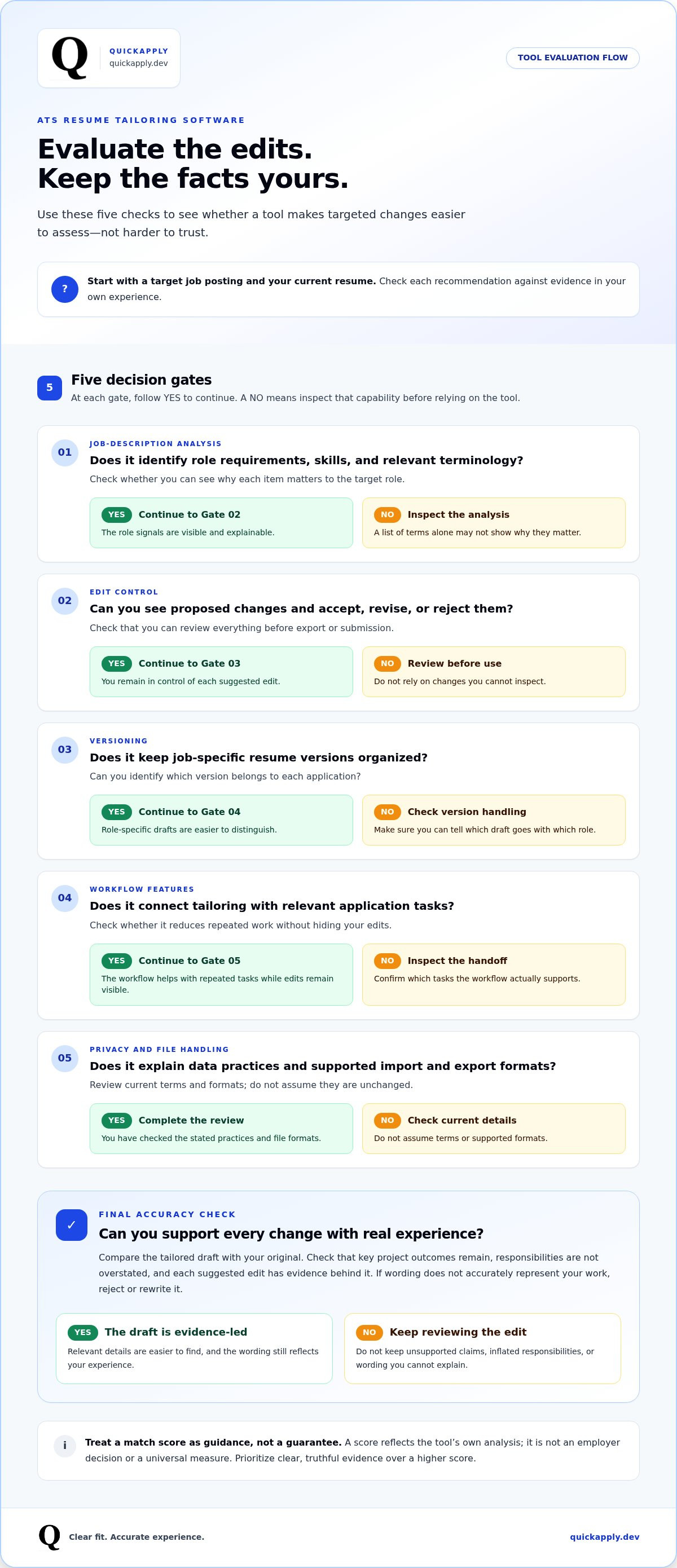
Use this framework to compare tools:
| What to evaluate | What strong support looks like | What to inspect |
|---|---|---|
| Job-description analysis | Identifies role requirements, skills, and relevant terminology | Can you see why each item matters to the target role? |
| Edit control | Shows proposed changes and lets you accept, revise, or reject them | Can you review everything before export or submission? |
| Versioning | Keeps job-specific resume versions organized | Can you identify which version belongs to each application? |
| Workflow features | Connects tailoring with relevant application tasks | Does it reduce repeated work without hiding your edits? |
| Privacy and file handling | Explains data practices and supported import and export formats | Review current terms and formats; don’t assume they’re unchanged. |
How should you compare accuracy, control, and workflow?
Test a tool with a target posting and your current resume. Inspect each suggested change and identify the source evidence behind it. Then compare the tailored draft with your original: are key project outcomes still there, and has any responsibility been overstated? Your approval matters because only you can verify whether an edit accurately represents your work.
Check the handoff, too. A useful workflow makes it straightforward to review and edit the draft, export a readable file, and keep the right version associated with the right application. Before uploading personal information, review the tool’s current privacy terms and supported file formats. Don’t infer data handling or compatibility from a feature label alone.
For tech professionals and students managing role-specific applications, QuickApply’s resume tailoring and application workflow brings job-description tailoring, match insights, and application tracking together. Use the match score as an indicator to review, then make the final call on every claim and edit.
ATS Resume Tailoring Software vs. Manual Editing and Generic AI
Each approach trades time for control differently. Manual editing gives you direct oversight, but you must reread each posting, find the matching evidence, and revise the right sections yourself. A general-purpose AI prompt can draft or rephrase content quickly, but the result depends on the information and instructions you provide. Purpose-built ats resume tailoring software focuses on comparing a particular job description with your resume and preparing a role-specific version.
Automation is useful for repeatable tasks: identifying recurring requirements, surfacing relevant resume content, suggesting targeted wording, and organizing versions. It can reduce the effort of starting from scratch. But it can’t decide which achievement best demonstrates your judgment or whether a project deserves more space than a skills list. You make those calls.
When is purpose-built tailoring software more useful than manual edits?
It can help when you’re applying to several relevant roles with overlapping requirements. Start with a consistent resume, make job-specific changes, and label each version clearly. That reduces the risk of attaching the wrong resume to an application. A specialized role may still need deeper customization, especially if its technical stack, domain, or responsibilities differ sharply from your other targets.
Think of the tool as an efficiency layer, not an application-volume engine. Sending more resumes or chasing a higher match score doesn’t automatically lead to interviews. Focus on roles that fit, then spend review time showing the strongest evidence for each one.
What are the risks of generic AI resume prompts?
A general AI assistant only has the context you provide. A short prompt, incomplete work history, or partial job posting can lead to missed constraints or generic language. The tool may also suggest impressive-sounding details that aren’t in your source material. Never accept an invented metric, tool, credential, or responsibility just because it makes a bullet sound stronger. Explore ChatGPT resume limitations for a closer look at prompt-based workflows.
Use a simple division of labor:
- Automate: repetitive job-description analysis, first-pass wording, and version organization.
- Decide: which projects and outcomes best support the role’s requirements.
- Verify: every technical claim, achievement, metric, and responsibility against your actual experience.
Before submitting, read the resume as if you’ll need to explain every line in an interview. A tool can help prepare a role-specific draft; your judgment keeps it credible. QuickApply brings resume tailoring and application organization together, so you can review each suggested change before using it.
A Safe Workflow for Tailoring Your Resume to Each Job
Speed only helps if the finished resume is accurate. Use a repeatable review process so ats resume tailoring software can handle repetitive comparisons while you stay in control of what each application says. Start with roles that genuinely fit your background, then use the posting to guide emphasis, not rewrite your career history.
- Choose a suitable role. Check that its core responsibilities and requirements align with work you’ve done or skills you can credibly demonstrate. A long list of keywords doesn’t make a role a strong fit by itself.
- Start with verified career history. Use a current source resume or career record. Confirm dates, job titles, technologies, credentials, project details, and outcomes before tailoring begins.
- Identify the posting’s priorities. Note the main responsibilities, required skills, and recurring terminology. Separate essential qualifications from preferred ones, and focus on requirements your experience can support.
- Generate a targeted draft. Use a tailoring tool to bring relevant accomplishments forward and adjust wording where it accurately reflects the posting. Treat generated edits as proposals, not approved facts.
- Review each change. Check every statement for accuracy, relevance, evidence, and readability. Restore details that matter if the draft removes important context, and reject wording that overstates your contribution.
- Save and track the approved version. Give the file a clear name tied to the role, then record the application and resume version in your tracker. This makes it easier to follow up without confusing drafts.
How do you tailor a resume without keyword stuffing?
Use a job-description term only when it accurately describes your experience, then connect it to evidence: a project, responsibility, or result. If a role asks for cloud deployment and you deployed services to a named platform, describe that work in a concise bullet. Don’t add a technology just because it appears in the posting. Natural wording should make sense to a person and remain clear in a parsed document.
A focused resume tailoring strategy starts with the role’s requirements, then maps each relevant one to proof in your work history. Leave out terms you can’t substantiate.
What should you verify before submitting an AI-tailored resume?
Compare the draft with your source. Confirm dates, titles, technologies, credentials, project outcomes, and any figures. Check that headings and layout remain readable, the file opens correctly, and the content still fits the role. Tailored resumes should clarify your fit, not create new qualifications.
After reviewing the draft, save the approved resume with the job details in your application tracker. Tailor your resume with QuickApply and review the draft before adding it to your application workflow.
How QuickApply Fits an ATS Resume Tailoring Workflow
Good ats resume tailoring software should reduce repetitive preparation without taking your judgment out of the process. QuickApply brings job-specific resume tailoring, cover letter generation, match insights, and application tracking into one career platform for tech professionals and students. The goal is a more organized workflow, not a shortcut around checking whether every claim is true.
How can QuickApply reduce repetitive tailoring work?
QuickApply uses AI to tailor resumes and cover letters to specific job descriptions in seconds. Instead of starting with a blank page for each application, you can use the role’s requirements to generate a targeted draft. That can save time on repeated analysis and first-pass wording, leaving more room to check whether the strongest parts of your experience are clear.
Review matters. Compare the draft with your verified career history, then inspect each claim, technology, and accomplishment. Keep suggestions that accurately connect your experience to the role. Revise or discard anything that lacks evidence or changes the meaning of your work. A faster draft is useful only if you can stand behind it.
QuickApply’s match score can help you gauge how closely your resume aligns with a job description and identify areas for closer review. Treat it as a fit indicator, not a hiring prediction, employer decision, or promise of an interview. A score can inform your review, but it can’t measure every part of your suitability or account for an employer’s complete selection process.
How does application tracking support the tailoring process?
Tailored materials are easier to manage when they stay connected to the application they were created for. An application tracker gives you a place to organize job-search activity alongside role-specific preparation, helping reduce confusion between versions. That’s especially useful when several applications are in progress and each resume emphasizes different experience.
Use a simple loop:
- Assess the role. Check that its core responsibilities fit your experience and goals.
- Tailor your materials. Generate a resume and cover letter draft using the job description.
- Review the evidence. Confirm that the wording and accomplishments are accurate, relevant, and readable.
- Track the application. Keep the application activity organized with the appropriate role-specific materials.
This workflow connects automation to accountability. QuickApply handles the initial tailoring and provides match insights, while you decide which opportunities deserve attention and approve the final story your application tells. No score can replace that judgment, and more applications alone don’t guarantee better results.
Build a more organized, role-specific application workflow with Explore QuickApply.
Make Your Next Application More Intentional
Your next application is a chance to build a process that gets sharper with each role. Choose an opening that fits your experience, prepare a tailored draft, and treat the review as a quality check, not a box to rush through. Keep a record of what you changed and why. Over time, you’ll build a clearer picture of which strengths to bring forward for different opportunities.
The best ats resume tailoring software supports that process without taking ownership of your story. Use it to cut repetitive work, then apply your judgment to every detail that represents you. A focused, accurate application is a better next step than sending out another version you haven’t reviewed.
Ready to put a more deliberate workflow into action? Start tailoring your next application with QuickApply, then review the draft and make it yours. You’re in control of the details, and each thoughtful application helps you move your search forward.
Frequently Asked Questions
What is ATS resume tailoring software?
ATS resume tailoring software helps adapt a resume to a particular job posting by identifying relevant requirements and surfacing matching experience. For example, if a role emphasizes backend development, it may help bring related projects or responsibilities forward. It doesn’t replace your career history or decide what you’re qualified for. Treat the result as a draft to refine, especially when the posting uses terminology that differs from your own.
Does ATS resume tailoring software guarantee that my resume will pass an ATS?
No, it can’t guarantee that a resume will pass an employer’s screening or reach a recruiter. A tool’s analysis reflects its own method, while employers may use different systems, settings, and review steps. Use suggestions to find details you may have overlooked, such as a relevant skill described with different wording. Then check the final resume for clear, accurate information. A score or scan result isn’t an employer decision.
Can AI tailor my resume without adding skills I do not have?
AI can help tailor your resume, but review its wording before using it. Give the tool accurate source information, then check every suggested skill and claim against your experience. For instance, if you used a cloud platform in a class project, make sure the resume doesn’t imply you operated it professionally. Remove unsupported tools, credentials, responsibilities, or results, even if they appear to match the job ad.
How do I choose ATS resume tailoring software for tech jobs?
Choose a tool that makes its recommendations easy to inspect and edit. Test it with a real posting and a resume that includes technical projects, tools, and outcomes. Look for suggestions that connect a requirement, such as database performance, to evidence in your background rather than merely displaying a match score. Also review how the tool organizes versions and handles your information. A good fit supports your process without obscuring your edits.
Is a higher resume match score always better?
No. A higher score isn’t automatically better if it comes from awkward repetition or claims you can’t substantiate. Use the score to spot a possible gap, then decide whether it reflects a real qualification. If a posting asks for Kubernetes and your experience is limited to coursework, describe that accurately rather than implying production experience. Clear, relevant evidence is more useful than optimizing a number at the expense of credibility.
Can ATS resume tailoring software replace manual resume editing?
No. It can reduce repetitive work, but your review is still necessary. Software can flag role-specific terms or suggest a new emphasis; you decide which accomplishments best support the application and whether the wording is accurate. Manual editing may be especially useful for a senior or specialized position where the scope of your contributions needs careful explanation. Use automation for a first pass, then edit for context and clarity.
Should I use the same tailored resume for every job at one company?
Not necessarily. One employer may advertise distinct roles with different requirements, such as a data engineering position and a frontend development position. Start with the same verified career history, but adjust which projects, tools, and accomplishments receive emphasis for each application. Keep each version clearly labeled with the role so you don’t submit the wrong document. Reuse accurate content, but tailor the focus to the specific job.


