

The most direct way to find an in-person tech role is to search employers’ own career pages and check each listing’s work-location terms. Finding a tech job that is not remote takes more than adjusting a job-board filter: build a focused list of employers, then look for onsite and hybrid openings. Start with employers in your preferred locations and scan their careers pages for roles that match your skills and work preferences.
It’s frustrating to find a promising job only to discover it’s remote-only. A targeted search helps you spend less time on mismatches and more time applying to roles with in-person work. This guide explains how to research employers, create a practical company list, and search career pages for onsite tech openings. You’ll also learn how to assess hybrid listings, track applications, and tailor your materials to the roles you want.
Key Takeaways
- Prioritize employers whose locations and work practices match the kind of in-person experience you want.
- Build a focused company list so your search stays organized and targeted.
- Read career-page listings closely for location details, then use job-board filters to narrow the search.
- Tailor your application materials to each role and track your progress to keep the search moving.
1. Researching employers and roles
Start with the work arrangement, not just the job title. On each employer’s careers page, search for terms such as “onsite,” “in-office,” “hybrid,” and “remote.” Read the full listing: a role marked hybrid may require regular office attendance, while a remote role may have no local office expectation. Before deciding whether to apply, note the stated location, attendance pattern, and team responsibilities.
Hybrid roles can be a practical middle ground. In June 2022, 50% of surveyed individuals worked in hybrid roles, compared with 30% fully remote and 20% in an office. The survey included over 8,000 individuals. For junior developers, hybrid work can offer in-person experience while building remote-work skills. Look for listings that describe both office collaboration and independent work, rather than assuming “hybrid” means the same schedule at every employer.
Research the employer’s location and technical teams. Dallas, Houston, Washington, D.C., Detroit, and Chicago are growing tech hubs that need software developers. Search local employers by role, then inspect their engineering, data, product, or IT teams. A company’s main business may not be technology, yet its internal teams can hire developers and other tech professionals.
Distinguish remote marketing roles from technical openings. A remote marketing job may be at a software company, but its core tasks are marketing, not software development or IT. If you’re considering one, compare its responsibilities with your target career path. For a technical role, highlight projects and tools that match the job description, such as a deployed application for a developer opening or data pipelines for an analytics role.
Set your filters before applying: target job title, acceptable commute, workplace format, and required skills. Use the same criteria across employer pages. That turns finding a tech job that is not remote into a focused search rather than a stream of mismatched applications.
2. Building a targeted company list
Build a practical shortlist, not a directory of every tech employer. Start with your target role, strongest skills, preferred commute, and acceptable workplace setup. Then list companies that fit, including employers outside the software industry. A hospital, manufacturer, or university may hire developers for internal systems, data platforms, or cybersecurity.
Use a spreadsheet or another simple tracker. Record each employer’s name, careers-page link, office location, relevant team, and work-format details. Add columns for roles to monitor and your next action. For example, beside a company with software teams but no suitable vacancy today, note “review engineering openings.”
A GitHub-editable list of 400 companies can provide a starting point for discovery. Treat it as a source of leads, not a ready-made application plan. Check each company’s current locations and business focus, then keep only entries that fit your commute and technical interests. An employer’s presence on a list doesn’t establish that its roles are in-person.
Assess each company using the same practical criteria: role relevance, location, workplace format, and evidence that the work matches your skills. A developer seeking backend work might prioritize organizations with product engineering teams and openings mentioning APIs or databases. Someone seeking IT support could focus on employers with local offices and user-support operations.
Keep your list current. After applying, record the role, date, and next task so opportunities don’t disappear into browser tabs. Review employers’ career pages regularly, and remove companies that no longer fit your location or work preferences. This system makes applications more deliberate and helps you identify remote-only listings before investing time in an application.
3. Finding openings on company career pages
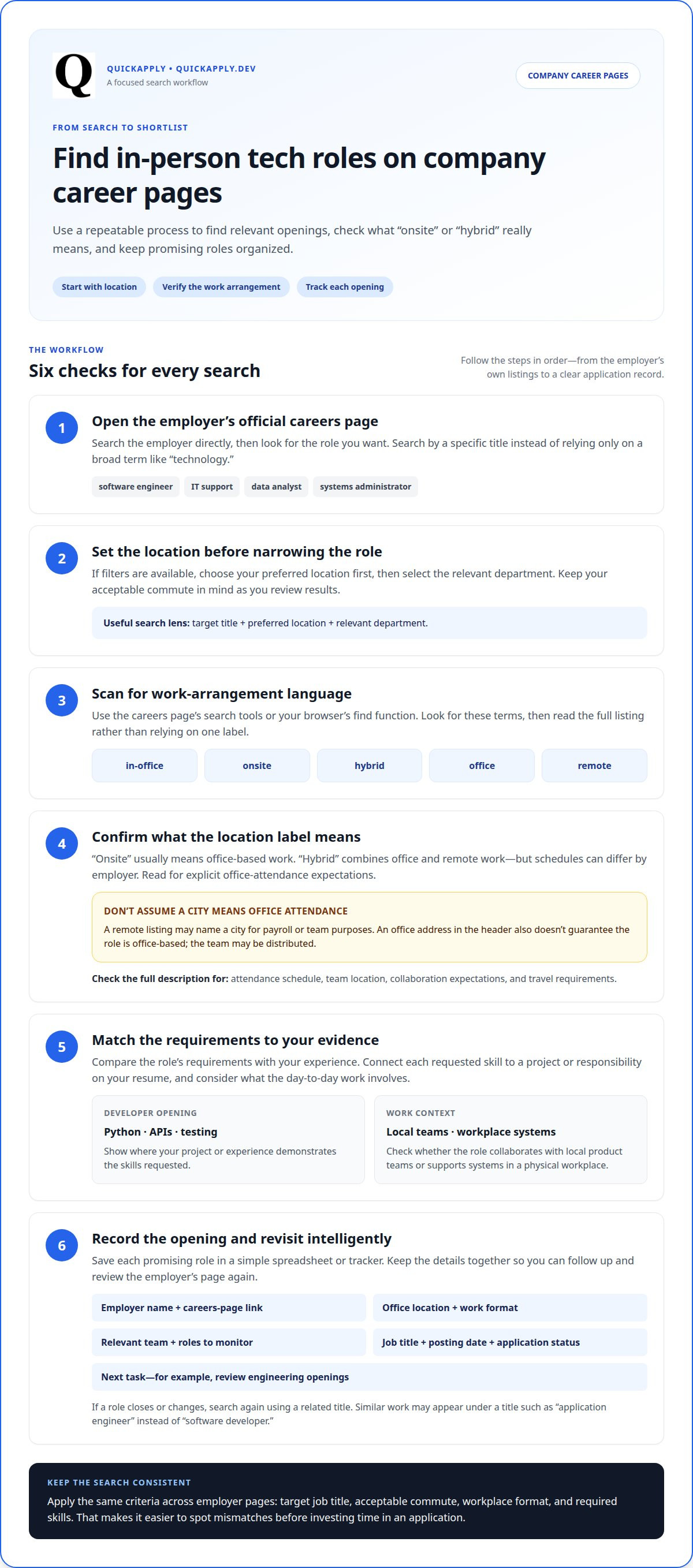
Open the employer’s official careers page and search by job title, not just “technology.” Try terms such as “software engineer,” “IT support,” “data analyst,” or “systems administrator.” If filters are available, set the location first, then choose the relevant department. This narrows results to positions suited to your skills and commute.
Read each listing’s location and work arrangement closely. “Onsite” usually means office-based work, while “hybrid” combines office and remote work. A listing marked “remote” may name a city for payroll or team purposes, so a city label alone does not prove that office attendance is required. Look for explicit details about being in the office.
Use the page’s search tools and your browser’s find function to look for “in-office,” “onsite,” “hybrid,” “office,” and “remote.” Then read the full description for schedule expectations, team location, and travel requirements. A software engineer listing, for example, may show an office address in its header but describe a distributed team below. Consider the details together to understand the work environment.
Compare the requirements with evidence from your own experience. If a developer position asks for Python, APIs, and testing, connect each requirement to a project or responsibility on your resume. Check whether the role involves collaborating with local product teams or supporting systems in a physical workplace. These details can clarify what your day-to-day work may involve.
Before applying, save the job title, location, posting date, and application status in your tracker. If a position closes or changes, revisit the company page and search again using a related title. An employer may describe similar work as “application engineer” instead of “software developer.” This repeatable process helps you find relevant openings without relying on one exact phrase.
4. Which job boards and filters help find non-remote tech jobs?
Start with a broad job board, then narrow the results using location and workplace filters. Enter your preferred location, choose the closest available onsite or hybrid option, and search for a specific title. For example, pair “software engineer” with a location rather than searching only “tech jobs.” If the board has no workplace filter, add terms such as “in-office” or “onsite” to your query.
Try related titles because employers describe similar work in different ways. For support roles, search “IT support specialist,” “help desk technician,” and “technical support.” For development, compare “software developer,” “application developer,” and “backend engineer.” Search each title separately by location. This makes results easier to review and shows which terms surface relevant local openings.
Read the listing before relying on a filter label. A result marked onsite may describe a remote-first team, while a hybrid label may explain office attendance in the details. Check the work location, schedule, and wording about office presence. Exclude postings that say “remote anywhere” if regular in-person work is your priority. Save useful search combinations to repeat later.
Use date and job-type filters to prioritize current, relevant positions. Select full-time roles if that matches your goal, then sort by newest when possible. Job alerts can surface new matches, but review each full description before applying. Record the title, employer, location, work arrangement, and application status in one tracker. This helps prevent duplicate applications and keeps your search focused.
QuickApply: Resume Tailoring
QuickApply helps you turn a relevant opening into an application tailored to the role. Use Resume Tailoring to align your resume with the job description, then generate a cover letter connecting your experience to the employer’s needs. This is useful when applying to several onsite or hybrid positions with different technical requirements.
Keep your search organized with the Application Tracker, and use Interview Practice to prepare to discuss your projects and skills. These tools support your application process, while your employer research helps you decide which roles deserve your attention.
Visit QuickApply to prepare your next application.
Choose your next move with purpose
To find a tech job that is not remote, turn your work preference into a consistent decision rule. Before applying, decide which workplace arrangements you’ll accept and what role fits your career direction. That keeps an appealing job title from distracting you from the conditions that matter.
Treat each application as a focused iteration. Note the role you targeted, the evidence you emphasized, and what you might refine next time. A thoughtful process helps you learn from each submission and improve your approach without losing sight of the work environment you want.
If you’re ready to prepare your next application, contact QuickApply for job search help. Take the next step with intention, and keep moving toward a role that fits how you want to work.
Frequently Asked Questions
Which industries and employers hire on-site tech workers?
Healthcare systems, financial institutions, telecommunications companies, manufacturers, and government agencies all need technology teams. Their work may involve maintaining internal networks, securing sensitive systems, supporting staff, or developing software for business operations. For example, a hospital may hire IT support staff to help employees use clinical systems. Search employer career pages by both industry and function, using terms such as “network administrator” or “cybersecurity analyst.”
How should I tailor a résumé and cover letter for an in-person tech role?
Show how your experience meets the role’s workplace needs. For an IT support position, describe resolving user issues, documenting fixes, and explaining technical steps clearly. In your cover letter, connect those examples to the employer’s team or operations. If you’ve worked face to face with colleagues, mention a relevant project and your contribution. Keep every claim accurate and easy to discuss in an interview.
How can I network locally and find in-person tech hiring events?
Use professional groups, alumni networks, public library programs, and technology meetups to connect with people working in your area. Search event calendars using your location and terms such as “developer meetup,” “tech careers,” or “hiring fair.” Before attending, review the organizer’s description and prepare a short introduction about your interests. Follow up with people you meet by mentioning a specific conversation, project, or shared technical interest.
What skills and qualifications are most in demand for local tech jobs?
The article highlights role-specific skills: Python, APIs, and testing for developer roles; deployed applications for development roles; and data pipelines for analytics roles. Match these skills to the listing and point to relevant projects or responsibilities.
What are the advantages and disadvantages of on-site, hybrid, and remote tech jobs?
Onsite work is office-based; hybrid combines office and remote work. Hybrid may give junior developers in-person experience as they build remote-work skills. Remote roles may have no local office expectation, which can be a mismatch if you want regular in-person work.
What should I ask employers about office attendance, commute, and relocation?
Confirm the stated work location, how often office attendance is required, the schedule, and any travel requirements. Check whether the location is an actual workplace or only a city listed for payroll or team purposes, and whether the commute suits your preferences.


