

What if the problem isn’t how many applications you send, but how closely each one matches the role? If you’re figuring out how to improve resume response rate, it’s frustrating when applications disappear without feedback and you can’t tell whether your resume, target roles, or application process needs work.
You don’t need to rewrite everything or chase design trends. Start with a clear baseline, then compare outcomes across similar roles and resume versions. That makes it easier to spot useful patterns instead of guessing.
This guide shows you how to track applications, assess role fit, and tailor your resume with relevant evidence from the job description. You’ll also learn how to make focused edits, verify every claim, and follow a consistent process that saves time. The goal isn’t to send more applications blindly. It’s to make each one more relevant and use the results to refine your approach.
Key Takeaways
- Calculate your response rate using employer responses and applications submitted over the same period.
- Prioritize roles where your proven experience aligns with the essential requirements, not just every preferred qualification.
- Tailor your resume by selecting relevant evidence, using job-description language naturally, and checking every claim for accuracy.
- Keep an application log with role, submission date, resume version, source, and outcome.
- Test one major change at a time and compare results across similar applications to learn how to improve resume response rate.
How to Improve Your Resume Response Rate: Start by Measuring the Right Thing
When applications receive no reply, it’s hard to know what to fix if each submission blends into the next. Before changing your resume, establish a baseline. A consistent measure gives you a reference point and helps you avoid treating one disappointing batch as proof that your whole approach is failing.
Resume response rate is the number of employer responses divided by the number of applications submitted during the same stated period. For a useful measure, count direct employer or recruiter outreach about your application, such as an interview request or a message asking to discuss your experience. Don’t count an automated submission confirmation as a response. Track interview invitations separately from other direct replies so you can distinguish initial contact from progress to the next stage.
Calculate a baseline before changing your resume
Choose a recent batch with a clear start and end date, then log every application and its status. Record total submissions, employer responses, and interview invitations as separate counts. Use the same calculation each time: responses ÷ applications × 100. If you submitted 20 applications and received 2 employer responses, the response rate for that batch is 10%.
Don’t treat unanswered applications as final outcomes while they’re still new. Set a consistent review point for the batch and label unresolved applications as pending until then. This prevents recent submissions from artificially lowering your baseline. The purpose isn’t to find a universal “good” number. It’s to create a fair reference point for comparing your own process.
Separate resume problems from job-search variables
A response rate is a signal, not a diagnosis. A low result alone can’t tell you whether your resume needs work. The roles may be a poor fit, the seniority may be mismatched, a central skill may be missing, or an application may be incomplete. Hiring workflows also vary. An Applicant Tracking System (ATS) can be part of how employers receive and manage applications, but a response metric by itself won’t show what happened to any individual submission.
Make comparisons useful by keeping the conditions visible. Group applications by similar role type and seniority, and compare batches over equivalent time windows. Record whether each application came through a referral, a direct company application, or a recruiter. These routes aren’t interchangeable, so combining them without labels can hide patterns.
- Role fit: Note how closely your experience matches the core requirements.
- Seniority: Separate entry-level, mid-level, and senior roles where relevant.
- Application completeness: Record whether you submitted every requested document and completed each required field.
- Application source: Track referral, direct, and recruiter-submitted applications separately.
Once these factors are recorded, investigate patterns instead of guessing. A consistent baseline makes it easier to learn how to improve resume response rate by testing one change at a time, without confusing a resume edit with a shift in role fit or application source.
Improve Resume Response Rate by Targeting Roles That Match Your Evidence
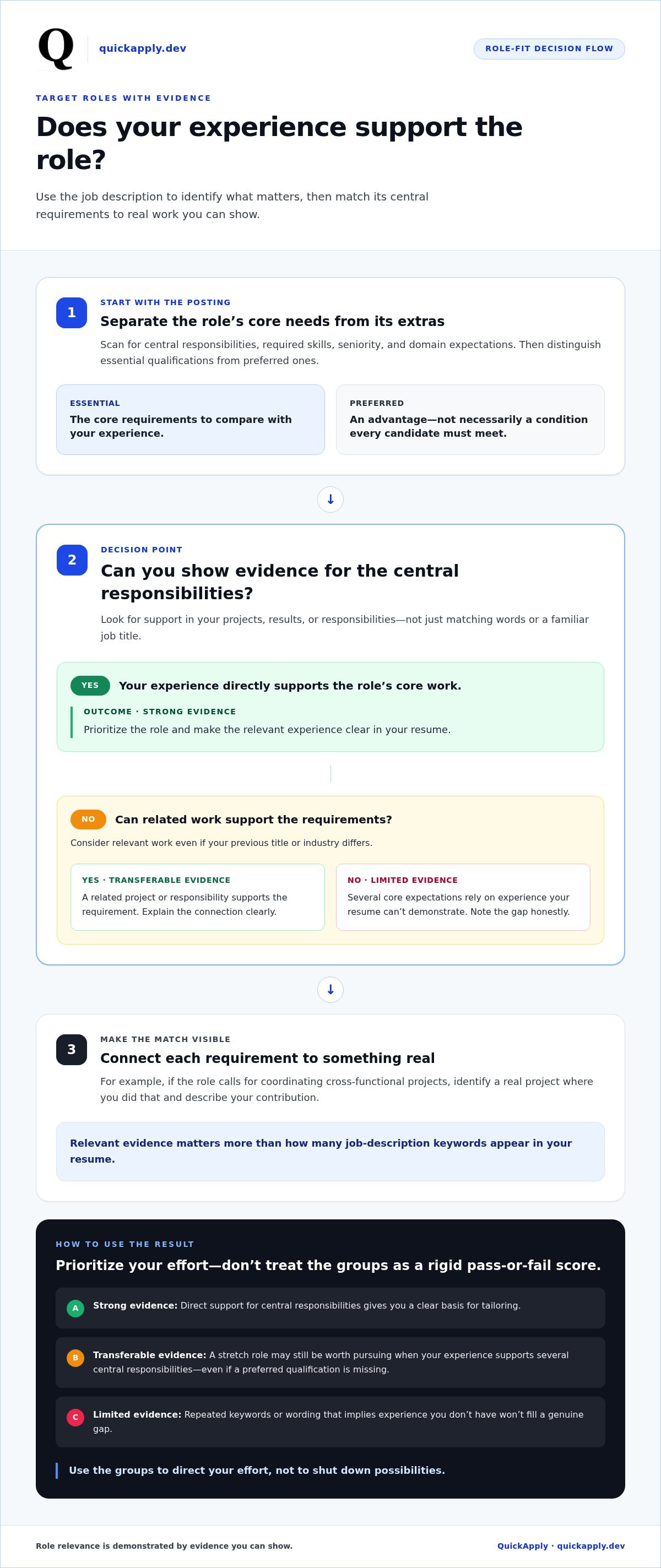
More applications won’t automatically create more opportunities. Prioritize roles where your experience gives you something concrete to show. A job title can look like a match while the responsibilities, level, or domain tell a different story. Compare the posting with your actual work before investing time in an application.
Role relevance is demonstrated by the evidence you can show, not by how many job-description keywords appear in your resume. This distinction keeps your search focused on credible matches rather than superficial overlaps. It also helps you decide where to tailor your resume and where a role may require experience you haven’t yet built.
Build a quick role-fit check from the job description
Scan the posting for its central responsibilities, required skills, seniority, and domain expectations. Separate essential qualifications from preferred ones. An employer may describe preferred qualifications as an advantage, not a condition every candidate must meet. Then connect the core requirements to evidence from your projects, results, or responsibilities.
For example, if a role calls for coordinating cross-functional projects, identify a real project where you did that and describe your contribution. If you can’t support a central requirement, note the gap honestly. Don’t try to cover it with repeated keywords or wording that implies experience you don’t have.
Prioritize applications without narrowing too far
Use a simple shortlist to compare opportunities. Group roles by type and level, then note how much evidence you have for the main requirements. This is a prioritization aid, not a rigid pass-or-fail score. A stretch role may still be worth pursuing if your experience supports several central responsibilities, even if you’re missing a preferred qualification.
- Strong evidence: Your experience directly supports the role’s central responsibilities.
- Transferable evidence: Related work supports the requirements, even if your previous title or industry differs.
- Limited evidence: Several core expectations rely on experience your resume can’t demonstrate.
Use these groups to direct your effort, not to shut down possibilities. A transferable match can be compelling when your resume explains the connection clearly. By contrast, applying indiscriminately to roles with little relevant evidence makes it harder to tailor convincingly and harder to learn which opportunities suit your background.
Make role selection part of the process, not an afterthought. Before applying, ask whether you can point to evidence for the job’s most important needs. QuickApply’s opportunity match score can help you assess role fit, while resume tailoring helps bring relevant evidence forward. Compare your experience with a job opportunity using QuickApply.
Tailor Resume Content to the Job Without Keyword Stuffing or False Claims
A tailored resume isn’t a collection of copied phrases. It’s a focused version of your experience that makes the most relevant proof easy to find. Use a repeatable edit sequence so each application feels specific without requiring a full rewrite.
- Extract priorities: Identify the role’s central responsibilities, skills, and terminology.
- Select evidence: Choose real accomplishments that support those priorities.
- Revise wording: Describe your work clearly and connect it to the role.
- Verify accuracy: Check that every claim reflects what you actually did.
- Proofread: Review the final version for errors, clarity, and consistency.
Turn requirements into specific, truthful resume evidence
Start with accomplishments that are relevant to the role, then place each near the job or project where you did the work. If the posting asks for stakeholder communication, show who you worked with and what you helped deliver. Include scope or results only when you can substantiate them. Keep technical terms precise, too. Brief exposure to a tool shouldn’t read like mastery.
Use the employer’s terminology where it accurately describes your experience. Don’t copy a phrase just because it appears in the posting. If the wording implies ownership, expertise, or a result you can’t support, rewrite it to reflect your actual contribution. Keyword stuffing weakens clarity; truthful, relevant language helps readers understand the match. For a fuller walkthrough, use a guide to tailoring a resume to a job description.
Make resume structure support fast scanning
Keep the layout readable and consistent, with clear labels such as “Work Experience,” “Education,” and “Skills.” Put a relevant accomplishment beside the position or project that supports it, rather than separating the evidence from its context. Formatting should organize your qualifications, not do the explaining. A guide to good resume examples for 2026 can help you assess how structure and content work together.
AI can speed up drafting, but it can also produce generic wording or overstate your role. Treat every suggestion as a draft, not a verified claim. Ask yourself: Did I do this? Can I explain the details in an interview? Does the wording match the scope of my contribution? If not, edit or remove it. Resume tailoring tools can help align content with a job description, but your review protects accuracy and keeps the application personal.
These edits make relevant evidence easier to spot without sacrificing credibility. Align the resume with the role, then verify that every line remains true to your experience. That’s a practical part of how to improve resume response rate.
Improve Applications with a Consistent Submission and Follow-Up Workflow
A reliable application process turns scattered submissions into useful data. Record each application when you send it, keep its status current, and review the results on a schedule. You’ll then know which resume you used and won’t have to reconstruct your search from memory.
Use the same basic workflow each time:
- Prepare: Save the final resume version and note the role and application source.
- Submit: Follow the employer’s instructions and record the submission date.
- Log: Add the application to your tracker and mark its initial status.
- Follow up thoughtfully: Check the posting for instructions or stated timelines before deciding whether to reach out.
- Review: Update the outcome and look for patterns during a regular tracker review.
Track applications so patterns become visible
Keep the fields consistent across every entry: role, company, submission date, resume version, application source, and outcome. Add a short note about role type or level if it will help you compare similar opportunities. Define outcomes consistently rather than switching between vague labels such as “maybe” and “in progress.”
Record outcomes as they happen: no response yet, recruiter contact, interview invitation, or a later interview stage. “No response yet” is more precise than treating silence as final before your chosen review point. Review the tracker at a regular interval that fits your search instead of checking each entry for clues every day. An application tracker can keep these records organized and make comparisons easier.
Follow up with context and professionalism
Follow-up timing depends on the employer’s instructions and the stage of the process, so don’t apply one universal rule to every submission. Check the posting and any confirmation message first. If the employer gives a timeline, respect it. If no timeline is provided, use your judgment and keep any follow-up measured, relevant, and directed through the preferred communication channel.
A concise message can restate the role, confirm your interest, and briefly connect one relevant qualification to the position. Keep the tone courteous. Don’t send repeated nudges or assume silence reveals the employer’s decision or internal process. A comprehensive job application process also includes recording whether you followed up and what happened next, so that action doesn’t get confused with the resume version or application source.
Use your tracker as the operating layer for your search, not just an archive. QuickApply’s Application Tracker helps you manage applications alongside tailored resumes and cover letters. Track your applications with QuickApply to keep your workflow organized as you refine your approach.
Use Application Results to Improve Your Resume Response Rate Over Time
Your application data becomes useful when you turn it into a controlled review cycle. Don’t make a sweeping resume overhaul after one quiet batch. Compare similar roles and application routes, look for repeated patterns, then test one substantial change at a time. This gives you a clearer read on what may be helping and keeps decisions grounded in evidence.
Run a simple application review cycle
Choose a regular review interval that gives applications time to develop, then compare groups with similar role types, levels, and submission routes. Look beyond the overall response rate. Check whether applications that led to employer contact shared a clearer connection between the role’s requirements and the experience highlighted in your resume.
Test one variable at a time. You might narrow your target roles, foreground a different accomplishment, or use a revised resume version. Keep other factors as consistent as practical. If you change targeting and resume content together, it’s harder to tell which change relates to a difference in outcomes.
Small samples can produce noisy results, and hiring activity can shift over time. Treat a pattern as a clue to investigate, not proof that one edit caused a particular outcome. Keep changes that improve relevance and make your qualifications easier to understand. More keywords alone aren’t a useful success measure.
Use automation to reduce repetitive work, not judgment
Rebuilding documents for every application takes time. QuickApply tailors resumes and cover letters to specific job descriptions, helping bring relevant evidence forward for each opportunity. Its match score can help identify better-fitting roles, while the application tracker helps you organize submissions and review outcomes as your search progresses.
Use these tools to structure the workflow, not replace your judgment. Review suggested wording against your actual experience, remove claims you can’t support, and make sure each version reflects the role. Then track that version’s results alongside comparable applications. The goal is a faster feedback loop, not automatic changes without review.
Take the next step with a more focused workflow
Keep the process simple: prioritize relevant roles, tailor your resume truthfully, track each application, and refine your approach based on patterns in the results. If an edit doesn’t make the fit clearer, revise it. If the evidence is too limited to draw a conclusion, keep collecting comparable outcomes before deciding what to change next.
This is a practical way to approach how to improve resume response rate without confusing activity with progress. A structured process can help you make better-informed application choices, but it can’t guarantee an employer reply. Explore QuickApply’s resume tailoring and application tools to bring role matching, tailored documents, and application tracking into one workflow.
Make Your Next Application More Intentional
Your next step doesn’t need to be another full resume rewrite. Choose one opportunity that fits your experience, make one focused improvement, and use the result to guide what you test next. That feedback loop turns how to improve resume response rate from a guessing game into a process you can refine while keeping every claim accurate.
QuickApply supports that workflow with resume and cover letter tailoring based on job descriptions, a match score to help identify better-fitting opportunities, and an application tracker to manage your search. Use the tools to save time on repetitive tasks while keeping your experience and decisions in your hands.
Explore QuickApply and build a more focused application workflow. Take the next step with a clearer process, and keep moving toward opportunities that fit.
Frequently Asked Questions
How do I calculate my resume response rate?
Divide employer responses by applications submitted within the same defined period, then multiply by 100 to get a percentage. Decide whether a response means any recruiter or employer contact, or only interview invitations, and keep those outcomes separate if useful. Compare like with like, such as similar roles submitted through the same route. Recent applications may still be pending, so treat the result as a snapshot, not a verdict on resume quality.
Why am I not getting responses to my job applications?
Silence can reflect several factors, not just resume quality: a role may be above your current level, your evidence may not clearly match its priorities, an application field may be incomplete, or competition may be high. To diagnose the issue, review a defined group of similar applications. Check whether each resume proves the role’s central needs, then compare referrals with direct submissions before choosing a change. That’s a practical starting point for how to improve resume response rate.
How long should I wait before following up on a job application?
Follow the timeline in the job posting or confirmation message first. If the employer gives no guidance, there’s no single wait period that fits every hiring process; use the context of the role and any communication you’ve already had. If you follow up, keep it brief, professional, and tied to the position. Log the date and any reply so you can avoid duplicate messages and keep your search records accurate.
Does tailoring a resume for every job improve response rates?
Tailoring can help when your background genuinely fits the role because it brings the most relevant accomplishments into clearer view. It can’t ensure a reply, and swapping in job-posting terms without matching experience may make the resume less credible. Adapt emphasis and wording only where accurate. Then compare similar applications using tailored and less-tailored versions, allowing enough time for outcomes to develop before judging which approach helps.
Should I use AI to tailor my resume?
Yes, use AI as a drafting aid, not as an authority on your work history. It can help identify overlaps between a job description and your resume or suggest clearer phrasing. Verify each skill, accomplishment, date, and metric against your records before using it. For example, confirm whether you led a project or contributed to it. Keep only claims you can explain clearly in an interview.
How many job applications should I submit before changing my resume?
There’s no universal application count that signals it’s time to change your resume. Build a batch of comparable applications and give employers time to respond, especially if submissions are recent. Before editing, check whether those roles genuinely matched your background and whether the resume made relevant evidence easy to find. Then adjust one major element, such as the target role or accomplishment emphasis, and compare the next batch rather than rebuilding everything.


