

What if the mock behavioral interview simulator that asks the most questions is wasting your prep time? Behavioral questions can feel unpredictable, and practising alone can make it hard to spot whether your answers are clear, relevant, and specific. More repetitions won’t help much if you don’t know what to improve.
The right tool should turn each response into a useful feedback loop, not just another practice session. Compare simulators by prompt relevance, feedback, repeatability, and fit with your preparation needs. A good choice helps you sharpen truthful, personal examples without adding busywork.
This guide explains what to look for in answer-structure and delivery feedback, how simulator practice differs from a live interview, and how to build a focused routine around your job search. QuickApply’s interview practice tools can sit alongside resume tailoring and application tracking, keeping preparation connected to the rest of your workflow. Choose with purpose, practise toward a clear goal, and make each session count.
Key Takeaways
- Know what a mock behavioral interview simulator is designed to practise, and how it differs from a software-testing mock object.
- Prioritize role-relevant prompts and feedback that points to a specific improvement, not just a feature-packed interface.
- Compare tools by practice quality, feedback, repeatability, and fit with the time you have before your next interview.
- Use a simple practice cycle to refine truthful examples around the situation, your actions, and the outcome.
- Connect interview practice with the rest of your job search, including resume tailoring and application tracking.
What a Mock Behavioral Interview Simulator Should Help You Practise
A mock behavioral interview simulator is a practice environment for answering questions about situations you’ve faced at work, school, or on a team. It isn’t a software-testing mock object, which is a stand-in used to test how code behaves. Here, “mock” means simulated: you rehearse interview responses before speaking with an interviewer.
A behavioral interview simulator helps you practise explaining what you did in real situations, so you can make your examples clear, relevant, and easy to follow. The goal isn’t to memorize a perfect script. It’s to get more comfortable choosing an appropriate example, describing your actions, and explaining the result.
Behavioral questions test how you handled real situations
Interviewers ask about past actions and decisions to understand how you approach work, not just what you know in theory. A question about conflict might ask how you handled a disagreement. One about collaboration could focus on your contribution to a shared goal. Other prompts may explore initiative, setbacks, or how you responded when a plan changed.
Prepare with real examples. If a project missed its target, explain what happened, what you did, and what you learned. Don’t invent a dramatic rescue or claim credit for someone else’s work to make the story sound stronger. Specific, honest details give you a solid account to explain and help you handle follow-up questions. They also replace vague claims such as “I’m a great team player” with evidence.
A simulator is different from a question list
A list of prompts can help you identify themes to prepare for. But reading a question and thinking “I know what I’d say” isn’t the same as forming an answer under interview-like conditions. Practising aloud can reveal rambling, missing context, or an outcome you forgot to explain. Written rehearsal can help you organize your thoughts, though it won’t exercise spoken delivery in the same way.
Evaluate tools by what they let you practise and review, rather than assuming every simulator offers the same feedback or repeat options. If feedback is available, look for guidance you can act on, such as whether your response answers the prompt or clearly describes your contribution. Then try the response again and see whether the change makes it stronger. Generic praise may feel encouraging, but it doesn’t tell you what to do next.
Simulation supports thoughtful preparation; it doesn’t replace it. Choose examples that fit the role, know the details well enough to discuss them honestly, and practise adapting rather than reciting. A simulator can help you build clarity and composure, but it can’t guarantee an interview result. Treat practice as a way to communicate your experience more effectively, not as a promise of an offer.
Which Simulator Capabilities Make Behavioral Interview Practice Useful?
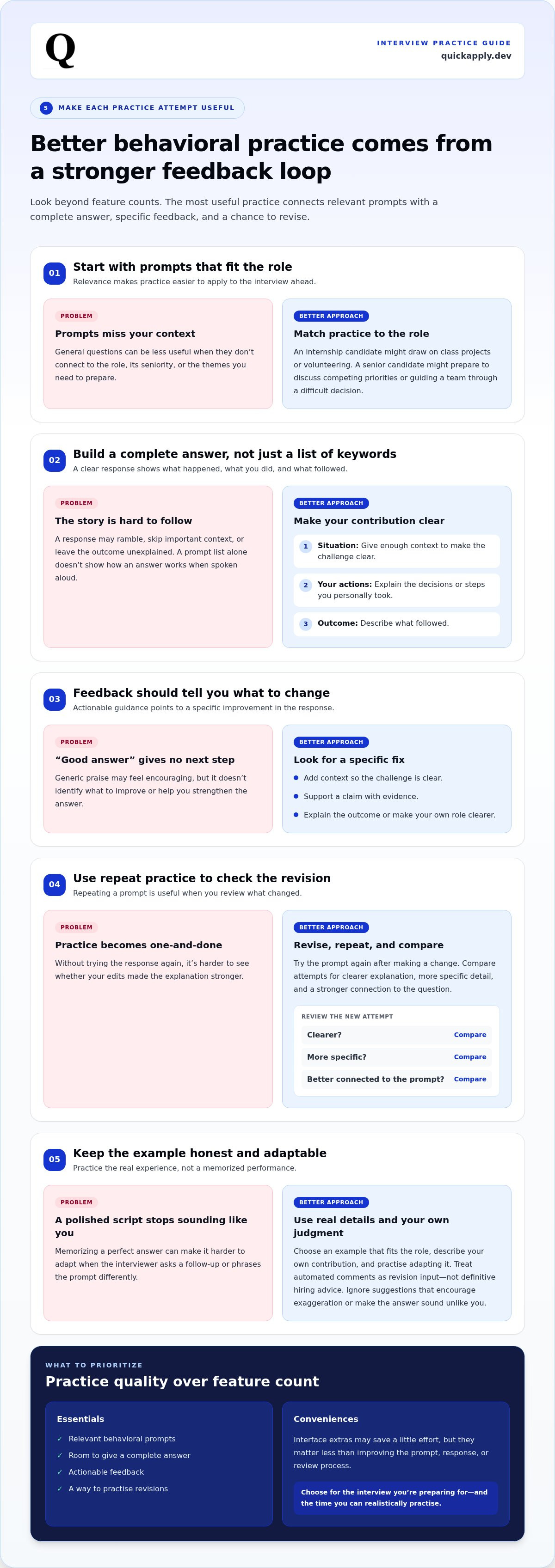
A useful simulator does more than generate activity. It helps you practise situations your next interview is likely to explore, then gives you a way to improve your response. Evaluate the quality of the practice loop, not the number of buttons or modes. A mock behavioral interview simulator is worth your time when its prompts fit your target role and each attempt helps you make a specific adjustment.
Evaluate prompt relevance and practice flow
Start with fit. Prompts should connect to the role, its seniority, and the behavioral themes you want to prepare for. A student applying for a first internship may need examples from class projects or volunteering. A senior candidate may need to explain how they handled competing priorities or guided a team through a difficult decision. General prompts can still help, but role-relevant ones make practice easier to apply.
Check whether the format helps you develop a complete response, not just recall keywords. A strong answer explains the situation, your contribution, and what followed. Clear instructions and a comfortable interface can help, but they matter less than relevant prompts and a practice flow that lets you work through a full answer.
Judge feedback by whether you can act on it
“Good answer” doesn’t tell you what to do next. Useful feedback identifies a fix: add context so the challenge is clear, support a claim with evidence, or explain the outcome. For example, if your response describes a team project but leaves your own role vague, revise it to show the decisions or actions you personally took.
Treat automated comments as revision input, not definitive hiring advice. Keep your own judgment in the loop. A tool can help you spot gaps, but your story, tone, and final wording should remain yours. If a suggestion pushes you to exaggerate or makes the answer sound unlike you, don’t use it.
Repeatability matters too. Practise a prompt again after revising, then compare the new response with your first attempt. Focus on whether the explanation is clearer, more specific, or better connected to the question. Don’t aim to memorize a polished script. Practise the underlying example so you can adapt it if the interviewer asks a follow-up or phrases the prompt differently.
Before choosing, separate essentials from conveniences:
- Essentials: relevant behavioral prompts, space to give a complete answer, actionable feedback, and a way to practise revisions.
- Conveniences: interface extras that save a little effort but don’t improve the prompt, response, or review process.
Choose based on the interview you’re preparing for and the time you can realistically practise. QuickApply’s interview practice tools sit alongside resume tailoring and application tracking, so you can keep preparation connected to your broader job-search workflow. Explore QuickApply's interview practice tools as part of a more organized preparation routine.
Compare Mock Behavioral Interview Simulators Without Chasing Feature Counts
A long feature list can hide the question that matters: will this tool help you improve the answers you need for your next interview? Compare a mock behavioral interview simulator against your preparation gap, the time you have to practise, and how well its feedback helps you shape a better response. Structure can keep practice focused, but repeating a script word for word can make you sound rehearsed rather than responsive.
Actionable feedback matters more than a long feature list because one clear revision can improve your next answer, while extra features may add nothing to your practice. Use the same criteria for each option:
| Criterion | What to assess | A useful sign |
|---|---|---|
| Prompt relevance | Do prompts fit your role, seniority, and likely behavioral themes? | You can connect each prompt to experience that suits the position. |
| Feedback actionability | Does feedback identify a specific gap in your response? | It points to something concrete to revise, such as missing context or an unclear result. |
| Repeatability | Can you practise again after making a change? | You can compare attempts and notice whether your revision made the answer clearer. |
| Workflow fit | Can you fit practice into the time and routine you have? | It’s straightforward to start a focused session and return to preparation later. |
Match the tool to your interview-preparation gap
Choose based on the problem you need to solve, not a generic ranking. If your answers jump between details, prioritize clear prompts and a structure that helps you stay on track. If your examples feel vague, look for feedback that flags missing context, your specific contribution, or the outcome. If time is tight, choose a focused practice routine you can return to without rebuilding your preparation each time.
Set a minimum bar before comparing options. Prompt relevance, useful feedback, and a workable practice routine may be must-haves. Interface preferences or extra practice modes are nice-to-haves unless they solve a specific problem for you.
Check fit, privacy, and cost before committing
Before subscribing, review the tool’s current plan terms and feature descriptions. Product details can change, so base your decision on what’s currently stated, not an old comparison. Consider how often you expect to practise and whether ongoing access fits your needs. A larger feature set isn’t automatically better value if you won’t use it.
Also read how the tool handles personal interview examples and career information. Your practice stories may include sensitive workplace details. Keep examples truthful, but remove names or identifying information that isn’t needed to rehearse the answer. The best fit supports your preparation, respects your comfort with the information you share, and helps you practise without turning every response into a memorized script.
How to Use a Behavioral Interview Simulator in a Repeatable Practice Cycle
A simulator is most useful when each session has a clear target. Don’t try to perfect every story at once. Pick one prompt, practise one real example, and make one focused improvement before moving on. This keeps preparation efficient and helps your answers stay natural instead of turning into scripts.
- Choose a prompt. Select a behavioral question that fits the role or a skill you want to demonstrate.
- Answer without stopping. Respond aloud or in writing as you would in an interview, rather than planning every sentence first.
- Review the response. Check whether the example answers the question and makes your contribution clear.
- Revise one element. Add missing context, clarify an action, or make the outcome more concrete. Don’t rewrite everything.
- Retry in your own words. Answer the same prompt again, then check whether the change made your response easier to follow.
Turn a real experience into a clear answer
Use STAR as a flexible scaffold: describe the situation, explain the task or responsibility, focus on the actions you took, and finish with the result. Keep the action specific to your own decisions, even when the work was shared. Use accurate details, and leave out confidential employer or customer information. The goal is a credible account you can discuss, not a polished story built from invented details.
Review, revise, and practise again
Listen to a recording or reread your response. Does the opening establish what was happening? Do your actions address the prompt? Is there a clear outcome? Choose the weakest element and revise that alone. Then try again in your natural voice. Stop when the answer is focused and authentic, not when you can recite it from memory.
Keep a simple practice note after each attempt: record the prompt, the improvement you targeted, and whether the revision helped. For example, you might note that your first answer described the challenge but didn’t explain how your actions changed the outcome. A short log helps you spot patterns across sessions without turning preparation into a second job.
Behavioral practice works best alongside preparation for the technical demands of a role. For a related perspective, this guide to interview preparation for software engineers covers another part of interview readiness.
Use QuickApply’s interview practice tools to make your next practice cycle more focused, with one improvement to work on at a time.
Choose Your Next Step: Add QuickApply Interview Practice to Your Job Search
The right simulator isn’t the one with the longest feature list. Choose a tool that gives you relevant prompts, feedback you can act on, and a way to practise again after revising. Then focus on the behavioral questions most likely to matter for your upcoming role. That keeps practice connected to a real goal instead of turning it into an endless loop of generic answers.
Use interview practice alongside application management
Interview preparation is one part of an active job search. You’re also identifying opportunities, tailoring application materials, and keeping track of where you’ve applied and what comes next. QuickApply brings interview practice tools into a broader career platform that also supports resume tailoring and application tracking. These distinct capabilities can help you coordinate your preparation and application tasks.
For a practical view of how application steps fit together, explore a more organized job application process. Keep preparation and application tasks moving in parallel, with a clear purpose for each practice session. A simulator can help you refine how you communicate your experience, but it can’t guarantee an interview, an offer, or a hiring outcome.
Make the choice based on your next interview
Start with the job description and likely behavioral themes. If the role emphasizes teamwork, prepare for questions about collaboration or resolving differences. If it calls for initiative, think through an example where you identified a need and acted. For a position with greater responsibility, consider situations involving prioritization, decision-making, or guiding a project. Match the simulator to those needs, then use the same criteria from your comparison: prompt relevance, actionable feedback, repeatability, and fit with your routine.
Set one goal for your first practice session. You might aim to make your individual contribution clearer, explain the result more directly, or keep the answer focused on the question. Review what changed after you practise again. Build on observed progress rather than adding features or sessions for their own sake.
Choose efficiently: start with the interview ahead, find a tool that supports the practice you need, and improve one answer at a time. QuickApply’s interview practice tools sit within a platform that also supports resume tailoring and application tracking, bringing preparation and application management into one broader job-search workflow. Explore QuickApply and choose a focused next step for your interview preparation.
Turn Your Next Answer Into Your Next Advantage
Your next interview doesn’t require a perfect script. It calls for an honest example you can explain clearly, adapt to the question, and stand behind. Use a mock behavioral interview simulator to make practice intentional: choose one answer to strengthen, make a focused revision, and carry that improvement into your next conversation.
Keep the routine manageable. A short, purposeful session can give you a clear next action without taking over your job search. Connect each practice goal to the role you want, not an imaginary ideal candidate. Your experience is the raw material. The work is making its value easier to see.
QuickApply brings interview practice into a broader career platform, so you can keep preparation connected to your job-search workflow. Explore QuickApply's interview practice tools and take one practical step toward your next interview. You’ve got real experience to draw from. Now make it count.
Frequently Asked Questions
Can a mock behavioral interview simulator replace practising with another person?
No. A simulator can help you build fluency, but it can’t fully recreate the timing, reactions, or unexpected follow-up questions of a live conversation. After practising, ask a friend or peer to choose a follow-up such as “What would you do differently?” or “How did your team respond?” Answer without restarting. This tests whether you understand your example well enough to discuss it naturally, not just deliver a rehearsed version.
How many times should I practise an answer in a simulator?
There’s no fixed number of attempts. Stop when you can explain the example without losing the thread or relying on exact wording. Try a practical check: close your notes, answer the prompt, then see whether you can recall the key decision and its result. If you’re only repeating the same phrasing, switch to another question or example. The aim is flexible recall, not a flawless performance.
Is AI feedback from a behavioral interview simulator always accurate?
No. Treat feedback as a prompt to review your response, not as an objective score of your interview ability. For example, a suggestion to add detail may help if your action is hard to understand, but extra detail may distract from the answer. Check each comment against the question and what actually happened. Keep revisions that make your meaning clearer, and reject ones that distort your experience.
Can I use a simulator if I have little work experience?
Yes. You can draw on a class assignment, volunteer shift, club activity, internship, or personal project with shared responsibilities. For example, describe how you organized tasks when a group project fell behind. Explain what you personally did and what happened next, even if the outcome was modest. A relevant, honest example is more useful than a grand-sounding story you can’t support with details.
What should I avoid sharing in a mock interview simulator?
Leave out confidential company information, private details about other people, and anything you’re not authorized to disclose. You can replace names with neutral labels such as “a teammate” or “a client” while preserving the real challenge and your actions. Before entering personal or employment details, read the tool’s privacy information and decide what you’re comfortable sharing. Keep the example useful for practice without exposing sensitive information.
Will a simulator predict the exact behavioral questions in my interview?
No. A practice prompt can prepare you for a theme, but it can’t reliably forecast an interviewer’s exact wording or follow-up. Prepare examples you can adapt across related questions. One project challenge, for instance, might demonstrate prioritization, collaboration, or problem-solving, depending on what the interviewer asks. Practise identifying which part of the experience best answers the prompt instead of memorizing a list of predicted questions.
Should I memorize my behavioral interview answers?
No. Remember the important facts and sequence, but leave room to speak naturally. Memorized wording can be hard to adjust if an interviewer asks about a different aspect of the same experience. Try retelling your example with a different opening or in a shorter version. If the core facts remain accurate and the answer still makes sense, you’re building flexible recall instead of relying on a fixed script.


