

Greenhouse reported an average of 244 applications per job in 2025. More applications don’t automatically lead to more interviews. A job search dashboard to track success metrics helps you see what’s working, where progress stalls, and what to try next.
If your applications are spread across spreadsheets, inboxes, and notes, it’s hard to spot patterns. You may not know whether few responses point to role fit, application materials, or follow-up timing. The answer isn’t to track every possible number. Choose a few useful metrics and connect each one to a practical next step.
This guide shows you how to build a dashboard that keeps active applications and next steps in one view. You’ll learn which funnel measures to watch, how to identify where applications lose momentum, and how to focus on suitable roles instead of chasing volume. An application tracker can organize statuses and follow-ups, while match scores and tailored resumes and cover letters can support role selection and preparation. The goal is a repeatable workflow that gives you clarity without turning tracking into another time-consuming task.
Key Takeaways
- Track more than application volume: compare role fit, responses, interviews, and completed follow-ups to spot where progress slows.
- Use clear denominators for response and interview rates so your metrics show meaningful patterns rather than misleading percentages.
- Build a simple table with one role per row, consistent status labels, and details that help you compare results.
- Review your job search dashboard to track success metrics weekly, then test one change at a time when a funnel stage needs attention.
- Use a spreadsheet if it’s easy to maintain, or a dedicated tracker to organize applications alongside tailored resumes, cover letters, and match scores.
Why a Job Search Dashboard Needs More Than an Application Count
A job search dashboard is a compact view of your applications, their outcomes, and the next actions each one needs. It brings scattered notes and inbox reminders together so you can see what’s active, where each opportunity stands, and what to do next. The aim isn’t to collect data for its own sake. A job search dashboard to track success metrics should help you make better decisions about your search.
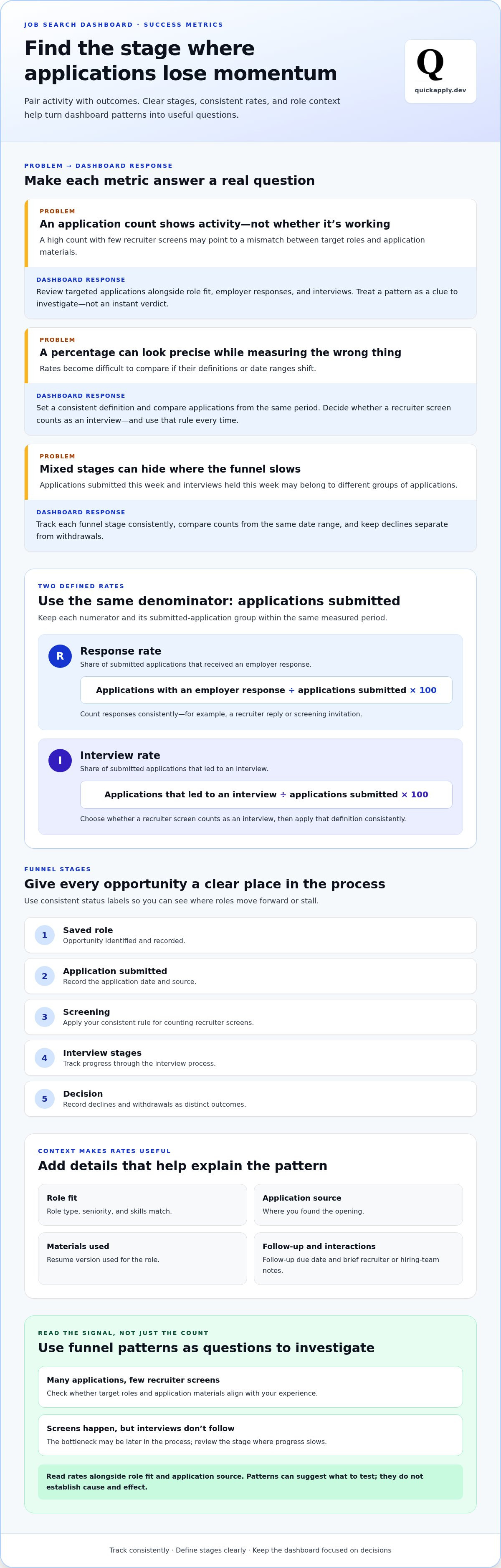
An application count shows how much activity you’ve logged, but not whether those roles fit your experience or whether employers are responding. A high count paired with few recruiter screens could point to a mismatch between your target roles and application materials. If screens happen but interviews don’t follow, the bottleneck may be later in the process. Treat these as clues to investigate, not instant verdicts.
Job searching involves several activities, from finding opportunities to researching employers and applying. A dashboard makes those steps easier to review together, reflecting the wider job search process. Keep the view compact so it helps you act instead of creating a second job managing data.
What belongs in a job search dashboard?
Start with the fields you need to identify an application and move it forward:
- Company and role: Make each opportunity easy to recognize.
- Application date and source: Record when you applied and where you found the opening.
- Status and next action: Note the current stage and the next step, such as following up or preparing for a screen.
Add optional notes only when they help you make a decision, such as a role-fit detail or the resume version you used. Choose one place as your source of truth, and update it whenever an application changes status. If details remain split between spreadsheets and inbox reminders, the dashboard can’t reliably show what needs attention.
Activity metrics versus outcome metrics
Separate what you control from what employers do. Weekly targeted applications and completed follow-ups are activity measures. Recruiter screens, interviews, and progression to later stages are outcome measures. Activity measures effort, while outcomes show how the funnel responds.
Targeted applications are a leading indicator: they show whether you’re consistently pursuing roles that match your criteria. Interviews are an outcome. Review both, but don’t treat a short run of results as proof that one resume change or job source caused a difference. Small samples can reveal a pattern worth testing, but they don’t establish cause and effect. Track consistently, then adjust one part of your approach at a time.
Which Job Search Success Metrics Should You Track?
Choose metrics that answer practical questions: Are you targeting suitable roles? Are employers responding? Which stage is slowing down? A useful job search dashboard to track success metrics combines activity, outcomes, and context. Track role fit, applications submitted, employer responses, interviews, and follow-up completion. Keep the set focused so you can review it consistently.
Define each rate before comparing results. Otherwise, a percentage can look precise while measuring the wrong thing:
- Response rate: Applications that received an employer response divided by applications submitted in the same period, multiplied by 100. Count responses consistently, such as a recruiter reply or screening invitation.
- Interview rate: Applications that led to an interview divided by applications submitted in the same period, multiplied by 100. Decide whether a recruiter screen counts as an interview, and apply that rule every time.
Response rate is the share of submitted applications that receive an employer response within the period you’re measuring. Use it to spot direction, not as a benchmark or promise. Read rates alongside role fit and application source. A lower rate for a group of stretch roles may mean something different from a lower rate for roles that closely match your experience.
Core metrics for the application funnel
Use consistent stages to see where opportunities move or stall: saved role, application submitted, screening, interview stages, and decision. Compare counts from the same date range, and define what qualifies for each stage. For example, count applications submitted in a given week separately from interviews that took place that week, since those interviews may have come from earlier applications.
Record declines and withdrawals as distinct outcomes. A decline means the employer ended consideration; a withdrawal means you chose to step away. Keeping them separate makes the funnel more useful and helps you review decisions without blending different causes.
Useful context fields that explain the numbers
Rates need context to guide action. Add role type, seniority, skills match, application source, and resume version. If you use one resume version for several roles, you can compare its results with other versions over time. For a more focused approach to adapting materials, see how to tailor a resume to a job description.
Include a follow-up due date and a brief note about recruiter or hiring-team interactions. Match scores can inform your fit assessment alongside your own criteria. QuickApply’s application tracker helps organize application statuses and follow-up actions alongside tailored resumes and cover letters. Interpret patterns carefully: a small number of applications can suggest what to investigate, but it can’t prove why an outcome occurred.
A Job Search Dashboard Template for Comparing Roles and Results
Build your dashboard around one rule: one application per row. That structure makes it easier to compare roles, trace outcomes, and spot the next task without searching old messages. Use the same labels and date formats throughout. A job search dashboard to track success metrics only works when its fields stay consistent enough to compare.
Copyable application tracker columns
Copy this header row into a spreadsheet or adapt it to your tracker. Add one row for each application:
Company | Role | Job link | Date found | Application date | Source | Priority | Role fit | Resume version | Status | Last contact | Next action | Due date | Outcome
Keep each field focused. Use role fit or priority to record how closely the opportunity matches your criteria. Note the resume version so you can connect an application to the materials you submitted. Keep last contact, next action, due date, and outcome separate because they answer different questions.
Choose a controlled set of status labels, such as Saved, Applied, Screening, Interviewing, Decision, Closed. Use the same label for the same stage every time. Record outcomes separately, such as Offer, Declined, Withdrawn, No response. This prevents slightly different wording from splitting one category into misleading counts. Store only details that help you make job-search decisions, and avoid sensitive personal information about recruiters, interviewers, or yourself.
A summary view that makes patterns visible
Keep a small summary above or beside the application list. It should surface four things: weekly activity, funnel outcomes, overdue actions, and active applications. Then group results by week, role category, application source, or funnel stage to see where opportunities are progressing and where they stall.
Compare like with like. For example, review applications from the same period or roles in a similar category. If a group contains only a handful of applications, treat its pattern as a prompt for further observation, not a firm conclusion. The dashboard supports decisions, but it doesn’t prove why an employer responded or passed.
Use the wider job application process guide to connect your tracking setup with the steps before and after submitting an application. QuickApply’s application tracker helps organize applications, statuses, and follow-up actions in one place, while tailored resumes and cover letters support preparation for specific roles.
How to Review Dashboard Metrics and Improve Your Job Search
A dashboard earns its place when a review leads to a focused next step. Set aside a short block of time each week to check what moved, what’s waiting, and what you’ll test next. Use your job search dashboard to track success metrics as a decision tool, not a scorecard for judging your effort.
A repeatable weekly dashboard review
Keep the process consistent so changes are easier to interpret:
- Update the record: Refresh application statuses, log new contacts, and set or revise follow-up dates. Mark overdue actions so they don’t disappear in the list.
- Inspect the funnel: Compare progression by role type, fit, application source, and resume version. Look for a stage where applications tend to pause, while accounting for differences in role mix.
- Choose one experiment: Make a small adjustment, such as narrowing your search to stronger-fit roles or revising how you tailor a resume. Record the change date and review later applications separately.
Change one variable at a time where possible. If you alter your target roles, resume approach, and application source in the same week, a later shift in responses won’t tell you which adjustment mattered.
Diagnosing common job-search bottlenecks
Start with the stage that needs attention, then check the surrounding information before changing your whole strategy:
- Few suitable roles: Revisit your search criteria and match quality. A match score can inform role selection, but weigh it alongside your skills, experience, and priorities before increasing application volume.
- Few responses: Compare role alignment, application source, and the materials used. Check whether your resume and cover letter clearly reflect the requirements of the roles you’re targeting.
- Interviews that don’t progress: Review where conversations stall and identify an area to work on. Practice scenarios relevant to the role, then track how later interviews progress.
Focus on controllable inputs: role selection, application materials, follow-up completion, and interview preparation. Employer response timing and hiring decisions aren’t under your control. Don’t treat a delay as proof that your approach failed, and avoid universal response-rate targets. Compare results with your own baseline, accounting for role fit, seniority, and application channel. A small or uneven group of applications may suggest a question to test, not a definitive cause.
QuickApply’s application tracker and interview practice help you organize application progress and prepare for relevant conversations.
Connect Your Job Search Dashboard to a More Efficient Application Workflow
Your dashboard should fit the way you search. The right setup is one you’ll keep current, with enough structure to connect role selection, application preparation, and follow-up. Start simple. Add complexity only when managing the process starts taking attention away from the work itself.
Spreadsheet or dedicated job application tracker?
A spreadsheet gives you control over columns, labels, and views. It can be enough if you have a manageable number of active applications and updating each row feels straightforward. You’ll need to maintain statuses, dates, and follow-up reminders yourself.
A dedicated tracker makes more sense when repeated updates across scattered notes and files become a source of friction. It gives you a focused place to organize applications and review their current status. Choose based on workflow fit: how easy it is to update, see what’s active, and keep next steps connected to the roles you’re pursuing. Neither format improves hiring outcomes on its own.
Use QuickApply to keep applications moving
QuickApply brings application tracking together with role-specific preparation. Use its tracker to manage applications across your search, while AI-tailored resumes and cover letters help you prepare materials for specific job descriptions. This creates a repeatable sequence: evaluate a role, prepare relevant materials, record the application, then organize its status and follow-up action.
Job match scores can help you assess whether an opportunity aligns with your background, but treat them as one input alongside your own priorities and judgment. A score doesn’t predict or guarantee an employer response. Your job search dashboard to track success metrics helps you assess what happens after you apply and decide what to adjust based on your results.
Explore QuickApply’s application tracker and resume tools to organize applications and streamline role-specific preparation.
Turn Your Job Search Data Into Your Next Move
A useful dashboard does more than count applications. It connects role fit, responses, interviews, and follow-ups so you can see where your search needs attention. Track activity and outcomes separately, then review them regularly to spot patterns without treating a small sample as proof.
Keep the system simple enough to maintain. Use one source of truth for applications, consistent status labels, and a clear next action for every active role. When a funnel stage stalls, investigate the context and test one adjustment at a time. That’s how a job search dashboard to track success metrics becomes a practical guide, not another spreadsheet to manage.
QuickApply brings application tracking together with AI resume and cover-letter tailoring for specific job descriptions. Match scores can help you evaluate role fit alongside your own priorities. Start organizing your applications with QuickApply and connect role-specific preparation to a clearer, more manageable search.
Frequently Asked Questions
What metrics should I track in a job search dashboard?
Track targeted applications, employer responses, interviews, stage progression, follow-ups due, and outcomes. A job search dashboard to track success metrics is more useful when you add context, such as role fit, application source, and resume version. These details help you interpret what the numbers may indicate. Keep the set compact enough to update consistently, and treat rates as personal signals rather than universal benchmarks.
How do I calculate my job application response rate?
Divide the number of employer responses by the number of applications submitted during the same period, then multiply by 100. Compare responses to those applications, not responses to older applications. Define what counts as a response first. For example, you might exclude automated acknowledgments. The rate is directional, especially when the sample is small or the roles differ.
Can a job search dashboard help me get more interviews?
A dashboard can’t guarantee interviews, but it can help you identify patterns to investigate. Track application sources, role fit, resume versions, and funnel stages. If suitable applications rarely lead to interviews, review how closely your materials align with the roles before changing your entire search. Then test a focused adjustment and review later results. The dashboard supports better decisions; it doesn’t control employer responses or hiring outcomes.
How many applications should I submit each week?
There’s no single weekly application target that fits every job seeker. Your pace depends on available roles, seniority, application complexity, and the time needed to tailor materials. Track both submitted applications and role fit to check whether your pace is sustainable and producing progress. A larger count isn’t automatically better. Prioritize opportunities that match your skills and goals, and use your own results to refine your routine.
Is a spreadsheet enough to track a job search?
A spreadsheet can be enough if you have a manageable number of applications and can keep its fields and statuses current. It gives you control over what you record and how you organize it. A dedicated tracker may suit you better if updating applications, follow-ups, and materials across separate places has become a hassle. Choose the simplest system you’ll maintain. Accurate statuses and clear next actions matter more than the format.
When should I change my job-search strategy based on dashboard data?
Review your dashboard regularly and look for repeated patterns rather than reacting to one unusual week. Check whether a slowdown appears related to role fit, application materials, follow-up, or interview progression. Change one variable at a time, note when you made the adjustment, and compare later results using consistent definitions. Avoid firm conclusions from small samples or employer response timing, which you can’t control.


