

Your resume shouldn’t end up as a folder full of competing “final” files. But tailoring each application by copying and editing documents can leave you unsure which version has the right details. The solution isn’t to stop customizing. It’s to control how you do it.
A reliable system for resume version control for different job types starts with one accurate master resume, then builds focused versions for each role without losing your source facts. You don’t need a technical Git workflow to keep changes organized. You need a clear folder structure, consistent file names, and a reliable way to match each resume to the application it supports.
This guide shows you how to build and maintain a master resume, adapt it for different job types, and track application-specific edits so you submit the right file every time. You’ll also learn how an application tracker can complement your file system and how AI tailoring can reduce repetitive edits without replacing your judgment or version history.
Key Takeaways
- Build one authoritative master resume, then create focused versions for each role family.
- Use simple folders and clear file names to manage resume version control for different job types without Git.
- Choose a workflow that fits your needs and account for the maintenance risks of each method.
- Review every tailored resume against your real experience before saving and archiving the submitted file.
- Use QuickApply to tailor resume content to a job description in about 30 seconds, then track each application separately.
Why resume version control matters when you apply to different job types
A single resume file can’t always tell the right story. A software engineering role may prioritize system design and code quality, while a data science opening calls for evidence of statistical analysis, experimentation, and model performance. Product management roles often need proof of customer insight, prioritization, and cross-functional delivery. Resume version control for different job types helps you surface the relevant evidence without rewriting your career history or losing track of which facts are accurate.
Think of version control as keeping one authoritative source of career facts and creating traceable, purpose-specific copies from it. The principle is similar to version control systems, which preserve a source and let people track changes. You don’t need technical tools to apply that idea to a resume. Separate facts from presentation: your dates, responsibilities, and results stay consistent, while ordering, emphasis, and selected projects can change by role.
What belongs in a master resume?
Keep one source document with verified roles, dates, education, skills, project details, and accomplishments. Include fuller descriptions than you’d put in a submitted resume, with context on your contribution and the outcome. Flag any metric, tool, or claim that needs checking before use. This gives each tailored version a dependable starting point instead of relying on details you have to recall while editing under pressure.
Why one resume rarely serves every tech role
A generic resume can contain strong experience and still make a recruiter work to find the evidence that matters. Separate role-family versions let you change the emphasis, not the underlying facts:
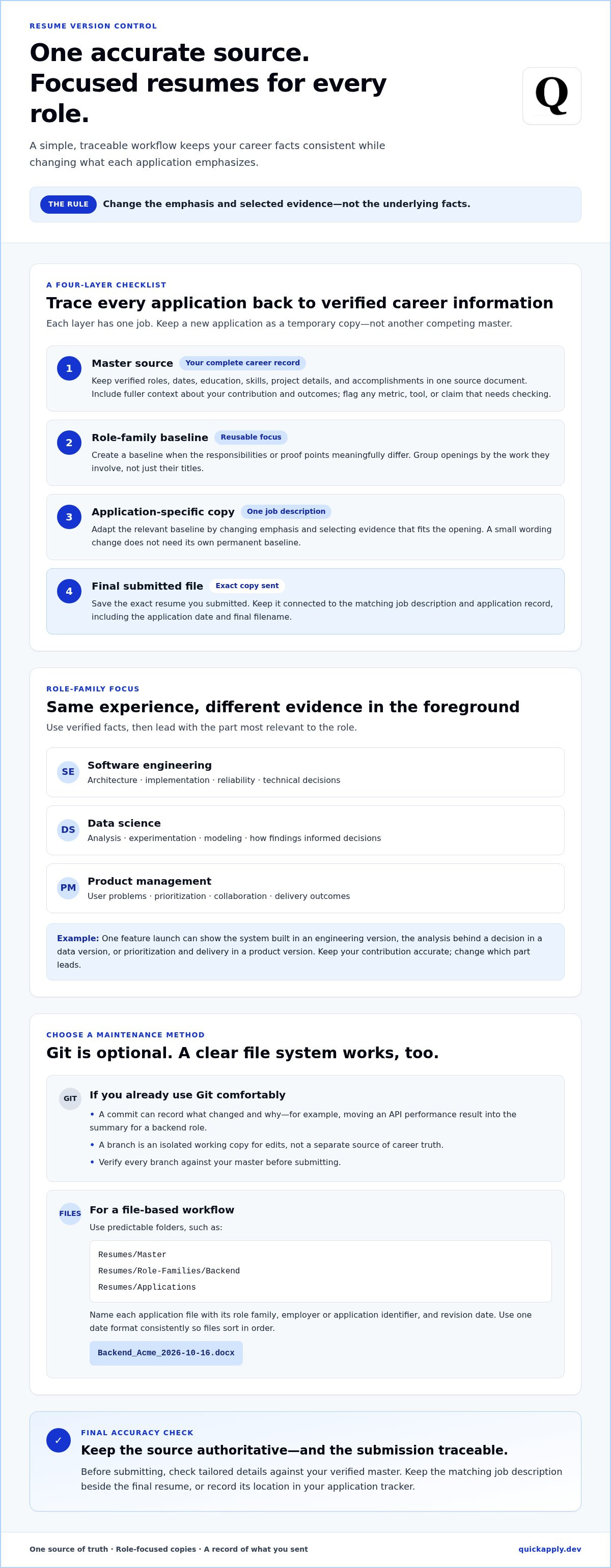
- Software engineering: foreground architecture, implementation, reliability, and technical decisions.
- Data science: emphasize analysis, experimentation, modeling, and how findings informed decisions.
- Product management: highlight user problems, prioritization, collaboration, and delivery outcomes.
The same verified project can support all three applications. Imagine you helped launch a feature using customer feedback and product usage data. An engineering version could describe the system you built; a data-focused version could explain the analysis behind the decision; a product version could show how you helped prioritize and ship the feature. Keep your contribution accurate and change which part leads. For more guidance on presenting evidence clearly, explore these good resume examples for 2026.
This approach reduces two common problems: a broad resume that buries role-relevant achievements and a pile of loosely edited copies with conflicting dates or metrics. Your master file protects accuracy; focused versions improve relevance. The workflow doesn’t need branches, commits, or a technical setup. The next step is to organize each version so its role, source, and application are clear.
Build a resume version-control system around role families
Keep the structure simple. Each application should trace back to accurate career information, while its resume copy stays connected to the role it targets. Use this sequence:
- Master source: Store your complete, verified career record.
- Role-family baseline: Create a reusable version for a distinct kind of work, such as backend engineering or data science.
- Application-specific copy: Adapt the baseline to one job description by adjusting emphasis and selecting relevant evidence.
- Final submitted file: Save an exact copy of what you sent and link it to the job description and application record.
This layered setup makes resume version control for different job types easier to scale. A new application gets a temporary copy, not another permanent resume competing with your master.
Choose role families before making individual versions
Group openings by their actual responsibilities, not just their titles. Backend engineering and QA may both involve software, but the evidence they require can differ: architecture and implementation for one, test strategy and defect analysis for the other. Create a separate baseline only when the responsibilities or proof points meaningfully change. Don’t add a permanent version for every small wording adjustment.
For example, a backend baseline might prioritize services you built, design choices, and reliability work. A QA baseline could foreground test automation, coverage, and how you identified or prevented defects. If an opening differs only in its preferred programming language and you have relevant experience, update the application copy instead of creating another baseline.
Use Git branches or a simpler file-based workflow
Git is optional. If you already use it comfortably, think of a commit as a dated checkpoint that records what changed and why, such as “Moved API performance result to summary for backend role.” A branch is an isolated working copy for edits. It isn’t a separate source of career truth, so verify every branch against your master before submitting.
Prefer files? Use a predictable folder structure, such as Resumes/Master, Resumes/Role-Families/Backend, and Resumes/Applications. Name each application file with the role family, employer or application identifier, and revision date. For example: Backend_Acme_2026-10-16.docx. Choose one date format and use it consistently so files sort in order.
Keep the matching job description beside the final resume, or record its location in your application tracker. Add the application date and final filename to the record. That link between file and application makes it easier to reopen the exact version you submitted instead of mistaking a later draft for the final copy.
Once your naming and folder rules are set, repeat them for every application. QuickApply’s resume tailoring and application tracking can help connect role-specific drafts with the jobs you’re pursuing, while your file structure remains the record of what you submitted.
Compare resume versions without duplicating or distorting your experience
The best setup is the simplest one you’ll maintain accurately. A single master document can work well for occasional applications. If you regularly target roles that require different evidence, role-family copies help you tailor faster without rebuilding each resume. Git-managed text files provide detailed change tracking, but they also add setup and editing complexity. Choose based on how often you apply and how much change history you need.
Which version-control workflow fits your job search?
For a small number of applications, keep one master file and clearly named copies. For recurring openings in distinct fields, maintain role-family baselines and make a fresh application copy from the closest match. Git is useful if you already value plain-text editing, diffs, and commits. It isn’t required for effective resume version control for different job types.
| Workflow | Best-fit user | Change history | Common maintenance risk |
|---|---|---|---|
| One master document | Occasional applicants with similar target roles | Manual or limited to document history | Overwriting the source or losing track of edits |
| Role-family copies | Applicants targeting recurring, distinct job families | Tracked through labeled files and dates | Outdated copies drifting from verified facts |
| Git-managed text files | Applicants comfortable with Git and plain text | Commits and diffs show what changed | Managing branches and exports becoming extra work |
What should change between role-specific resumes?
Change the evidence and its order, not the underlying career facts. Prioritize verified achievements, skills, and projects that match the opening. A data role might lead with analysis work, while a software role could foreground system implementation. Keep employer names, dates, qualifications, and accomplishment facts consistent. For a practical tailoring process, see how to tailor your resume to a job description.
Before saving, compare versions side by side. Check that every changed bullet still describes work you did and that no result or metric shifted during editing. Remove content that doesn’t support the target role rather than stretching a claim to fit.
Markdown can be a useful source format for plain-text editing and Git history, but it’s not necessarily the file you submit. Export to a clean format that follows the employer’s application instructions. No workflow guarantees ATS compatibility. Check that headings and sections are clear, then inspect the exported file’s extracted text for missing content, scrambled reading order, or formatting changes.
Use a repeatable review process to keep every resume version accurate
A consistent review catches two costly errors: a tailored resume that overstates your experience and a correct resume attached to the wrong application. Use the same five-step loop for every opening. This makes accuracy part of the workflow, not a last-minute guess.
- Select the role family. Start from the baseline closest to the job’s actual responsibilities.
- Compare requirements. Identify the skills, experience, and outcomes emphasized in the job description. Match them to evidence you can verify.
- Tailor the copy. Reorder relevant sections and achievements, and adjust wording without changing what you did or delivered.
- Review the final file. Check claims, dates, layout, filename, and exported text. Confirm that the attachment is the right resume for this application.
- Archive the submission. Save the exact submitted file and log the job title, employer, resume revision, and submission date.
Apply one rule throughout: every skill, tool, metric, and outcome must trace back to real experience. If you can’t explain a keyword or accomplishment clearly in an interview, it doesn’t belong in the resume as written. Tailoring should make relevant evidence easier to find, not turn exposure into expertise or imply ownership of a team’s result.
Review changes before you submit
Compare the tailored draft with its baseline using a diff, if available, or a side-by-side view. Inspect each meaningful change. Did “supported the migration” become “led the migration”? Does a percentage still describe the same result? Restore accurate wording or remove unsupported claims. Keep keywords only when they truthfully describe work you can discuss with specific examples.
Then check the exported document, not just the editing view. Confirm employer names, job dates, education, and qualifications. Look for missing bullets, unexpected page breaks, inconsistent formatting, or text that appears in the wrong order when copied from the file. A visual scan and a text extraction check can catch errors that are easy to miss in a draft.
Prevent version mix-ups across applications
Make filenames distinguish drafts from submitted files. For example, use DataScience_Northstar_Draft_2026-10-16.docx while editing, then save the final as DataScience_Northstar_Submitted_2026-10-16.pdf if that format fits the application instructions. Archive the final copy as read-only when possible. In one application log, record the title, employer, revision or filename, and submission date so you can identify exactly what you sent.
A formatting review can also catch document issues before submission. Use this ATS formatting checklist as a companion to your accuracy checks. For a job-specific draft based on real keyword matching, tailor your resume with QuickApply, then review and archive the final version yourself.
Turn resume version control into a faster application workflow with QuickApply
A clean version system protects accuracy. Resume tailoring helps each application put the most relevant verified experience in view. QuickApply tailors resume content to a job description using real keyword matching. It doesn’t replace Git, your master source, or your own file history. Keep those as the control layer and use tailoring to reduce repetitive edits.
Pair a controlled resume source with job-specific tailoring
Start with accurate career information, then select the role family and evidence that fit the opening. QuickApply takes about 30 seconds to tailor a resume to a job description. Treat the result as a draft, not an automatic final. Review each change for factual accuracy, your natural voice, and role fit. Make sure the claims reflect work you can explain, then save the approved file using the same naming rules as your other application versions.
That division of work keeps the process clear: your source and history preserve what’s true, while a tailored draft helps surface relevant information for a specific role. If a suggested phrase changes the meaning of an achievement or implies experience you don’t have, edit or remove it. Matching language to a posting is useful only when it accurately describes your background.
Keep applications moving without losing track
QuickApply includes an application tracker. Use it alongside your version naming and submission records to see which roles you pursued and identify the resume file you chose. Keep the exact submitted copy in your file system, and record its filename or revision with the application. This gives you a dependable reference if you revisit the posting or prepare to discuss the experience highlighted in that version.
After tailoring, the platform provides a 94% ATS match score. Treat it as a platform-specific match metric, not a promise of ATS acceptance, an interview, or a hiring outcome. It doesn’t replace your final checks: confirm the resume’s facts, review the exported document, and make sure you attach the correct file.
The goal of resume version control for different job types is not to automate judgment. It’s to keep facts stable while making relevant evidence easier to present, and to reduce the manual work between applications. Keep your source authoritative, review each draft, and record what you submit.
If you want to streamline repetitive tailoring while keeping your own version workflow in control, explore QuickApply's AI-powered job application tools.
Make your next application easier to manage
A good system should make the next application simpler, not add another layer of admin. Treat resume version control for different job types as a repeatable habit: choose the right starting point, make focused edits, and keep a clear record of what you send. Each application then becomes a considered update, not a scramble through old files.
As your target roles shift, refine your role-family baselines instead of rebuilding your process. Keep the facts grounded in your experience, and let each version show the evidence that matters most for that opportunity. That balance gives you room to adapt without losing control of your story.
Ready to reduce repetitive tailoring and keep applications organized? Explore QuickApply's AI-powered job application tools and build a workflow that moves with you. Your experience is yours to shape. Make every version count.
Frequently Asked Questions
Is Git necessary for resume version control?
No. Git is useful if you already work with it and want to inspect differences or revisit earlier edits, but it’s optional. A folder with one source document, a few role-focused copies, and clearly labeled submitted files may be easier to maintain. Pick the simplest setup that helps you find a specific resume and verify its claims. Extra tooling only helps if you use it consistently.
Can employers see the Git history behind my resume?
Usually, employers see the file you submit, not the private history used to edit it. A public repository or accessible link could reveal other resume files and commit details. Keep your repository private, review link permissions, and send the requested document rather than a source repository unless access is specifically required. Before sharing any URL, open it in a private browser window to see what a recipient can access.
Can an applicant tracking system read a Markdown resume?
It depends on the system and how the file is submitted. Markdown is plain text that works well as an editable source, but don’t assume every application accepts or interprets a Markdown file as intended. Follow the employer’s requested format, export a clean document, then copy its text into a plain-text editor. Check that headings, contact details, dates, and bullets still appear in the correct order.
How many role-specific resume versions should I keep?
Keep enough to reflect genuinely different kinds of work, not every posting you consider. If you apply to backend and QA roles, for example, separate baselines may help because each needs different evidence. For two similar backend openings, one baseline plus application-specific copies may be sufficient. Review your versions periodically: if two baselines now use the same emphasis, merge them and archive the one you no longer use.
Should I create a separate Git branch for every job application?
Not necessarily. A branch for each application can create clutter, especially if you apply to similar roles often. Keep branches for durable differences, such as separate role families, and use a labeled copy for a one-off application. If you create a branch, give it a recognizable name and remove or archive it after saving the final resume. A branch should make a change easier to track, not harder to find.
How can I stop resume versions from contradicting each other?
Use your verified career record as the reference for facts, then check each version against it before applying. Compare details that are easy to alter accidentally, such as whether a project was led or supported, the scope of a result, and the tools used. With resume version control for different job types, adapt the emphasis while keeping claims defensible. If a bullet sounds stronger than your actual contribution, correct it before saving the file.


