

Did you know that 65% of enterprise career portals now run on Workday, a system that can permanently lock your profile if you trigger a duplicate submission? Managing 50+ applications across different platforms makes it nearly impossible to keep track of every Requisition ID manually. You're likely wasting hours on redundant forms and risking a "scripted submission" flag from ATS bot detectors. If you want to maintain your professional edge, you must learn how to stop applying to the same job twice by using automated synchronization instead of legacy spreadsheets.
It's exhausting to feel like your job search is a chaotic mess of open tabs and forgotten logins. We agree that your time is too valuable for manual data entry; you should be focused on high-impact interview prep instead. This 2026 efficiency guide promises to help you master the technical workflows and the QuickApply Application Tracker to prevent duplicate applications automatically. We'll break down how to identify canonical job IDs across different boards, avoid the dangerous "withdrawal trap," and implement a zero-effort tracking system that keeps your search perfectly organized.
Key Takeaways
- Identify the hidden technical triggers in modern ATS that flag duplicate submissions and lower your candidate integrity score.
- Expose the failure points of manual spreadsheets and why they cannot detect the cross-platform syndication traps common in 2026.
- Master how to stop applying to the same job twice by using real-time scrapers that identify unique Requisition IDs across different job boards.
- Standardize your high-volume search parameters to synchronize application data across LinkedIn, Indeed, and private company portals.
- Deploy the QuickApply Application Tracker to eliminate manual logging and receive instant duplicate alerts before you hit submit.
The Technical Cost of Duplicate Job Applications
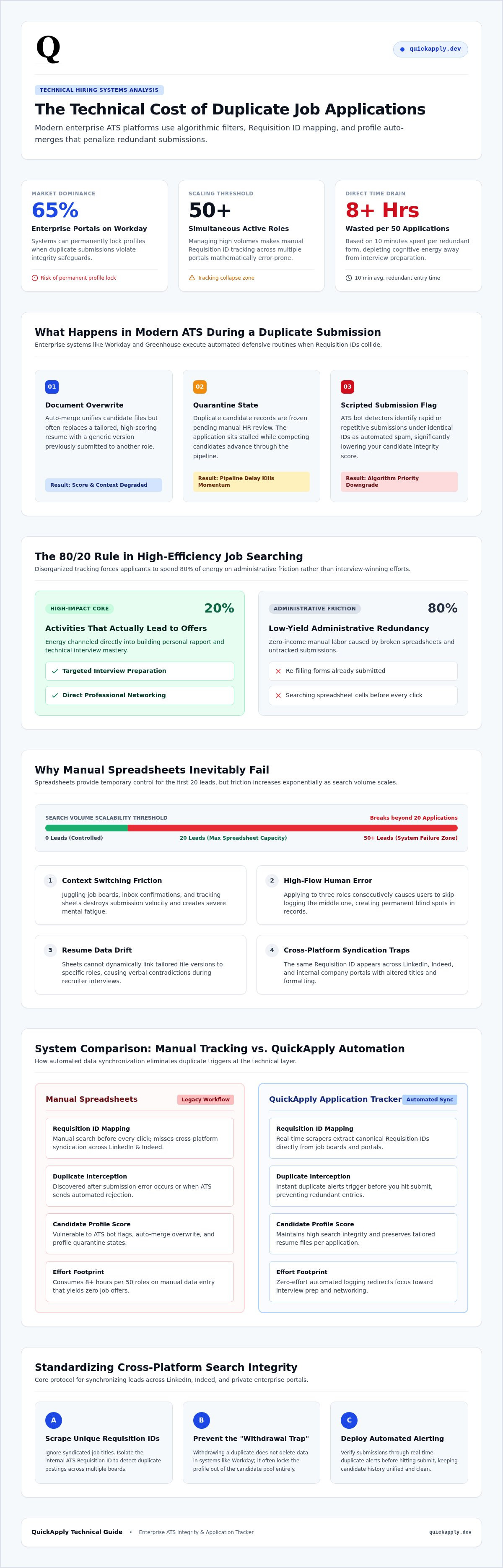
Your job search is a data pipeline. If you feed it redundant entries, the system breaks. Most candidates think resubmitting a resume demonstrates persistence. In 2026, technical recruiters see it as a lack of organizational control. Modern Applicant Tracking Systems are designed to filter noise, not reward repetition. When you trigger a duplicate entry, you aren't getting double the attention. You're likely getting flagged as a system error.
Learning how to stop applying to the same job twice is essential for protecting your candidate score. High-volume hiring environments use automation to rank applicants based on integrity and accuracy. If your profile shows multiple, conflicting submissions for the same Requisition ID, the algorithm may downgrade your priority. It suggests you're using uncalibrated bots or simply aren't paying attention. Neither look is professional in a competitive market.
How ATS Software Handles Duplicate Profiles
Most enterprise platforms, like Workday or Greenhouse, use auto-merge functionality to unify candidate data. While this sounds helpful, it often overwrites your progress. If you submit a tailored resume for one role and then apply to a similar one with a generic version, the system may replace your high-scoring document with the weaker one. Additionally, many systems flag duplicate profiles for manual review. This puts your application in a "quarantine" state where it waits for a human to resolve the conflict; this delay can kill your chances before a recruiter even sees your skills.
The Opportunity Cost of Search Inefficiency
Disorganization has a literal price. Spending ten minutes re-filling a form you already completed kills your momentum. If you do this across fifty applications, you've lost over eight hours of productive time. This redundancy leads to mental fatigue and eventual burnout. Search Integrity is the consistency of your professional data across all applications. Maintaining this integrity requires a centralized record. Using the QuickApply Application Tracker ensures you never waste a second on a role you've already conquered. This allows you to focus on the 20% of activities that actually lead to offers, like networking and interview practice.
Manual Tracking Methods: Pros, Cons, and Failure Points
Most job seekers start with a spreadsheet. It's the default move for anyone trying to figure out how to stop applying to the same job twice. While it provides a temporary sense of control, manual logging is a fragile solution. According to Bureau of Labor Statistics job search data, the sheer volume of search activities required in a competitive market can quickly overwhelm basic organizational tools. When you're managing dozens of active leads, your "system" becomes a second job that produces zero income.
Building a Basic Job Tracker Template
A functional manual tracker requires intense discipline. You need specific columns to maintain any level of search integrity. Essential headers include the Company Name, Requisition ID, Job Title, and the specific Resume Version used. Without these, your data is useless. Many seekers use conditional formatting in Excel or Google Sheets to flag duplicate Company Names or URLs. This setup forces a "check-before-apply" workflow. You must search your document before every new submission. It works for your first 20 leads, but the friction increases exponentially as your search scales.
Why Tech Pros Outgrow Spreadsheets
High-volume searches eventually break manual systems. The primary issue is context switching. Moving between job boards, your email, and a tracking tab creates friction that slows your submission velocity. Human error is inevitable during high-flow sessions. You might apply to three roles in a row and forget to log the middle one. This blind spot is exactly why candidates fail at learning how to stop applying to the same job twice. If the data isn't entered the moment you hit submit, the system fails.
Data drift is another silent killer. If you're tailoring resumes, you need to know exactly which version went to which recruiter to avoid contradictions in the interview. A spreadsheet doesn't automatically link your files; it just sits there waiting for you to type. If you're ready to stop managing cells and start managing opportunities, consider an application tracker to handle the heavy lifting. Manual entry is a legacy failure; synchronization is the only way to maintain search integrity in 2026.
Use Automation to Block Duplicate Applications
Manual logging is a bottleneck. It relies on your memory, which inevitably fails during a high-velocity search. In 2026, elite candidates have shifted to automated browser extensions to maintain a single source of truth. These tools act as a persistent layer over your web browser, identifying opportunities and risks before you ever click a button. By centralizing your data in real time, you create a definitive record that prevents technical overlaps across fragmented job boards. This isn't just about saving time; it's about systemic search integrity.
Integrating your resume versions with your application history is the final step in total search control. When you tailor a document for a specific role, you need an automated way to link that file to the specific Requisition ID. Automation ensures that you never send the wrong version to a recruiter who already has your data on file. This level of synchronization is the only way to navigate a market where speed and accuracy are the primary filters for top-tier talent.
Leveraging Browser Extensions for Real-Time Tracking
Browser extensions solve the context switching tax that kills productivity. Instead of jumping between LinkedIn and a spreadsheet, the extension reads the page metadata instantly. It identifies the underlying Requisition ID and cross-references it with your entire history. If you've already submitted a resume, a visual alert appears directly on the job description. This is the most effective method for how to stop applying to the same job twice. You capture job descriptions, salary ranges, and contact info with one click, ensuring your tracking your job applications workflow remains unbroken and error-free.
AI-Powered Application Management
Modern tools do more than just record data; they analyze it. The best ai resume builder 2025 options now include integrated tracking suites. These systems use match scoring to compare your profile against the job requirements in real time. Instead of blindly re-applying to roles where you were previously rejected, the AI suggests new, higher-probability targets. Automated status updates move roles through your funnel based on email triggers or portal changes. This eliminates manual clicks and keeps your search moving at the speed of the market. You gain a massive competitive advantage by focusing only on fresh leads while the system protects your professional reputation in the background.
Cross-Platform Strategy: Syncing LinkedIn, Indeed, and Portals
In 2026, job boards function as high-speed syndication engines rather than isolated lists. A single opening at a tech firm is often broadcast to LinkedIn, Indeed, and Glassdoor simultaneously. This "Multi-Channel" trap creates a scenario where you encounter the same requisition three times under different URLs and tracking codes. If you rely on platform-specific "Applied" indicators, you'll eventually double-dip. Learning how to stop applying to the same job twice requires you to look past the aggregator and identify the company's internal Requisition ID.
Standardizing your search parameters is the only way to catch these overlaps before they hit the recruiter's inbox. Treat every listing as a specific data point in a larger set. When you see a role on an aggregator, your first step should be a quick verification on the company's own career portal. Aggregators often lag behind the source, displaying "Ghost Jobs" that were filled weeks ago. Verifying the source ensures you aren't wasting energy on expired data or redundant submissions that have already been processed by the internal ATS.
Centralizing Your Search Data
Silos kill search efficiency. LinkedIn doesn't communicate with Indeed, and your Workday login doesn't sync with your local spreadsheet. Relying on the "Applied" tab of any single platform is a high-risk strategy that leads to data fragmentation. Mastering the job application process means building a system where the job board is irrelevant. You need a platform-agnostic hub that centralizes every outbound click. Exporting your data into a central hub allows you to see the full scope of your search without the friction of switching tabs or managing multiple logins.
Detecting Reposted Roles
Companies frequently refresh old listings to boost visibility in search results. This reposting tactic can trick you into thinking a role is a fresh opportunity. You must use AI to compare job descriptions; subtle differences in requirements often signal a genuine new opening versus a simple listing refresh. As a general rule, follow the 6-month rule for re-engagement. If you applied to a specific company more than half a year ago, it's usually safe to submit again. Anything sooner requires a unique Requisition ID to avoid being merged as a duplicate in the system. To keep your search lean and professional, use an automated application tracker to sync your cross-platform activity instantly.
QuickApply: The Ultimate Automated Application Tracker
QuickApply isn't just a tool; it's a systemic upgrade for your professional life. It eliminates the friction of manual data entry by automating the entire tracking lifecycle from start to finish. If you've been struggling with how to stop applying to the same job twice, this is your definitive solution. You can now scale your application volume to 10x your previous output with zero risk of redundant submissions. The platform acts as a protective layer between your talent and the recruiter's database, ensuring your search integrity remains flawless in a high-speed market.
Automation is the only way to stay ahead of the curve in 2026. While other candidates are busy updating spreadsheets, you're moving through your funnel with surgical precision. The system handles the logistics of data centralization, allowing you to focus on the high-impact activities that actually lead to offers. By removing the mental load of manual tracking, you maintain the energy needed for peak performance during interviews.
Smart Tracking for Modern Career Transitions
The Application Tracker operates as a real-time scraper across all major platforms. It extracts metadata that manual seekers miss, such as internal company codes and hidden requisition numbers. When you use resume tailoring, QuickApply creates a permanent link between that specific document and the job entry. You'll never walk into an interview wondering which version of your experience the hiring manager has on their screen. The Match Score feature further optimizes your time by highlighting new roles that align perfectly with your verified skill set.
Beyond the Application: Managing the Full Lifecycle
Managing the funnel requires more than just logging submissions. QuickApply transitions with you into the final stages of the hiring process. The platform's Interview Practice module uses your application history to generate hyper-relevant prep sessions. You practice with the exact job description and resume that got you through the door. Once you reach the offer stage, the Salary Negotiation Guide provides data-driven leverage based on the roles you've actually tracked. It's about maintaining search integrity from the first click to the final signature. Don't let disorganization hold your career back.
Stop wasting time and start tracking with QuickApply today.
Master Your Professional Momentum
Your job search is a high-speed data pipeline that requires technical precision. Legacy tools like spreadsheets and manual logs can't keep up with the complexity of 2026 hiring. You've now mastered the strategy of how to stop applying to the same job twice by centralizing your data and identifying internal requisition IDs across fragmented platforms. Redundancy is more than a waste of time; it's a risk to your professional reputation and a drain on your mental energy. By switching to automated workflows, you ensure that every submission moves you closer to an offer rather than into an ATS quarantine.
QuickApply provides the infrastructure you need to scale your output without the chaos of duplication. With AI-powered duplicate detection and a 1-click browser extension, your search integrity stays perfectly intact across every board. Integrated resume tailoring ensures you never send conflicting data to the same hiring manager. It's time to stop managing rows of data and start winning the roles you deserve. Start your optimized job search with QuickApply's AI Tracker and gain the competitive advantage of a streamlined, tech-first career transition. You have the talent; now you have the system to match it.
Frequently Asked Questions
Does applying to the same job twice help or hurt my chances?
Applying twice generally hurts your chances by creating data friction in the Applicant Tracking System. Most enterprise platforms merge duplicate profiles, which can overwrite your tailored documents with generic ones. Recruiters view double submissions as a sign of poor organization or uncalibrated automation. Instead of showing persistence, you risk being flagged as a system error. Focus on search integrity to ensure your first submission is high-quality and correctly logged.
Can I re-apply to a job if I've updated my resume significantly?
You should only re-apply if the company has posted a new Requisition ID or if six months have passed since your last submission. Simply updating your resume doesn't reset the ATS status for an active role. If you resubmit to the same opening, the system will likely merge the files without notifying the recruiter. Use an automated tracker to verify if the listing is truly new or just a reposted refresh of the same role.
How do I check if I already applied for a job on LinkedIn?
You can check the "Applied" section under the "Jobs" tab on LinkedIn, but this only tracks native Easy Apply submissions. For external links, LinkedIn often fails to record the completion of the form. This is why learning how to stop applying to the same job twice requires a platform-agnostic tool. A browser extension like QuickApply identifies your history across multiple boards, providing a real-time alert directly on the job description page.
What should I do if I accidentally applied twice for the same role?
If you accidentally apply twice, do not attempt to withdraw the application. In systems like Workday, withdrawing often permanently disqualifies your profile for that specific Requisition ID. Most ATS platforms will automatically merge the duplicates into a single candidate record. Let the system handle the merge and focus on your next opportunity. Moving forward, use an automated tracker to ensure every new lead is unique before you hit the submit button.
How long should I wait before re-applying to a company that rejected me?
The standard cooling-off period is six months. Applying sooner often results in an automated rejection because your previous "Candidate Disqualified" status remains active in the ATS. Use this time to enhance your skills and update your portfolio. When you do re-engage, ensure you use how to stop applying to the same job twice techniques to verify you are targeting a fresh requisition rather than a closed one from your previous attempt.
Is there a free tool to track my job applications automatically?
QuickApply offers a free tier for its automated Application Tracker. This tool eliminates manual logging by capturing job details and Requisition IDs directly from your browser. It provides a centralized hub for your search history, helping you maintain search integrity without paying a subscription fee. Unlike static spreadsheets, the free version includes basic duplicate detection to keep your high-volume search organized. You can upgrade later for advanced features like AI match scoring.
Why do some jobs appear as 'new' even if I applied to them last month?
Many companies refresh their listings every 30 days to stay at the top of search results. While the job board marks it as "New," the internal Requisition ID often remains the same. Applying to these "refreshed" roles triggers a duplicate flag in the employer's database. Automated trackers solve this by comparing the underlying metadata rather than the posting date. This ensures you don't waste effort on roles you've already conquered in the previous month.
How can I organize my job search if I'm using multiple email addresses?
Centralization is critical when managing multiple email identities. Modern Applicant Tracking Systems use your email as a primary key, so using different addresses can create fractured profiles that confuse recruiters. You should link all your search activity to a single Application Tracker regardless of which email you use for the submission. This creates a unified record of your reach, preventing you from double-dipping into the same company under different aliases.


