

Excel is a tomb for your career data. While you're busy copy-pasting job titles and company URLs into a static spreadsheet, your competitors are already landing interviews. Manual data entry isn't just tedious; it's a bottleneck that kills your momentum. Most job seekers apply to 20 to 50 positions before getting an offer. Managing that volume in a basic spreadsheet leads to missed deadlines and version control nightmares. You're likely exhausted by the manual fatigue of tracking which resume version went to which company. It's time to find a job application tracker excel alternative that works as hard as you do.
Stop wasting hours on manual logging and start treating your job search like a high-conversion pipeline. This guide reveals how automated tracking transforms a chaotic hunt into a streamlined system of execution. We'll explore the top tools for 2026 that offer real-time status updates and integrated resume tailoring. You'll learn how to replace clunky sheets with smart technology that prioritizes roles and automates the grunt work. We're breaking down the best platforms to give you a competitive edge in a crowded market. It's time to stop organizing and start winning.
Key Takeaways
- Identify the "data tax" caused by manual spreadsheets and how it prevents you from reaching high-volume application targets.
- Explore the core features of 2026 tracking tools, including one-click browser extensions and automated status updates that sync with job boards.
- Find the right job application tracker excel alternative by comparing setup efficiency against the long-term value of integrated AI features.
- Analyze your search patterns to pinpoint success drivers and automate follow-up tasks to ensure no opportunity falls through the cracks.
- Learn the streamlined process for migrating legacy data into a smart dashboard that combines tracking with real-time resume tailoring.
Why Your Job Application Excel Sheet is Killing Your Momentum
Excel is a cemetery for your career data. It demands manual labor for every row you add, creating a "data tax" on every application you submit. Instead of spending your energy on high-value networking or interview prep, you're stuck in a loop of copy-pasting job titles and company URLs. Static sheets don't talk to the outside world. They can't tell you if a job is closed or if your resume actually parsed correctly into a database. When you rely on a spreadsheet, you're choosing a passive archive over an active command center.
The Hidden Cost of Manual Data Entry
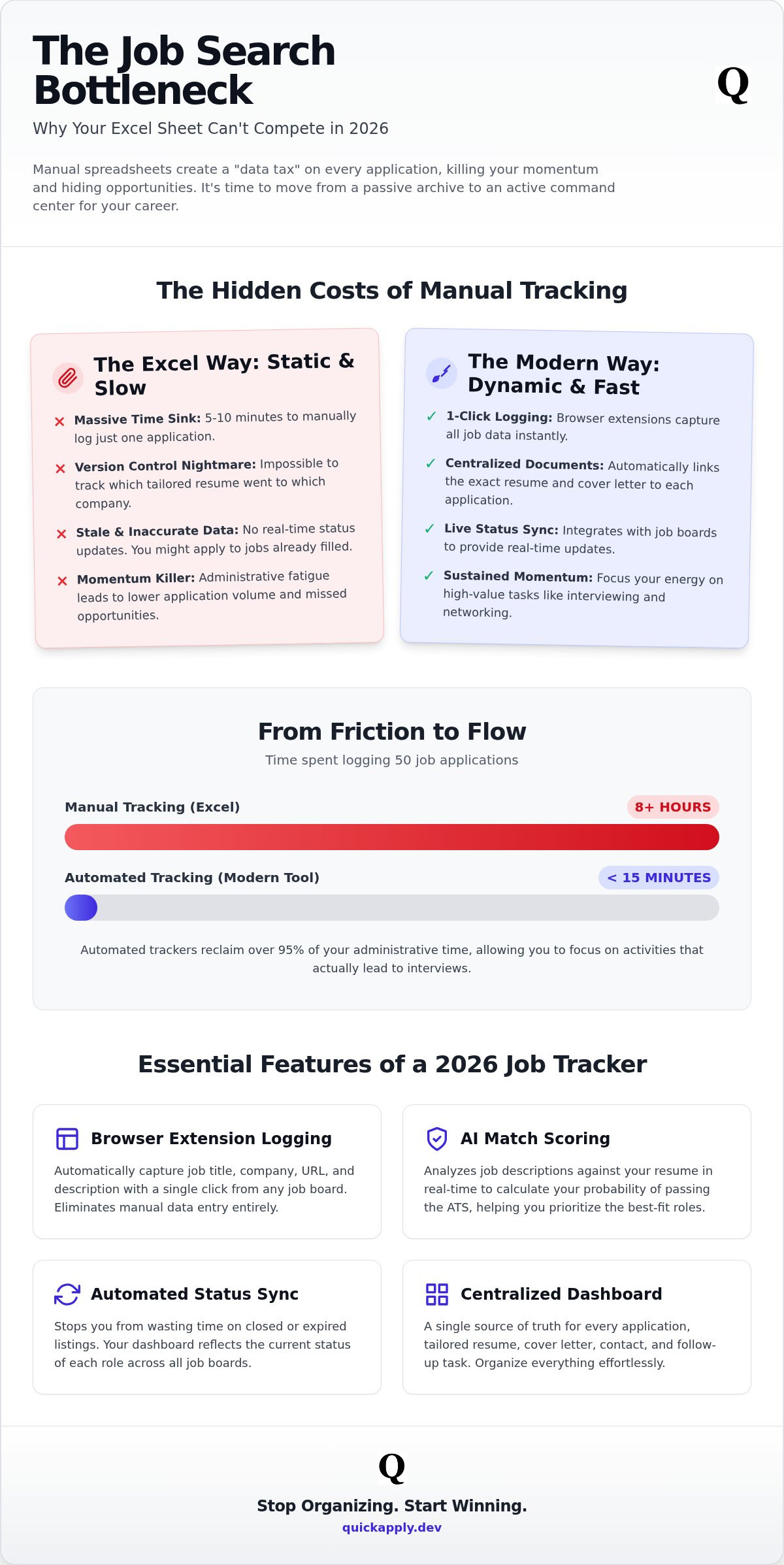
Think about your current workflow. It takes 5 to 10 minutes to log a single application manually. If you're applying to 50 jobs, that's over 8 hours of pure administrative overhead. This friction leads directly to search fatigue. When the process is painful, your application volume drops. You stop applying because the administrative "paperwork" feels too heavy.
- Volume Decay: Your output decreases as the logging backlog grows.
- Data Inaccuracy: You start skipping fields or making typos just to finish the entry.
- Missed Opportunities: Time spent on data entry is time taken away from finding new leads.
Spreadsheet friction is the #1 killer of job search consistency. You need a job application tracker excel alternative that automates the boring stuff so you can focus on the interview. Modern tools handle the logging in the background, keeping your momentum high and your focus sharp.
Version Control Nightmares and Stale Data
Managing 50+ tailored resume versions in a spreadsheet is a recipe for disaster. When a recruiter calls, you need to know exactly which version they see. Excel won't show you the specific keywords you used to beat their Applicant Tracking System (ATS). It's just a dead cell in a grid. Without a live link to your documents, you're forced to dig through local folders while your phone is ringing.
Stale data is another constant risk. You might spend an hour tailoring a cover letter for a role that was filled three days ago. Excel doesn't offer real-time status updates or integration with job boards. It doesn't link your specific cover letters to your entries automatically. You end up guessing which file matches which application. Finding a job application tracker excel alternative that syncs with your browser is no longer a luxury; it's a requirement for speed. If you can't see patterns in your rejections or successes instantly, you're flying blind in a market that moves at the speed of light.
Beyond the Spreadsheet: Essential Features of a 2026 Job Tracker
Excel is a static archive. A modern job application tracker excel alternative is a dynamic engine. It doesn't just store data; it generates action. In a market where 99% of Fortune 500 companies use an Applicant Tracking System (ATS), you cannot afford to manage your search with tools from the 1990s. You need a system that fights back. A 2026-ready tracker provides a centralized cockpit for every tailored resume, cover letter, and follow-up task. It eliminates the mental load of remembering deadlines and allows you to focus on the only thing that matters: landing the interview.
Automated Status Updates and Browser Extensions
Modern job searching is a high-volume numbers game. You can't win if you're stuck in a tab-switching nightmare. A dedicated job application tracker excel alternative eliminates manual labor through browser extensions. These tools detect when you click "Apply" on sites like LinkedIn or Indeed. They scrape the job title, company, and description instantly. Your dashboard stays synced across all devices without you lifting a finger. This level of automation is central to modern tips for conducting an organized job search. It moves your focus from data entry to execution. You don't have to wonder if you logged a role; the software confirms it for you in real-time.
Integration with AI Tailoring and Match Scoring
In 2026, the most critical metric is your Match Score. This isn't just a number. It's a calculated probability of passing an ATS. Your tracker must analyze job descriptions against your profile in real-time. High-probability roles should move to the top of your queue automatically. This data should feed directly into your resume tailoring tools. When you know exactly where you lack keywords, you can fix them in seconds. You stop guessing and start optimizing based on hard data.
The same logic applies to your outreach strategy. Integrated AI cover letter builders pull data from your tracker to create specific, high-impact narratives. They use the job description you just saved to highlight your most relevant skills. This synergy ensures that every document you send is a perfect match for the role. You can automate your tracking pipeline today to start seeing these results. Stop fighting your tools and start using a system designed for the modern web.
Finally, your tracker must handle the "afterlife" of an application. Automated follow-up reminders should trigger based on industry-standard response times. If a company hasn't responded in seven days, your tracker should prompt you to send a pre-written follow-up. This ensures you never lose momentum due to a busy recruiter's inbox. You stay top-of-mind without having to check a calendar or a spreadsheet cell every morning.
Top Job Application Tracker Excel Alternatives Compared
Selecting the right job application tracker excel alternative is a strategic decision. You aren't just looking for a place to store links; you're looking for a tool that accelerates your search. In 2026, the market is split between general-purpose organizers and dedicated career platforms. The best choice depends on whether you value infinite customization or out-of-the-box automation. If you're applying to dozens of roles weekly, you can't afford a tool that requires you to build the engine before you can drive it.
Notion and Trello: The Visual Organizers
Many seekers gravitate toward Notion or Trello because they love Kanban boards. These tools are excellent for visual thinkers who want to see their pipeline at a glance. You can drag and drop cards from "Applied" to "Interviewing" with ease. However, these platforms often lead to the "customization trap." You spend three days building the perfect database and zero hours actually applying to jobs.
- Pros: High flexibility, familiar interface, and excellent desktop-to-mobile syncing.
- Cons: Zero career-specific automation, manual data entry for every field, and high setup friction.
- Setup Time: 2 to 5 hours of configuration.
These tools are best for those with a low application volume who enjoy the process of building their own systems. For everyone else, the manual overhead becomes just another form of spreadsheet friction that slows you down.
Dedicated Career Platforms: Why Purpose-Built Beats General-Purpose
Purpose-built platforms eliminate the setup phase entirely. They're designed for the modern web, offering one-click logging and instant data scraping. While general tools show you what you've done, dedicated trackers show you what to do next. This proactive approach is why a dedicated job application tracker excel alternative is the smarter play for high-growth professionals. You need a tool that handles the administrative debt so you can focus on performance.
QuickApply integrates directly with ATS resume checkers to ensure your documents are optimized before you hit submit. This synergy is missing from general tools. Having your interview practice sessions and salary negotiation guides in the same UI creates a unified workflow. Tech professionals benefit from platforms that understand specific job boards like GitHub or Y Combinator's Work at a Startup. You get a mobile experience that allows you to track a new lead while you're on the move, ensuring your pipeline never goes stale. The long-term value lies in the platform's ability to learn from your data and suggest improvements to your strategy in real-time.
Turning Tracking into Interviews: The AI-Powered Workflow
Tracking is more than a record of the past. It is the blueprint for your next offer. A high-performance job application tracker excel alternative functions as a real-time feedback loop for your search strategy. If you notice a high success rate with startups but constant rejection from enterprise firms, your tracker should make that pattern obvious. This isn't just about storage. It's about intelligence. Automated status changes should trigger immediate next steps. When an application moves to "Interview Scheduled," your tracker should auto-generate a follow-up or prep task. You stop reacting to your inbox and start dictating the pace of your search.
From Applied to Interviewing with Match Score Optimization
Focusing on volume alone is a mistake. Quality of fit determines your interview rate. By utilizing a tracker that integrates Match Score technology, you can prioritize roles where you have an 80% or higher compatibility rating. AI match scores predict interview probability by quantifying how well your profile aligns with the specific technical requirements of a role. This allows you to stop applying for roles where you are a poor fit statistically. Every application you send should be a high-probability bet. Your tracker helps you refine your keywords for future applications by highlighting what worked in previous successful submissions. You learn from every "no" until you get a "yes."
Centralizing Your Tech Stack for the Job Hunt
Your career tools must talk to each other. Fragments of data in different tabs lead to missed opportunities. Your tracker should be the single source of truth that connects your research to your results. Linking your AI resume builder directly to your application history allows for instant iteration. If one resume version isn't getting hits, you see it in the data and change it immediately. Centralizing your cover letter examples provides a library of proven narratives you can adapt in seconds.
This centralized approach reduces the cognitive load of managing a high-volume search. You spend less time searching for files and more time preparing for conversations. When a recruiter calls about a specific project, you can pull up the exact document you sent in one click. Precision replaces panic. You can optimize your job search pipeline now to stop guessing and start executing with data-driven confidence. The difference between a long search and a fast hire is the quality of your system.
Switching to QuickApply: The Ultimate Excel Upgrade
Transitioning from a spreadsheet to a smart dashboard is the single most effective move you can make for your career. Excel is a relic of manual labor. QuickApply is a cockpit for execution. Moving your data isn't a chore; it's an upgrade that pays immediate dividends in time saved and interviews landed. By choosing a dedicated job application tracker excel alternative, you stop hoarding dead data and start building an active pipeline. You deserve a system that grows with your ambition. This is how you leave the grid behind and start winning.
Importing Your Existing Data and Setting Up Your Dashboard
Don't leave your history in a static file. Clean your Excel data first to ensure a smooth migration. Remove duplicate entries. Standardize your company names. Fix any broken URLs in your "Job Description" column. Once your sheet is lean, use the QuickApply import tool to populate your new dashboard instantly. This centralizes your history and prepares it for AI analysis.
Map your existing columns to match your specific interview process. Whether you use a standard "Applied, Interviewing, Offered" flow or a more complex technical screening sequence, your dashboard must reflect your reality. Set up your first Match Score analysis for any active roles immediately. This reveals which applications need a follow-up or a resume revision. You'll see your search in high definition for the first time. Precision replaces guesswork the moment you hit "Import."
Automating Your Future Applications in Seconds
The days of tab-switching are over. Install the QuickApply browser extension to enable the one-click "Apply and Track" workflow. When you find a role on LinkedIn or Indeed, the extension scrapes the metadata and logs the entry in the background. It links your tailored resume and cover letter to the entry automatically. This creates a seamless loop between your document creation and your tracking history. You stay in the flow. You apply faster. You track better.
Set up automated reminders to ensure you never ghost a recruiter. If an application remains stagnant for seven days, the system prompts you to take action. This persistent productivity happens without active effort on your part. Once you land the job, the platform continues to serve your growth. Use the Salary Negotiation Guide to secure your worth and the Promotion Roadmap to plan your next move. Your job application tracker excel alternative should be a career partner, not just a list. Stop tracking manually and start applying smarter with QuickApply. Efficiency is your new competitive advantage. Own it.
Dominate Your 2026 Job Search
Manual tracking is an administrative burden that delays your next offer. You've seen how legacy spreadsheets fail to keep up with the speed of modern hiring cycles. By adopting a dedicated job application tracker excel alternative, you replace static cells with a high-velocity pipeline. This shift allows you to spot success patterns and automate follow-up tasks instantly. You stop being a data entry clerk and start acting as a strategic candidate who knows exactly where to focus for the highest ROI.
QuickApply delivers the ultimate efficiency upgrade for high-growth professionals. It integrates an AI-powered Match Score with automated document tailoring to ensure every submission is optimized for success. You manage your entire trajectory through a unified career management dashboard that handles the grunt work in the background. Stop fighting against clunky grids and start using a system designed for the digital-first world. Upgrade your job search from Excel to QuickApply today. Your competitive advantage starts with a smarter system. Take the leap and turn your application history into a series of interview invitations.
Frequently Asked Questions
Is a dedicated job tracker better than a free Excel template?
Yes, a dedicated tracker is superior because Excel is a static archive while trackers are active engines. Excel requires manual entry; trackers automate data scraping via browser extensions. This saves roughly 8 hours of admin work for every 50 applications. Trackers also provide real-time status updates that spreadsheets can't replicate. Choosing a job application tracker excel alternative means moving from a passive list to a high-conversion pipeline.
How do automated job application trackers work with LinkedIn?
Automated trackers use browser extensions to scrape job metadata directly from LinkedIn pages. When you click "Apply," the tool captures the company name, job title, and description instantly. It logs this data to your dashboard without any manual typing. This eliminates tab-switching and ensures your application history is always accurate. You stay focused on the search while the software handles the documentation and background syncing.
Can I import my existing job search spreadsheet into QuickApply?
You can import your legacy data into QuickApply to maintain your search history. Simply clean your CSV file to remove duplicates and standardize company names before uploading. The system maps your old columns to the new smart dashboard. This transition turns your dead spreadsheet data into actionable insights. You can then apply Match Score analysis to any active roles you've previously logged. It's the fastest way to adopt a job application tracker excel alternative.
What is a Match Score and why does it matter for my tracker?
A Match Score is a calculated probability of your profile's compatibility with a specific job description. It matters because it helps you prioritize roles where you have an 80% or higher chance of passing the initial screening. Instead of guessing, you use hard data to focus your tailoring efforts. This metric transforms your tracker from a simple list into a strategic prioritization tool that predicts your interview probability.
Will using a job tracker help me beat the ATS?
Using a job tracker helps you beat the ATS by identifying keyword gaps in your resume before you submit. Trackers integrated with tailoring tools allow you to iterate on your documents based on the specific job description you just scraped. This ensures your resume is optimized for the 99% of Fortune 500 companies using applicant tracking systems. You aren't just tracking; you're actively increasing your technical compatibility for every role.
Do job application trackers keep my data private and secure?
Modern career platforms use industry-standard encryption to protect your professional data and application history. Unlike a local Excel file that can be lost or an unencrypted cloud sheet, dedicated trackers provide secure, centralized storage. Your resumes, cover letters, and contact details are accessible only to you. We prioritize data integrity so you can focus on your career growth without security concerns or the risk of data corruption.
How many applications can I track with an AI-powered tool?
AI-powered tools like QuickApply allow you to track an unlimited number of applications without the performance lag of a massive spreadsheet. You can manage hundreds of roles across multiple stages of the interview process. High-volume tracking becomes manageable because the software automates the logging and follow-up reminders. You maintain a high-conversion pipeline regardless of how many companies you're currently targeting. The system scales with your search volume.
What are the best free alternatives to Excel for job tracking in 2026?
In 2026, the best free alternatives to Excel include platforms like Teal, Huntr, and Prentus. Teal offers unlimited job and contact tracking on its free tier. Huntr's free plan allows for tracking up to 100 jobs with unlimited autofill. These tools provide browser extensions and visual Kanban boards that Excel lacks. They offer a significant efficiency upgrade over manual spreadsheets without requiring an initial financial investment or complex manual setup.


