

A spreadsheet can tell you where you applied. It can’t reliably show which opportunity deserves your next hour. That’s why a spreadsheet is not enough for job hunting once applications, contacts, resume versions, and follow-ups start living in separate rows and files.
Spreadsheets still work for a short, simple search. They’re flexible and easy to start. But every manual status update and reminder adds admin, while stale links or unclear next steps make it harder to decide what to do next. You need more than a record of applications. You need a system that helps connect decisions, timing, and progress.
This guide will help you spot when your current method is creating friction and compare alternatives using practical criteria, not a long list of features. You’ll see when a spreadsheet still makes sense, what a dedicated tracker can add, and how connecting application tracking with role matching and tailored resumes and cover letters can make your workflow easier to manage.
Key Takeaways
- Learn why a spreadsheet is not enough for job hunting when it records application status but leaves context and next steps disconnected.
- Compare spreadsheets and dedicated trackers by how well they support visibility, follow-ups, and application materials.
- Use a quick self-assessment to decide whether your current system is accurate, easy to scan, and actionable.
- See how a connected workflow can bring role-fit insights and tailored application materials alongside job tracking.
- Explore how QuickApply combines an application tracker, match score, resume tailoring, and cover letter generation.
Why a Spreadsheet Feels Like Enough for Job Hunting, Until the Search Gets More Complex
A company, a role, an application date, and a status. Put those in a spreadsheet and you have a clear record of where you’ve applied. It’s quick to set up, easy to customize, and familiar. For a small search, that may be all you need.
But a spreadsheet is a flexible grid, not a job-search workflow or decision system. It can store details you enter, but it won’t automatically turn them into a clear next action. That distinction helps explain why a spreadsheet is not enough for job hunting: the issue isn’t that spreadsheets are poorly made. It’s whether your tracking method still helps move your search forward.
What a spreadsheet does well at the start of a job search
A basic sheet can capture company names, job titles, dates, and application status in minutes. Add or rename columns to suit your process, then sort by date or status to find a record quickly. You don’t need to learn a new tool or build a complicated setup. When the list is short and each entry is easy to update, a spreadsheet can remain practical without paid software or automation.
When job-search tracking starts demanding too much maintenance
As your search grows, each application may need more context: hiring contacts, interview stages, job-description links, notes, document versions, and follow-up dates. Those details can live in separate files or require extra columns and manual updates. The spreadsheet may still hold the information, but keeping it complete can start to compete with the work it’s meant to support.
That’s workflow friction. If updating the tracker takes repeated effort, or you have to search elsewhere to understand what happened and what comes next, the system is creating administration instead of reducing it.
Employers may use applicant tracking systems to manage applications, while your spreadsheet remains a separate personal record. Your sheet can help you stay organized, but it doesn’t automatically connect your notes to an employer’s process or keep every piece of application context in one place.
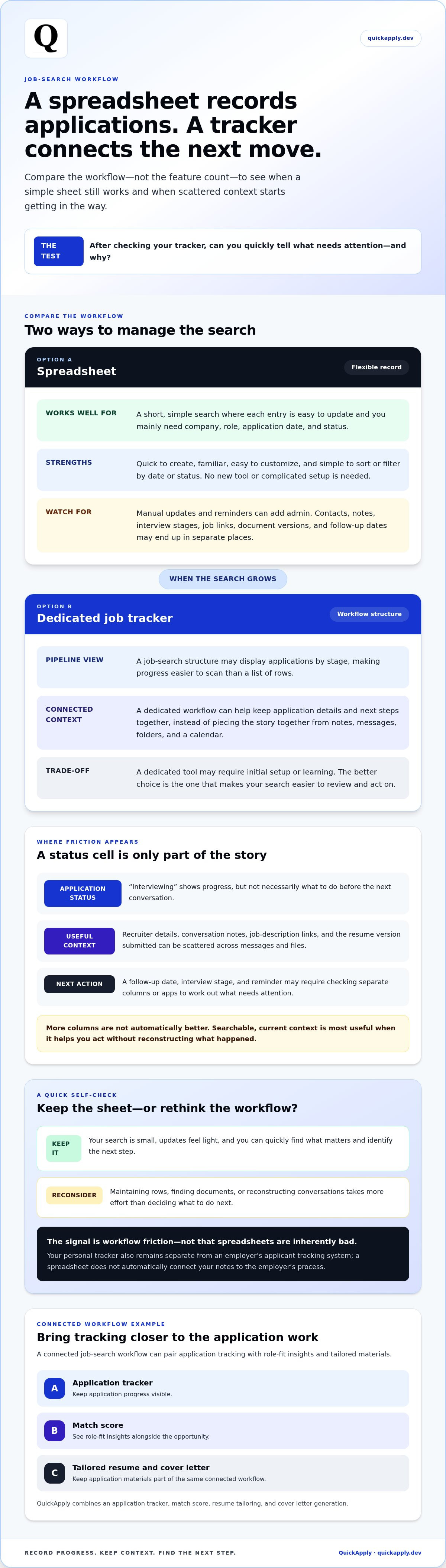
Use a simple test: after checking your tracker, can you quickly tell what needs attention and why? If yes, keep using it. If you’re spending more time maintaining rows, finding documents, or reconstructing conversations than deciding on your next move, it may be time to rethink the workflow, not blame the spreadsheet.
Where a Job-Hunting Spreadsheet Breaks Down: Context, Follow-Ups, and Decisions
A status such as “interviewing” captures progress, but it doesn’t tell you what to do before the next conversation. You may still need to find the recruiter’s name, review what they said about the role, open the job description, and identify which resume version you submitted. When those details sit in separate notes, email threads, and folders, the status cell is only a partial record.
Why application status alone does not preserve useful context
Imagine a recruiter mentions that the team values experience with a particular tool and asks you to follow up after meeting the hiring manager. If your sheet only says “interviewing,” you’ll need to search your notes or messages to recover both the detail and the next step. Add a job-description link that no longer works, or resume files with unclear names, and comparing roles or preparing for a conversation takes extra effort.
The problem isn’t the number of columns. It’s whether key context stays connected to the opportunity. An organized approach to job hunting depends on being able to find the information that supports your next decision, not simply storing more of it.
How manual tracking can obscure the next best action
A follow-up date may be in one column, interview status in another, and a reminder in your calendar. To find what needs attention, you might sort the sheet, scan several fields, or check a separate app. That process is manageable until it becomes hard to tell which record is current.
Manual tracking relies on memory: remember to update the status after an interview, record a new contact, and revise the next step when plans change. Missed updates can make you less confident in the tracker. Then you may double-check every entry, defeating the purpose of keeping a record.
Searchable, current context is more useful than extra columns when it helps you act without piecing the story together. That’s the practical reason why a spreadsheet is not enough for job hunting in some searches: it can log progress while leaving decisions and follow-ups scattered. This is a workflow limitation, not proof that spreadsheets are inherently bad. If manual updates still feel light and you can find what matters quickly, your sheet may be doing its job.
If you want application details and next steps in a dedicated workflow, explore QuickApply’s application tracker.
Spreadsheet vs. Job Application Tracker: Compare the Workflow, Not the Feature Count
The better choice isn’t automatically the tool with more features. It’s the one that makes your search easier to review and act on. Compare how each option handles the work you actually do, from recording an application to deciding whether a role deserves more effort.
| Workflow need | Spreadsheet | Dedicated tracker |
|---|---|---|
| Setup | Quick to create and customize; you choose the columns. | Uses a job-search structure, which may take some initial setup or learning. |
| Pipeline visibility | Sort or filter rows to review stages. | May display applications by stage, making the pipeline easier to scan. |
| Context | Notes and links fit in cells, but can be harder to navigate as details grow. | May organize notes and job details around each application. |
| Reminders | Usually require manual dates, calendar entries, or another reminder system. | Some trackers include follow-up prompts or reminders. |
| Application materials | Can record file names or links you maintain. | Some connect materials to individual roles; resume tailoring may be a separate capability. |
Which job-search tool fits a simple or complex application pipeline?
A spreadsheet can be a strong fit when you have a few active roles, straightforward stages, and a habit of keeping entries current. A dedicated tracker becomes more useful when several opportunities are moving through different stages and you need to manage notes, follow-ups, and materials together. There’s no universal application-count threshold. Your workflow’s complexity and your consistency matter more.
Which capabilities matter beyond storing company names and dates?
Check whether you can see each role’s stage, find relevant notes, connect application materials, and review which opportunities best match your priorities. These functions support different decisions. Tracking tells you where an application stands; role-fit assessment helps you decide where to focus; resume tailoring and cover letter generation help shape materials for a specific opening. They complement tracking, but aren’t the same capability.
For broader context on the stages and tasks involved, read the complete job application process guide.
That distinction explains why a spreadsheet is not enough for job hunting for some people: a record of applications doesn’t necessarily help prioritize the next move. Choose based on the gaps you need to close, not a feature checklist. A useful tracker should make the next decision clearer, not simply give you more fields to fill in.
Keep Your Spreadsheet or Switch to a Better Workflow?
Don’t switch just because another tool has a longer feature list. Switch when your current system repeatedly makes it harder to follow through, compare opportunities, or trust your records. This practical check can help you decide.
A practical checklist for deciding when a spreadsheet is no longer enough
- 1. Find the next action. Can you quickly identify each active role’s current stage and what you need to do next?
- 2. Retrieve the context. Are recruiter details, useful notes, job descriptions, and application documents easy to find for each opportunity?
- 3. Trust the record. Are updates consistent, or do you regularly need to clean up outdated statuses and reconstruct what happened?
If you can answer yes across the board, keep the spreadsheet. It’s doing its job if it stays accurate, easy to scan, and actionable. If the same gaps keep disrupting follow-through or make it difficult to compare roles, try a dedicated workflow. That’s a more useful signal than any fixed number of applications, and it gets to the practical question behind why a spreadsheet is not enough for job hunting: does the system support your decisions, or add friction?
How to switch tools without adding another job-search chore
Keep the transition small. Start with active opportunities, not a full archive of every role you’ve ever considered. For each one, bring over the company and role, current stage, next action, key contact or note, and links to relevant materials. Leave older applications in the spreadsheet for reference if you don’t need them in your daily workflow.
Next, choose a few clear stages that match how you actually search, such as applied, interviewing, and decision pending. Avoid adding a stage unless it helps you see progress or take action. Keep the structure lean enough that updating it feels easier than maintaining the old system.
Materials belong in the workflow too. Associate the resume tailored to a job description with that opportunity, so you can tell what you submitted. QuickApply helps tailor resumes to specific job descriptions as part of preparing role-specific applications.
Want to manage opportunities in a workflow built around job applications? Explore QuickApply’s application tracker.
How QuickApply Connects Job Tracking With Role Fit and Tailored Applications
A tracker helps organize opportunities, but it doesn’t answer every useful question. Which role aligns most closely with your experience? What should your application highlight? QuickApply brings those decisions closer to application tracking, connecting role-fit insight with the materials you prepare for specific openings.
Bring role fit and application tracking into the same search workflow
QuickApply includes an application tracker and a match score to help assess how well a role fits. The score can help you review opportunities and decide which ones deserve closer attention. Treat it as one input for prioritizing your search, not a prediction of whether you’ll get hired. Your goals, experience, and interest in the role still matter.
Once you choose to pursue an opportunity, the tracker helps you manage its progress alongside your other job-search tools. Keeping role evaluation and application activity in view together can help connect tracking with the decisions behind each application.
Tailor applications to the roles worth pursuing
After selecting a role, use its job description to guide your application materials. Resume tailoring helps focus your experience on relevant requirements, while a tailored cover letter gives you another way to address the position. QuickApply generates tailored resumes and cover letters for specific job descriptions, helping you prepare materials for the roles you choose to pursue.
This is the broader answer to why a spreadsheet is not enough for job hunting for some searchers: recording a role is only one part of the workflow. Evaluating fit, preparing role-specific materials, and tracking progress are connected tasks. A spreadsheet can still suit a search that’s simple and easy to maintain. If you want those tasks closer together, QuickApply brings them into one job-search platform.
Explore QuickApply and choose a workflow that fits the way you want to manage your search.
Build a Job-Search Workflow That Moves You Forward
A spreadsheet can be the right tool when your search is simple and your records stay current. The signal to switch isn’t a certain number of applications. It’s repeated friction: missed next steps, scattered context, or too much time spent maintaining the tracker.
That’s the practical answer to why a spreadsheet is not enough for job hunting: logging applications is only part of the process. A useful system should also help you assess role fit, keep progress visible, and connect each opportunity to the materials you prepare for it.
QuickApply brings an application tracker and match score together with AI resume tailoring and cover letter generation for specific job descriptions. These tools can support a more connected workflow, while your choices and experience remain central to each application.
Explore QuickApply and streamline your job search. Choose a system that fits the way you work, keeps your next steps clear, and lets you focus your effort on opportunities worth pursuing. You can make your search more organized, one thoughtful application at a time.
Frequently Asked Questions
Is a spreadsheet good enough to track a job search?
Yes, a spreadsheet can be enough when your search is manageable and you keep it accurate. A simple record of company, role, application date, status, and next step may cover what you need. The question of why a spreadsheet is not enough for job hunting depends on your workflow, not a fixed number of applications. If details are scattered or updates keep slipping, consider a system that makes context and actions easier to manage.
When should I switch from a spreadsheet to a job application tracker?
Consider switching when you can’t quickly see each active role’s status and next action, or when you regularly search across files to find contacts, notes, and application materials. Time spent correcting outdated entries is another signal. If your spreadsheet remains easy to scan, current, and useful for decisions, keep it. Choose a dedicated tracker when recurring friction makes it harder to manage follow-ups or compare opportunities.
What can a job application tracker do that a spreadsheet cannot?
A tracker may provide job-search-specific views, such as applications grouped by stage, and keep notes or materials connected to individual roles. Some platforms also bring other tools into the same workflow. For example, QuickApply combines an application tracker with a match score, resume tailoring, and cover letter generation. A spreadsheet can be customized to store similar information, but these capabilities depend on the tool and may otherwise require separate manual steps.
Can I use a spreadsheet and a job search tool at the same time?
Yes. You might keep a spreadsheet as an archive or use it to compare opportunities while managing active applications in a tracker. Set a clear purpose for each tool and decide which one holds the current status and next action. Otherwise, duplicate records can drift out of sync. For a simple transition, leave historical applications in the sheet and move only active roles and essential context to the new workflow.
How do I move my job applications from a spreadsheet to a tracker?
Start with active applications instead of rebuilding your entire history. For each role, transfer the company, job title, application date, current stage, next action, key contact notes, and links to the relevant job description and materials. Then set up a small number of stages that match your actual process. Keep the old spreadsheet for reference until you’re confident the active records are complete and easy to use.
Do job application trackers help you find better-fit roles?
A tracker alone organizes applications; it doesn’t necessarily assess role fit. Some job-search platforms add tools such as a match score to help you evaluate how a job description aligns with your profile. QuickApply includes a match score alongside its application tracker. Use that score as one input when deciding which roles to explore, alongside your experience, priorities, and interest. It can inform your choices, but it can’t guarantee an outcome.
What information should I track for each job application?
Track the details that help you understand progress and take the next step: company, role, job-description link, application date, current stage, and follow-up action or date. Add recruiter or contact details, interview notes, and the names or links for the resume and cover letter you submitted. Keep fields practical. If a detail doesn’t help you compare a role, prepare for an interaction, or follow through, you may not need to track it.


