

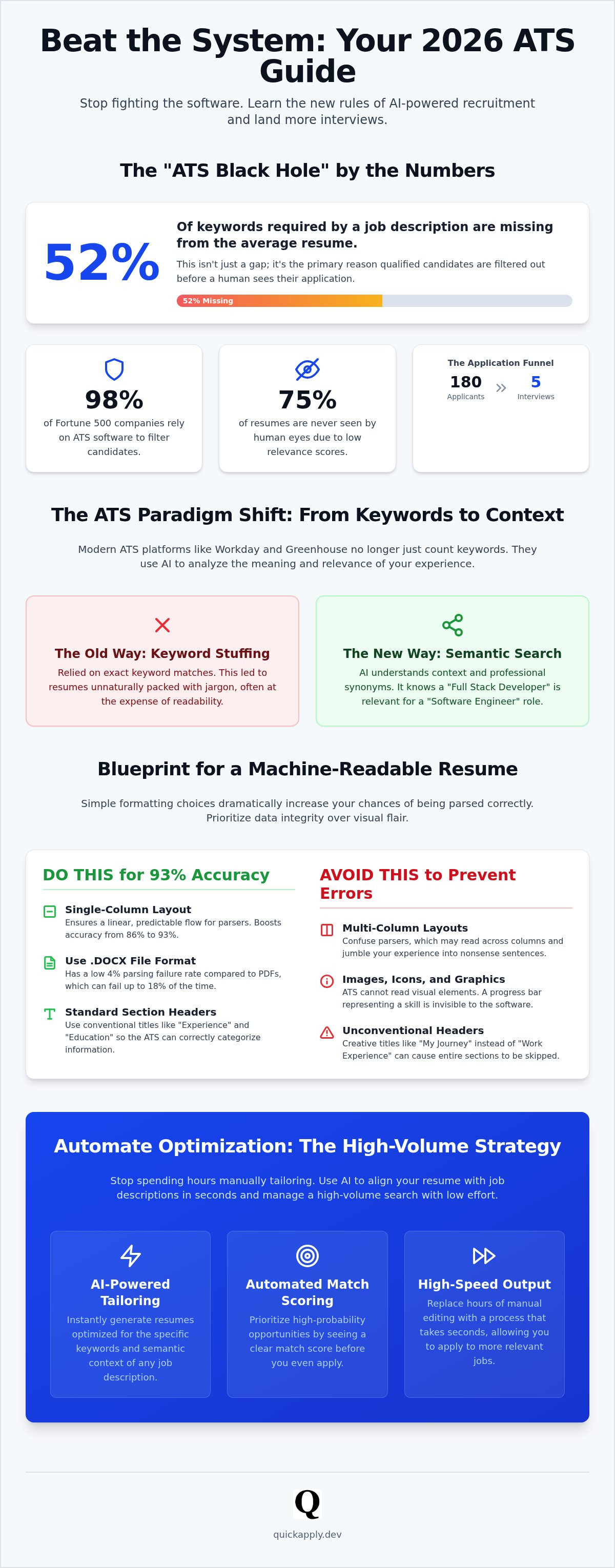
The average resume is missing 52% of the keywords required by the target job description. That is not just a gap; it is a wall. When 98% of Fortune 500 companies rely on software to filter talent, your qualifications don't matter if the machine can't read them. You're likely tired of the "ATS black hole" and the hours spent manually tailoring every bullet point only to receive an automated rejection. It's frustrating to feel like a digital ghost in a market that demands speed and precision.
This guide changes the math. You'll learn exactly how to beat applicant tracking system protocols by using AI to align your experience with the latest 2026 updates from platforms like Workday and Greenhouse. We're moving past simple keyword stuffing into the era of semantic search and contextual embeddings. This is about high-volume output with low-effort input. We'll break down the exact formatting rules that ensure 93% parsing accuracy and show you how to automate the tailoring process. Stop guessing and start optimizing your path to more interviews.
Key Takeaways
- Understand that modern ATS platforms function as searchable databases where ranking is determined by semantic relevance rather than simple keyword counting.
- Master the mechanics of contextual embeddings to learn how to beat applicant tracking system filters and secure higher match scores.
- Stick to single-column layouts and standard fonts like Arial or Calibri to maintain high parsing accuracy across major systems like Workday and Greenhouse.
- Deploy AI-powered tailoring to generate optimized resumes in seconds, replacing hours of manual editing with instant alignment.
- Use automated match scoring to prioritize high-probability job openings and manage a high-volume search with minimal effort.
The Reality of the ATS 'Black Hole' in 2026
The Applicant Tracking System isn't a wall. It's a database. To understand what an applicant tracking system is, you have to stop viewing it as a gatekeeper and start seeing it as a digital filing cabinet. Recruiters use these systems to manage thousands of submissions. Most HR teams are lean; they can't read every word. Instead, they run search queries. If your data isn't structured for those specific queries, you disappear into the archive.
The "black hole" is a statistical reality of ranking, not necessarily automatic rejection. While the myth of a "bot" rejecting you is common, the truth is that 75% of resumes are never seen by human eyes because they rank too low in search results. For every 180 applications, only 5 candidates typically secure an interview. To win, you must stop fighting the software. You need to learn how to beat applicant tracking system logic by optimizing your data for the recruiter's search bar.
Why Traditional Resumes Fail the Digital Scan
Creative layouts kill your conversion rate. Multi-column designs look great to humans but confuse 2026 parsers. Research shows single-column layouts have a 93% parsing accuracy, while two-column versions drop to 86%. Avoid non-standard headers like "My Journey" instead of "Work Experience." Parsers look for specific markers to categorize your history. If the machine can't find the marker, it skips the entire section.
Don't use images or icons to represent your skills. A progress bar for "Python" is invisible to the software. It can't quantify a graphic. Stick to text. Plain DOCX files have a low 4% failure rate, whereas PDFs can hit an 18% parsing failure rate in some legacy systems. Efficiency requires machine-readability first.
The Evolution of Recruitment Software
The tech has moved beyond simple keyword matching. In 2026, Workday's R1 release and Greenhouse's "Candidate Insights Agent" utilize sophisticated AI to grade candidates. They don't just count words; they analyze your career trajectory and skill relevance. Modern systems are designed to find the most efficient path between a job description and your professional profile.
Semantic Parsing is the ability for software to understand the context and meaning of professional experience rather than just identifying specific keywords.
This evolution means your resume must be more than a list of terms. It needs to demonstrate a logical progression of skills. Understanding how to beat applicant tracking system algorithms in 2026 requires high-speed alignment with these new semantic standards. You aren't just matching words. You're matching intent.
The Mechanics of ATS Parsing: How Your Data is Read
Parsing is the translation layer between your document and a recruiter's screen. It turns your file into rows and columns in a database. Modern systems use Optical Character Recognition (OCR) to "see" text within images, but relying on it is a gamble. For maximum efficiency, use standard section titles like "Experience," "Education," and "Skills." Deviating from these labels forces the parser to guess. When the software guesses wrong, your data ends up in the wrong field or disappears entirely.
In 2026, the file format debate remains critical for anyone learning how to beat applicant tracking system logic. Data shows resumes in plain DOCX format have a low 4% parsing failure rate. PDFs, while visually stable, still face an 18% failure rate in older enterprise systems. Optimizing your resume for ATS requires prioritizing data integrity over visual flair. If the system can't extract your phone number or latest job title, your qualifications are irrelevant.
Structured vs. Unstructured Data
Parsers are built to identify patterns. They look for dates, job titles, and company names in a linear flow. When you use floating text boxes or sidebars, you create unstructured data. The parser might read the sidebar content in the middle of a sentence from your main column. This results in a garbled profile that recruiters will ignore. If the system can't map your history to its internal database fields, you become unsearchable. You can verify your resume's machine-readability in seconds to ensure your data is structured correctly before you hit submit.
LLMs and Semantic Search in Hiring
The biggest shift in 2026 is the integration of Large Language Models (LLMs) into platforms like Greenhouse and Workday. These systems no longer just look for exact word matches. They use semantic search to understand that a "Full Stack Developer" possesses the "Intent and Capability" required for a "Software Engineer" role. They recognize professional synonyms and related skill sets with high accuracy.
Context is now the primary ranking factor. A laundry list of tech stacks at the bottom of your page carries less weight than describing how you deployed those tools in a professional environment. The software analyzes your bullet points to verify your actual expertise level. Understanding how to beat applicant tracking system algorithms today requires focusing on describing your impact with clarity. The machine is looking for evidence of your skills, not just the names of the tools you used.
Keywords, Context, and the 'Match Score' Logic
Recruiters don't browse; they filter. When you submit an application, the ATS generates a "Match Score" based on your resume's overlap with the job description. This score determines your position in the search results. If you are learning how to beat applicant tracking system logic, you must understand that the top 10% of scores get the most attention. Recruiters use these scores to prioritize their outreach, meaning a high match score places you at the top of the queue while a low score leaves you buried in the archive.
Hard skills are the primary drivers of this score. Technical competencies like "Cloud Architecture" or "GoLang" are weighted heavily because they are often binary requirements for the role. Soft skills matter, but they require context. An algorithm can't verify "Leadership" without seeing it linked to specific outcomes in your experience section. You need to learn how to tailor your resume to a job description to ensure these weights are distributed correctly across your profile. Placement matters too; keywords found in your most recent roles carry more authority than those from five years ago.
Cracking the Recruiter's Search Query
Recruiters build Boolean search strings to narrow down talent pools. These strings use operators like AND, OR, and NOT to find specific skill combinations. For example, a recruiter might search for "Senior Developer" AND "Python" AND "Django." If your resume lacks one of these "Must-Have" terms, you are excluded from the results entirely. Precision is efficiency. Including the exact job title from the posting in your headline is one of the most effective ways to align with these queries. Data indicates that candidates who match the job title exactly are 10.6 times more likely to receive an interview invitation. Identify the core requirements in the first three bullets of the job description; these are the keywords that drive the recruiter's search.
The Danger of Over-Optimization
Winning the algorithm shouldn't come at the cost of human readability. Keyword stuffing creates a disjointed experience for the recruiter who eventually views your profile. If your skills section is a massive block of unformatted text, you appear desperate rather than qualified. Modern systems are designed to detect these patterns. They prioritize documents that maintain a professional structure.
Avoid the "White Font" myth. Some candidates believe hiding keywords in white text at the bottom of a page is a clever way how to beat applicant tracking system filters. Modern parsers in 2026 identify this instantly. It flags your application as a manipulation attempt and can lead to a permanent blacklist in the company's database. Maintain a natural flow. Your resume must convince the machine to rank you and the human to hire you. High-speed optimization requires balance, not shortcuts.
Formatting for Machine Readability and Human Impact
Visual appeal means nothing if the parser can't read your file. To master how to beat applicant tracking system barriers, you must prioritize a clean, linear structure. High-speed hiring requires high-speed data extraction. Follow these five steps to ensure your resume survives the digital scan.
- Step 1: Use a single-column layout. Multi-column designs often cause the parser to read across the page, merging unrelated sections into a garbled mess.
- Step 2: Stick to standard fonts. Arial, Calibri, and Roboto are optimized for OCR. Avoid decorative or serif fonts that can cause character recognition errors.
- Step 3: Use clear, bolded headers. Labels like "Experience" and "Skills" act as anchors for the software to categorize your data.
- Step 4: Name your file professionally. Use a format like FirstName_LastName_TargetRole_Resume.docx to include relevant keywords in the metadata.
- Step 5: Perform the "Plain Text Test." Copy and paste your entire resume into a basic text editor like Notepad. If the text is out of order or full of strange symbols, the ATS will see the same mess.
The 'Clean Layout' Checklist
Eliminate tables, text boxes, and complex graphics. These elements are structural obstacles for most parsers. If you place your contact information in a header or footer, legacy systems may ignore it entirely, leaving the recruiter with no way to reach you. Keep all vital data in the main body of the document. Bullet points are superior to long paragraphs; they allow both machines and humans to scan for impact quickly. Limit bullets to one or two lines to maintain a high-speed reading rhythm. You can automate your resume formatting to ensure your layout is always machine-ready.
Standardizing Your Professional History
Consistency is the core of data integrity. Use a strict "Month/Year" format for all dates. For example, use 05/2023 instead of "May '23." Inconsistent dating confuses the algorithm's calculation of your total years of experience, which can lower your ranking. When handling remote roles, list the location as "Remote" followed by the country to ensure you appear in national location filters. For a visual reference on how to structure these sections, review these good resume examples. Mastering these technical nuances is the most efficient path to ensuring your resume remains machine-readable and human-friendly.
Automating Optimization: The QuickApply Strategy
Manual tailoring is a relic of a slower era. If you're still spending hours editing a single document for every application, you've already lost the volume game. Efficiency in 2026 demands automation. QuickApply replaces the tedious manual process with a high-speed AI engine specifically built for the modern tech landscape. Our system doesn't just guess at keywords. It performs a deep-dive analysis of job descriptions to generate a custom "Match Score" that mirrors the recruiter's dashboard view.
Mastering how to beat applicant tracking system filters is no longer a matter of manual labor. It's a matter of strategic deployment. The QuickApply workflow is built for speed, taking you from a job link to an ATS-optimized resume in under 30 seconds. This allows you to maintain a high-volume search without the burnout associated with manual editing. Our integrated Application Tracker stores every submission, providing a centralized command center to stay ahead of recruiters and manage your pipeline with professional precision.
- Instant Match Scoring: Know exactly how your experience aligns with the job requirements before you apply.
- Automated Tailoring: Generate resumes and cover letters that highlight your most relevant skills in seconds.
- High-Volume Management: Use the tracker to monitor dozens of applications without losing focus.
Tailoring at Scale without Losing Quality
Scaling your search to 50 or more applications per week is only viable through high-tech solutions. QuickApply ensures that your authentic professional voice remains intact while the underlying data is optimized for machine readability. This is the core benefit of tailoring your resume with AI. You gain a competitive edge by presenting perfectly aligned qualifications in seconds. The platform also generates custom Cover Letters that sync with your resume's specific data points, ensuring your narrative is consistent across the entire application package.
Closing the Loop: From ATS to Interview
Bypassing the digital gatekeeper is just the beginning of the conversion process. Once the software ranks you as a top-tier candidate, you must be ready for the human interaction. QuickApply provides a suite of tools for the next phase, including Interview Practice modules and a Salary Negotiation Guide. You can track every follow-up and manage your long-term career growth through our Promotion Roadmap feature. This isn't just a resume builder; it's a bridge between your talent and the market's biggest opportunities. Stop building documents. Start tailoring for the win.
Command Your Career Trajectory
You've identified the mechanics of the digital gatekeepers. You now know that 2026 hiring is driven by semantic search, structured data, and high-speed ranking. Success isn't about luck; it's about engineering your professional profile to meet the recruiter's specific search parameters. By mastering how to beat applicant tracking system logic through single-column formatting and contextual keyword alignment, you move from the "black hole" to the top of the interview list. The era of manual tailoring is over.
Stop wasting hours on manual edits that yield zero results. It's time to leverage technology that moves as fast as the market. Optimize your resume for the ATS in seconds with QuickApply. Our platform delivers AI-powered Match Scoring to prioritize your best opportunities, unlimited resume tailoring for every job description, and a built-in Application Tracker to manage your high-volume search with total precision. You have the talent and the roadmap. Now, use the right tools to bridge the gap between your skills and your next big offer. Your future is waiting; go claim it.
Frequently Asked Questions
Do ATS systems automatically reject resumes?
No, 92% of ATS platforms do not automatically reject resumes based on content. Instead, they rank and sort candidates for human reviewers. A low ranking is functionally similar to a rejection because recruiters rarely look past the top results. To understand how to beat applicant tracking system filters, you must focus on ranking at the top through high-speed optimization. This ensures your profile is actually visible to the hiring team during their initial search.
Is PDF or Word better for ATS in 2026?
Word (.docx) remains the gold standard for parsing accuracy. Data shows that DOCX files have a low 4% failure rate, while PDF files can hit an 18% failure rate in legacy enterprise systems. While modern platforms like Greenhouse are improving, sticking to a plain DOCX format is the most efficient way to ensure your data is read correctly. Avoid complex graphics or images that can break the parser logic entirely.
How do I know if my resume is ATS friendly?
You can verify your resume by copying and pasting the entire document into a plain text editor like Notepad. If the text appears out of order or contains strange symbols, the parser will struggle to read it. For a more sophisticated check, use an AI-powered tool that provides a match score. This gives you immediate feedback on whether your document is structured correctly for the latest 2026 software updates.
Can ATS read resumes with two columns?
While modern systems are more capable, accuracy drops from 93% for single-column layouts to 86% for two-column designs. Many parsers still read left-to-right across the entire page, which merges unrelated text from separate columns into a garbled mess. Stick to a linear, single-column structure to guarantee your professional history is extracted accurately. This simple formatting choice is a critical step in mastering how to beat applicant tracking system protocols.
Does the 'white font' trick actually work to beat the ATS?
The "white font" trick is a dangerous myth that will get your application rejected. Modern recruitment software in 2026 easily identifies text that is hidden from human view but visible to the machine. This triggers a red flag for manipulation and can result in your profile being blacklisted. It's much more effective to use AI-driven tailoring to naturally integrate the required keywords into your professional experience and skills sections.
How many keywords should I include to pass the ATS?
There is no magic number, but you should aim to include all "Must-Have" skills mentioned in the job description. Research indicates the average resume misses 52% of the required keywords. Focus on the first three to five bullet points of the posting, as these represent the recruiter's primary search criteria. Ensure these terms appear in your most recent roles to maximize their weight in the ranking algorithm's final match score.
What is a good ATS match score for a tech job?
A match score of 80% or higher is typically the benchmark for securing an interview in the tech sector. This score indicates that your technical stack and career trajectory align closely with the company's needs. High-volume searches require you to prioritize applications where your score is highest. Use an automated tracker to manage these top-tier opportunities and focus your energy where the algorithm already recognizes your capability and fit.
Do recruiters actually look at the cover letters attached to ATS applications?
Recruiters often use cover letters to differentiate between top-ranked candidates with similar technical scores. While the ATS ranks you based on resume data, the cover letter provides the narrative context that convinces a human to hit the "invite" button. Use an AI generator to create custom cover letters that align with your resume's data points. This ensures a consistent professional message across your entire application package without wasting hours on manual writing.


