

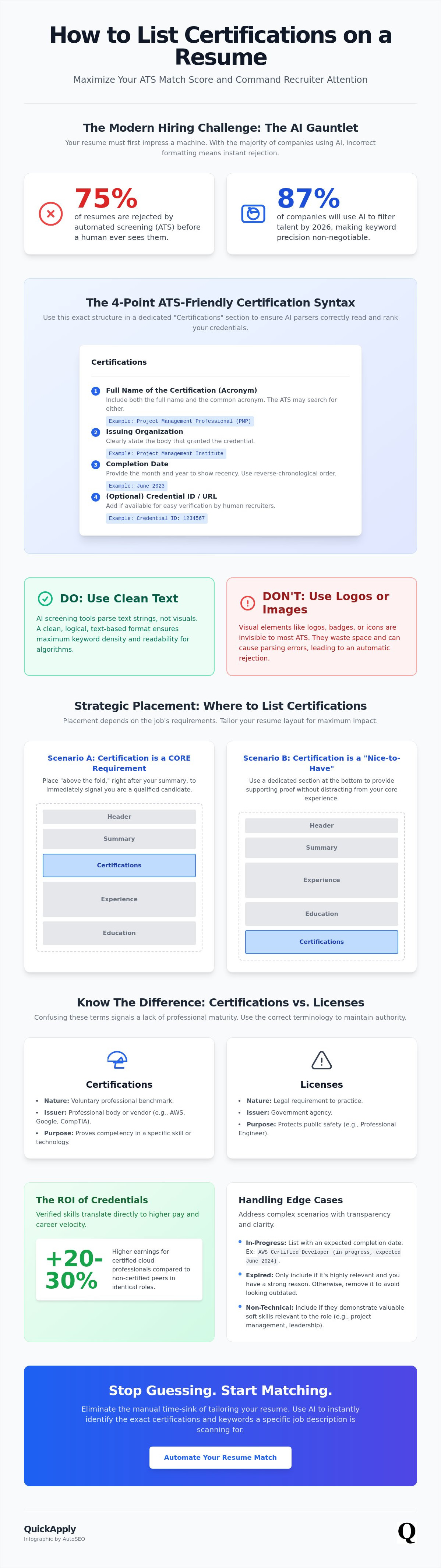
75% of resumes are rejected by automated screening before a human recruiter ever sees them. In a 2026 market where 87% of companies use AI to filter talent, your credentials aren't just badges. They are high-intent keywords. You probably feel the anxiety of wasting resume real estate or losing out because of a formatting error. It's a common frustration in a landscape where algorithms often outweigh experience. You need a system that ensures your hard-earned technical authority isn't ignored by a machine.
This guide solves that problem by teaching you exactly how to list certifications on resume to maximize ATS match scores and command attention. We'll strip away the uncertainty and provide the precise mechanics for formatting, placement, and handling in-progress certs. You will learn to distinguish between raw skills and formal credentials with surgical precision. Expect a clean, high-impact layout that turns your professional history into a streamlined engine for career growth.
Key Takeaways
- Deploy certifications as high-signal proof to reduce hiring risk and bypass automated gatekeepers.
- Master the exact mechanics of how to list certifications on resume to maximize keyword density and pass AI filters.
- Strategy over space. Determine whether to place credentials "above the fold" or at the bottom based on specific job requirements.
- Handle complex scenarios like expired or in-progress credentials using the "Expected Date" rule to maintain transparency.
- Eliminate the manual tailoring time-sink by using AI to identify which certifications a specific job description is scanning for.
Why Resume Certifications are Critical in the 2026 Tech Market
In 2026, the traditional four-year degree is no longer the ultimate gatekeeper. Rapid technological shifts have made many academic programs feel sluggish and outdated. Employers now demand verified, real-time proof of competency. This is where certifications become your most valuable asset. They function as a risk mitigation tool for hiring managers. By holding a current credential, you provide a third-party guarantee that you can execute specific technical tasks without expensive hand-holding. You aren't just claiming to have a skill; you are proving it through a standardized audit.
The 2026 market is flooded with digital noise. Every candidate claims expertise in Python or Cloud Architecture. A résumé is a document created and used by a person to present their background, skills, and accomplishments. To stand out within this document, you must prioritize signal over noise. Irrelevant certifications from five years ago clutter your profile and dilute your impact. High-intent, current credentials act as "hard filters" in modern Applicant Tracking Systems. If a role requires an AWS Certified Solutions Architect - Associate and you haven't mastered how to list certifications on resume correctly, the AI will discard your application before a human ever sees it. Approximately 87% of companies now use AI in their hiring process, making these keywords non-negotiable for survival.
Certifications vs. Licenses: Knowing the Difference
Recruiters expect technical precision. Confusing a license with a certification signals a lack of professional maturity. A license is a legal requirement granted by a government agency to protect public safety, like a Professional Engineer (PE) designation. You cannot legally practice without it. A certification is a voluntary professional benchmark issued by a professional body or vendor, such as AWS, Google, or CompTIA. Use the correct terminology to maintain your authority. Confusing these two suggests you don't understand the regulatory or professional standards of your own industry. This error can lead to immediate rejection during the initial screening phase.
The ROI of Credentials in High-Growth Industries
The math is simple: verified skills equal higher pay. In 2026, certified cloud professionals earn 20-30% more than their non-certified peers in identical roles. This premium is even higher for AI-specific credentials, where the talent gap is widest. As 87% of companies integrate AI into their hiring and operational workflows, "cloud-native" and "AI-ready" badges are the new currency. A certification is a strategic trust-building asset that converts your theoretical knowledge into a measurable financial advantage. Learning how to list certifications on resume ensures this value is immediately visible to both algorithms and decision-makers. It turns your resume into a high-conversion sales tool rather than a static list of dates.
Standard Formatting: How to List Certifications for Maximum Impact
Clarity is the foundation of high-performance resumes. You must use a dedicated section titled "Certifications" or "Professional Credentials" to ensure your technical wins aren't buried in a wall of text. This structural choice isn't just for human readability; it creates a specific data block for AI parsers to index. If you are unsure how to list certifications and credentials on your resume, the rule is simple: prioritize relevance over history. Use reverse-chronological order for your most recent achievements, but move a highly relevant, older credential to the top if the job description demands it. Your goal is to provide immediate proof of competency within the first few seconds of a scan.
Every entry requires four specific data points: the full name of the certification, the acronym, the issuing organization, and the completion date. An ATS might scan for "Project Management Professional" while another looks for "PMP." Including both ensures you don't lose points on a technicality. This level of detail provides the necessary metadata for recruiters to verify your professional timeline. Mastering how to list certifications on resume means treating every character as a potential match for a hiring algorithm. Don't leave your visibility to chance.
The ATS-Friendly Certification Syntax
AI screening tools process text strings, not visual design. Never use images, logos, or icons to represent your badges. These elements are invisible to the 82% of large corporations utilizing AI screening in 2026. Stick to a clean, text-based format that favors logic over flair. Use this 4-point template for every entry to ensure perfect parsing:
- Certification Name: Full Title (Acronym)
- Issuing Body: Name of the Organization
- Date: Month, Year of completion
- Verification: License Number or Digital Link
This structure ensures every data point is indexed correctly by the system. You can streamline this process by using Resume Tailoring tools to align your syntax with specific job descriptions instantly. This eliminates manual errors and boosts your match score before you hit submit.
Adding Verification Links and Credly Badges
In a remote-first tech market, instant verification is the new standard for trust. Don't just claim a credential; provide the proof. Hyperlink the certification title directly to your digital badge on platforms like Credly. This allows recruiters to validate your skills with a single click without leaving your profile. Keep the layout clean by using descriptive anchor text instead of raw, messy URLs. This protocol is vital for cloud and security roles where credentials expire frequently. Active links prove your status is current and your expertise is ready for deployment.
Strategic Placement: Where to Feature Certifications on Your Resume
Placement is a matter of hierarchy. In the 2026 tech market, recruiters spend less than six seconds on an initial scan. If a certification is a mandatory requirement for the role, it belongs "above the fold." This means placing it in the top third of your resume where it's visible without scrolling. For preferred but non-essential credentials, move them to a dedicated section at the bottom to save prime real estate for your work history. You must align your layout with the specific demands of the job description to ensure you aren't filtered out by human or machine eyes.
Integrating your most powerful credentials into your professional summary provides an immediate punch of authority. Instead of just listing "Cloud Architect," write "AWS Certified Solutions Architect with 8 years of experience." This ensures the keyword is hit twice: once in the summary and once in the certifications list. You can see this logic in action by reviewing a good resume example that prioritizes high-impact data. Mastering how to list certifications on resume requires understanding that your resume is a marketing deck, not a biography. Every pixel must earn its place.
When to Use the Header for Credentials
The "Name Post-Nominal" strategy involves adding your certification acronym directly after your name, such as "Jane Smith, CISSP, CISM." This is an aggressive move. It works best in fields like cybersecurity or systems engineering where the credential is the primary license to operate. Limit this to your top two most relevant certifications. Overcrowding your header with a long string of letters looks desperate and dilutes your brand. If the certification isn't a core requirement for the job title, keep it in the dedicated section instead.
The Dedicated Certifications Section vs. Skills Integration
A separate section is necessary when you hold multiple high-volume credentials that require verification details. This keeps your layout clean and organized. However, for minor or software-specific certs, a hybrid approach works well. You can integrate these into your "Skills" section to save space. This allows you to group technical tools with their corresponding validation. Your placement should strictly follow the hierarchy of the job description. Knowing how to list certifications on resume means being adaptable to what the employer values most in that specific moment.
Handling Edge Cases: In-Progress, Expired, and Non-Technical Certs
Real-world career paths aren't always linear. You likely have credentials in various states of validity. Knowing how to list certifications on resume when they aren't "perfect" is a critical skill for the 2026 market. Most technical credentials, such as CompTIA Security+ or AWS Cloud Practitioner, have a strict three-year expiration cycle. If your certification has lapsed, don't simply delete it if it represents a core foundation of your expertise. Instead, move it to a "Professional Development" or "Prior Credentials" sub-section. State the original earn date clearly. This demonstrates legacy knowledge without making false claims about current status. It shows you've mastered the fundamentals even if you haven't sat for the latest renewal exam.
Non-technical certifications require a different strategy. In a high-speed tech environment, space is at a premium. A First Aid or CPR certification is noise on a DevOps resume unless you're applying for a role that includes onsite safety leadership. Follow the 5-year relevance rule. If you haven't used the technology or the certification in half a decade, it's likely bloat. The only exception is for permanent credentials like Microsoft Azure Fundamentals (AZ-900), which doesn't expire. These stay on the resume indefinitely as they represent foundational platform knowledge that remains relevant across versions.
Auditing Your Credentials: The Legacy Tech Framework
"Dead tech" kills your professional credibility. Listing a certification for a deprecated system or an obsolete language makes you look like a legacy relic. It signals to recruiters that your skills haven't evolved with the industry. You must tailor your resume to a job description by purging these outdated markers. If the job description doesn't mention the tech, the certification is taking up space that could be used for measurable achievements. Focus on "cloud-native" and "AI-ready" credentials that align with 2026 hiring priorities. Use Resume Tailoring to identify which certs to keep and which to cut based on real-time market data.
Listing In-Progress Certs Without Misleading
In-progress certifications are powerful for entry-level candidates or those pivoting to new stacks. You can claim the keyword without being dishonest by using the "Expected Date" rule. Format the entry as "[Certification Name] — Expected [Month, Year]." Correct phrasing is vital. Use "Candidate for [Cert Name]" to signal you're actively pursuing the credential. Most hiring managers expect you to be at least 50% through the curriculum before it earns a spot on your profile. Be aware that including an in-progress cert for a mandatory job requirement is a risk. While it might pass an initial AI filter, you'll need to defend your current progress and exam timeline during the interview practice phase. Knowing how to list certifications on resume correctly ensures you build trust rather than suspicion.
Automating the Match: Leveraging AI to Tailor Your Credentials
Manual resume tailoring is the primary bottleneck for tech professionals. Spending hours tweaking bullet points and reordering lists for every application is a legacy workflow. It's inefficient. In a market where 73% of employers use AI to make hiring decisions, your strategy must be equally high-tech. You need a system that identifies exactly which certifications a specific job description is scanning for. AI doesn't just read your resume; it ranks it based on keyword density and credential relevance. If you miss a mandatory certification, your match score drops instantly. Automation is the only way to keep pace with the volume of modern job markets.
Identifying the exact mechanics of how to list certifications on resume becomes effortless when you use a technical ally. QuickApply’s match score engine analyzes the delta between your current profile and the employer's requirements. It highlights missing credentials that you might have forgotten to include or simply didn't prioritize. This ensures you aren't just sending a generic document. You are submitting a precision-engineered asset designed to clear every hurdle in the hiring pipeline. Stop guessing what recruiters want. Start using data-driven insights to prove your technical authority instantly.
Maximizing Your Match Score with QuickApply
The platform parses complex job descriptions to find "hidden" certification requirements that aren't explicitly labeled. It automatically reorders your credentials based on relevance, ensuring the most critical certs appear in the prime real estate we discussed earlier. This level of optimization is impossible to achieve manually at scale. You can experience the efficiency of tailoring your resume to a job description with AI to see how systemic automation replaces manual labor. It turns a three-hour task into a three-second execution. By aligning your syntax with the employer's specific scanner, you eliminate the risk of being filtered out for formatting errors.
Continuous Career Growth: Beyond the Application
Your professional journey doesn't end with a single submission. Use the Promotion Roadmap to identify which certifications you need for your next move up the ladder. This tool helps you track your credentials as part of your overall career management, ensuring your skills never become stagnant. By monitoring your progress through an Application Tracker, you maintain a bird's-eye view of your market value. Mastering how to list certifications on resume is just the first step. The goal is continuous productivity and systemic growth through smart technology. Stop building resumes and start tailoring with QuickApply.
Deploy Your Credentials for Maximum Impact
Your certifications are more than just proof of study; they are high-signal data points that determine your visibility in a crowded 2026 job market. You've learned how to leverage strategic placement and clean syntax to bypass AI gatekeepers. Success now depends on your ability to execute these changes at scale. Mastering how to list certifications on resume is the difference between being filtered out and being prioritized for the interview. Don't let your technical authority get lost in poor formatting or irrelevant bloat.
Efficiency is your competitive advantage. Manual resume editing is a legacy habit that slows your career momentum. You need tools that mirror the speed of the industry you work in. Optimize your resume credentials with QuickApply AI to access instant resume tailoring for tech roles and AI-powered match scoring. Utilize the automated application tracking to manage your pipeline without active effort. You have the skills. Now, use the right systems to ensure the world sees them. Your next high-growth role is within reach.
Frequently Asked Questions
Should I list certifications if I have a degree in the same field?
Yes. Degrees provide a theoretical baseline, but certifications prove you've mastered specific, current tools. Tech stacks move significantly faster than academic cycles. A degree in Computer Science is your foundation. An AWS Certified Solutions Architect badge is your proof of execution. Use both to demonstrate a balance of long-term logic and immediate technical utility for the team.
What is the best way to list a certification that is currently in progress?
Use the "Expected Date" format for the best results. List the certification title followed by "Expected Dec 2026" or "Candidate for [Cert Name]". Only include these entries if you've completed more than 50% of the material. This strategy signals your future value to an organization without risking your professional integrity or credibility during the verification phase of the hire.
How do I list certifications on a resume if they have expired?
Relocate them to a "Professional Development" section rather than deleting them. Clearly mark the original earn date to show your legacy expertise. This approach acknowledges your historical mastery of a system while respecting the fact that your current status isn't active. It prevents confusion during background checks while still highlighting your long-term commitment to the technical stack.
Where is the best place to put certifications on a tech resume?
Prime real estate depends entirely on the job description. If the certification is a "must-have" requirement, place it in the top third of your resume. If it's a "nice-to-have" credential, move it to a dedicated section at the end. This ensures you optimize the layout for the 82% of large corporations using AI screening in 2026.
Do I need to include the license number for every certification?
Include license numbers or digital verification links for every entry. Instant verification is the gold standard for trust in a remote-first hiring environment. Don't force a recruiter to hunt for proof of your skills. Providing a direct link to a Credly badge or a vendor portal streamlines the vetting process and projects a high level of professional maturity.
Should I include Coursera or Udemy certificates on my professional resume?
Only if they bridge a specific skill gap required by the role. Vendor-backed certifications like those from Microsoft or Cisco carry more weight than general course completions. Use Coursera or Udemy certificates to fill specific skill gaps or to show initiative in learning new, niche technologies—such as automated software packaging workflows via apptimized.com—that haven't yet reached standardized certification status in the broader market.
How many certifications are too many for a single resume?
Stop at five relevant entries to avoid clutter. Anything more leads to certification bloat and dilutes your core message. Focus on the 3-5 credentials that perfectly align with the target role. Quality matters more than volume when you're mastering how to list certifications on resume. Use your limited resume real estate for high-impact achievements that prove your value.
Can certifications help me beat the ATS (Applicant Tracking System)?
Absolutely. Certifications function as mandatory hard filters in many automated systems used by 87% of companies. Knowing how to list certifications on resume using both the full title and the acronym maximizes your keyword density. This ensures you hit the required match scores to bypass the 75% rejection rate common in modern automated screening pipelines today.


