
Did you know that submitting your resume as a PDF increases your risk of a parsing failure to 18 percent, while a standard .docx file carries only a 4 percent risk? It is a cold reality in a job market where 99 percent of Fortune 500 companies rely on automated systems to screen talent. You have likely felt the frustration of your best work disappearing into a digital black hole or the exhaustion of manual data entry when a parser fails to auto-fill your profile. Learning how to beat the ats resume scanner is not about luck or secret keywords; it is about mastering the technical audit of your own data structures.
We understand that your career should not be stalled by a legacy system's inability to read a simple header or a two-column layout. This guide promises to show you exactly how to view your resume through the eyes of an Applicant Tracking System. You will learn a clear, three-minute method to verify your document's readability and ensure your core competencies are indexed correctly every time. We are breaking down the formatting standards of 2026 so you can stop guessing and start outperforming the competition with a streamlined, high-speed application strategy.
Key Takeaways
- Audit your document instantly using the "Save as Plain Text" hack to see exactly what an automated parser indexes.
- Shift your strategy from basic keyword stuffing to entity-based optimization that satisfies modern Natural Language Processing requirements.
- Discover how to beat the ats resume scanner by removing disruptive formatting like tables and text boxes that break the data path.
- Structure your professional experience with standard document hierarchy to ensure your skills and dates are never lost or distorted.
- Optimize your workflow with precision tailoring tools that mirror the logic used by Fortune 500 hiring systems.
The Mechanics of ATS Parsing: Why Your Format is the Problem
Parsing is the automated extraction of your contact info, skills, and professional experience. It is the digital gateway to every tech role. If the software cannot map your data correctly, your application effectively ceases to exist. To understand the technical foundation of these filters, you should first grasp What is an Applicant Tracking System? and how it functions as a centralized database for recruiters. When you upload a file, the parser attempts to categorize every string into a structured profile. If your document architecture is flawed, the system fails.
You'll recognize a parsing failure immediately when you see jumbled dates or missing job titles in an application portal's auto-fill fields. These are not minor glitches. They are symptoms of a document that the system cannot decode. If a machine cannot read your resume, a human recruiter will never see it. Learning how to beat the ats resume scanner requires you to stop treating your resume as a design project and start treating it as a clean data set. Speed and accuracy are the only metrics that matter here.
How Parsers Break Down Your PDF
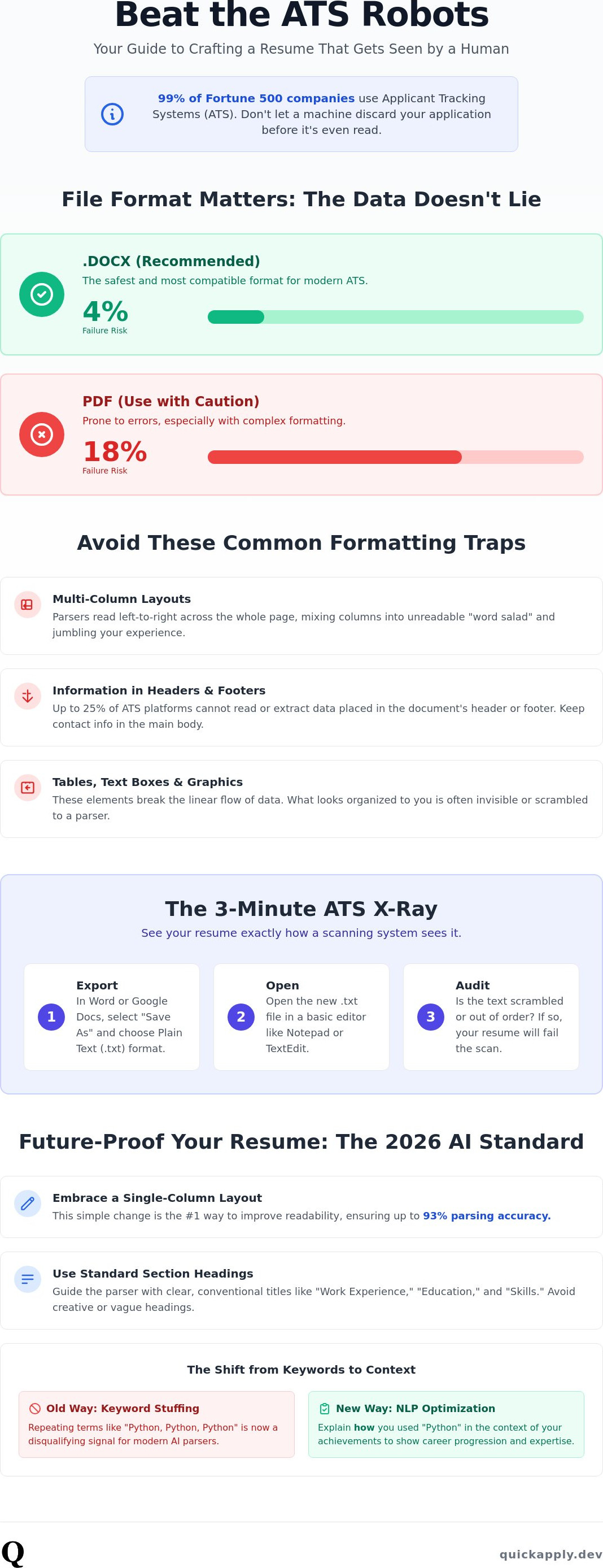
Most modern systems use Optical Character Recognition (OCR) to read the text layers within your PDF. While PDF is a standard, it carries an 18 percent parsing failure rate compared to just 4 percent for .docx files. Multi-column layouts are the primary culprit. Older parsers often read across the entire page, merging two separate columns into a "word salad" that makes zero sense to the algorithm. Additionally, 25 percent of ATS platforms cannot extract data placed in headers or footers. If your phone number or email is tucked away in a header to save space, you've already lost the game.
- Single-column layouts ensure a 93 percent parsing accuracy.
- Standard headings like "Work Experience" signal the parser to begin data extraction.
- Text layers must be selectable; if you can't highlight the text, the OCR will fail.
The 2026 AI Parsing Shift
The landscape has shifted from simple keyword matching to sophisticated Natural Language Processing (NLP). Modern systems now use Large Language Models (LLMs) to understand context rather than just searching for exact strings. This means legacy tactics like white-fonting or excessive keyword stuffing are now identified as disqualifying signals. The system isn't just looking for the word "Python"; it's looking for how you used it within your career trajectory. Just as an AI SEO agency Singapore helps brands maintain visibility in complex search ecosystems, NLP parsing in recruitment focuses on the semantic understanding of professional hierarchies. Systems now rank you based on the logical progression of your roles and the complexity of the environments you've managed. To succeed, your resume must provide a clear, high-fidelity map of your expertise that 2026-era AI can verify instantly.
The Save as Text Hack: The Fastest Way to Audit Your Resume
Stop guessing if your fancy template is compatible with modern hiring software. The "Save as Plain Text" hack is the ultimate litmus test for your document's architecture. It's fast, it's brutal, and it's 100 percent accurate. If you want to know how to beat the ats resume scanner, you must first see your career through the eyes of a machine. What you see in a raw .txt file is the exact data stream an old-school parser indexes into a candidate database. If the text version is unreadable, your resume is fundamentally broken.
This method strips away the visual distractions of bold fonts, icons, and layout structures. It reveals the underlying data layer that recruiters actually search. If your contact information is missing or your work history looks like a scrambled mess, no amount of keyword stuffing will save your application. You're effectively invisible to the system. Performing this audit before every submission is the only way to guarantee your data integrity in a high-volume market.
Step-by-Step Self-Parsing Guide
Start by opening your resume in Word or Google Docs. Select the "Save As" or "Export" option and choose the .txt (Plain Text) format. Open this new file in a basic text editor like Notepad or TextEdit. Now, run a manual audit of the output. First, look for character corruption. Check if your bullet points have turned into weird symbols like "•" or "ü". These encoding errors can confuse older parsers and lead to rejected files. Next, verify the reading order. Does the text flow logically from top to bottom, or did your two-column layout force the parser to read across the page? If your "Skills" section is now merged with your "Education" dates, the system won't be able to categorize your expertise correctly.
Analyzing the Results for Data Integrity
Pay close attention to merged words. This often happens when kerning or spacing is handled via graphics or text boxes. If "SoftwareEngineer" appears as a single string, a keyword search for "Software" will fail. Ensure your name and contact info are the very first items in the text dump. If they appear at the bottom, your file's metadata is likely overriding the content. Following established ATS formatting rules ensures your contact info stays where it belongs. Compare your plain text output against good resume examples to see if your document hierarchy remains intact. If you find yourself spending too much time fixing these technical glitches, using automated tailoring tools can streamline the process and ensure your data is never lost or distorted again. Mastering how to beat the ats resume scanner is simply a matter of ensuring your data remains structured and accessible.
Beyond Keywords: How to Verify Your Resume Data Structure
Modern hiring systems have evolved past simple string matching. They now prioritize entity recognition. This means the algorithm isn't just hunting for "Java"; it's identifying "Java" as a skill, "Senior Developer" as a role, and "2022 to 2024" as a temporal duration. If you're serious about how to beat the ats resume scanner, you must ensure these entities are clearly defined. When a parser encounters a date, it expects a specific format to calculate your years of experience accurately. Using non-standard formats like "Spring 2023" or just the year "2023" can lead to calculation errors that undercount your seniority.
The most advanced systems are moving toward structured data formats like JSON-LD, based on Schema.org vocabularies for resumes. While you don't need to write code, your document's hierarchy should mirror this logic. Standardize your date formats to MM/YYYY. This small adjustment ensures the machine indexes your tenure without manual intervention. A clean data structure is the difference between being ranked as a "Senior Engineer" and being filtered out as "Entry Level" because the parser couldn't calculate your timeline accurately.
This requirement for structured information parallels the strategies used in modern digital marketing, where AISEOAgency SG helps organizations optimize their content for the next generation of AI-powered search engines.
Testing with Free Online Parsers
Don't wait for a rejection to find out your resume is unreadable. Use free tools like Jobscan or Resunate to establish a baseline. These platforms provide a "Match Score," but you should focus primarily on the "Parsing Accuracy" report. Look at how the tool extracted your data. Did it correctly identify your last three companies? Did it miss your certifications? Ignore the stylistic advice these tools offer. Their goal is often to sell you a template. Your goal is strictly to verify that every data field is populated correctly in their system's backend view.
Verifying Skill Taxonomy
Parsers rely on massive libraries of known skills called taxonomies. They group your expertise into categories like "Programming Languages," "Cloud Frameworks," or "Soft Skills." If you use creative, non-standard names for your skills, you risk being excluded from recruiter searches. A recruiter searching for "React.js" might miss your profile if you only listed "Component-based UI development." You must align your language with the industry standard. Learn how to tailor your resume to a job description to ensure your specific skill taxonomy matches the requirements of the role you want. This alignment is the fastest path to a high-ranking profile.
2026 ATS Standards: Formatting Rules You Can’t Ignore
Parsing success in 2026 isn't about aesthetic appeal. It's about document architecture. If you want to know how to beat the ats resume scanner, you must strip away the visual fluff that confuses old-school OCR and modern NLP alike. Your resume is a data set first and a marketing document second. Follow these four non-negotiable rules to ensure your profile is never discarded due to a technicality.
- Rule 1: Eliminate all tables, text boxes, and graphics from the primary data path. These elements are data silos that often cause parsers to skip content or read it out of sequence.
- Rule 2: Use standard H1, H2, and H3 styling to signal document hierarchy. Semantic headers tell the machine exactly where one section ends and the next begins.
- Rule 3: Stick to universally recognized fonts like Arial, Roboto, or Lato. These are clean, web-safe, and highly legible for automated character recognition.
- Rule 4: Avoid skills bars or progress chart graphics. A machine cannot quantify a 70 percent filled bar; it simply sees an unindexable image.
The Death of the Creative Resume Template
Canva templates are a leading cause of parsing errors in the tech sector. While they look great to a human, their underlying code is often a nightmare for a scanner. They prioritize visual layers over logical data flow. If you're applying for high-stakes tech roles, adopt a hybrid resume strategy. Use a clean, machine-readable version for the initial application and save the designed version for your actual interview. You can use the best ai resume builder 2025 to generate high-fidelity, ATS-compliant PDFs that maintain their structure under pressure. Don't let a "pretty" template kill your chances before a human even sees your name.
Standardizing Section Headings
Don't get creative with your headings. "Professional Journey" or "Where I’ve Been" might sound unique, but they confuse a parser's categorization logic. Stick to "Work Experience" or "Professional Experience." This ensures the system correctly maps your tenure and seniority. Your skills section should be a structured list of industry-standard terms, not a decorative word cloud. When your headings are clear, the system can rank your expertise with 100 percent accuracy. If you're tired of fighting with formatting, start optimizing your applications today with tools built for the modern web.
Automate Your Success: Precision Tailoring with QuickApply
Manual auditing is a vital first step, but manual execution doesn't scale. QuickApply functions as the ultimate solution for resume parsing and tailoring, designed to dismantle the technical barriers between your talent and a recruiter’s screen. By mirroring the underlying logic of top-tier ATS platforms, our system ensures your data is structured exactly how the algorithm expects to find it. You no longer have to guess if your profile is being indexed correctly. You can see the results before you submit. This is the definitive way to master how to beat the ats resume scanner without wasting hours on formatting tweaks.
QuickApply acts as the final boss of resume parsing, utilizing a proprietary engine that interprets job descriptions with the same granularity as the systems used by Fortune 500 companies. This isn't just a template; it's a dynamic data layer that adjusts to the specific entity requirements of each vacancy. The Match Score feature provides a high-fidelity look at your candidacy from the perspective of an AI recruiter. It doesn't just check for keywords; it audits your semantic fit for the role based on 2026 industry taxonomies. This predictive insight allows you to adjust your strategy in real-time, ensuring you never waste an application on a low-probability match.
When you leverage automation, you eliminate the friction of manual data entry. Your resume just works on every portal, populating fields accurately and saving you from the fatigue of repetitive typing. By ensuring your data is clean at the source, you guarantee that your contact information, skills, and experience are captured perfectly by any system you encounter. This level of precision is how you stay ahead of the curve in a digital-first world.
How QuickApply Solves the Parsing Puzzle
Technology moves fast, and legacy resumes die quickly. Our AI provides continuous optimization, updating your document’s format to meet the evolving standards of 2026 automatically. You can tailor your resume to a job description with AI in seconds, moving from discovery to submission faster than your competition. The integrated Application Tracker provides an additional advantage, keeping every optimized version of your profile organized and ready for deployment. This isn't just about filing applications; it's about managing a high-volume, high-precision career offensive with zero wasted effort.
Stop Building, Start Applying
Manual auditing is a waste of your technical talent. You shouldn't be fighting with margins and font types when you could be preparing for interviews. Join the thousands of tech professionals who use AI to bypass systemic bottlenecks and reclaim their time. Efficiency is the only competitive advantage that matters in a crowded market. Stop building documents and start engineering your career growth with tools built for speed and functionality. How to beat the ats resume scanner is a solved problem. Get your AI-optimized resume now and ensure your data is never lost, distorted, or ignored again.
Master Your Data and Secure the Interview
Your resume is a technical document that requires a technical audit. By utilizing the "Save as Text" hack and adhering to 2026 formatting standards, you ensure your professional experience is never lost in a digital black hole. Understanding how to beat the ats resume scanner is no longer about guessing; it's about engineering a document that prioritizes data integrity over design fluff. Transitioning from manual keyword matching to a structured entity-based approach will place your profile at the top of recruiter searches instantly.
Stop wasting your time on manual fixes. Leverage AI-powered match scoring and unlimited resume tailoring to align your expertise with every job description automatically. Our tech-focused career growth tools are built to handle the complexities of modern hiring systems so you can focus on the interview. Optimize your resume for ATS in seconds with QuickApply. The system is predictable, and you now have the tools to navigate it with total confidence. Your next high-impact role is within reach.
Frequently Asked Questions
Can an ATS read a PDF or is Word better in 2026?
.docx remains the superior choice for parsing reliability across all major platforms. While modern systems are improving, PDF files still carry an 18 percent failure rate compared to just 4 percent for Word documents. Unless a PDF is specifically requested by the job portal, stick to the .docx format to ensure your data layers remain fully accessible to the scanner without distortion.
How do I know if my resume is being rejected by an ATS?
You can identify a parsing failure by checking the auto-filled fields in an application portal immediately after uploading. If your job titles are missing or your dates appear jumbled, the system has failed to read your file structure. This is a clear signal that you need to rethink how to beat the ats resume scanner by simplifying your document architecture and removing complex formatting.
Do tables really break an ATS in 2026?
Tables still present a significant risk to data integrity even in modern hiring systems. Many parsers process table content out of order, often merging separate cells into a single, nonsensical string that ruins your keyword ranking. To keep your professional experience structured and searchable, use simple tabs or standard alignment tools instead of grid-based layouts that create data silos.
Is it okay to use a two-column resume format for tech roles?
Avoid two-column formats if you want to maximize your parsing accuracy and ranking. Single-column layouts achieve a 93 percent accuracy rate, while two-column structures drop that figure to 86 percent. For tech roles where data precision is critical, a vertical, linear flow is the safest path to ensuring every framework and language you list is indexed correctly by the algorithm.
Does the font size matter for ATS parsing accuracy?
Font size matters less than the font type and the clarity of the text layer. Stick to standard sizes between 10 and 12 points for body text to ensure the character recognition layer remains legible. Using microscopic fonts to cram more content onto a single page can lead to character blurring during the scanning process, which often results in critical data being skipped entirely.
How many keywords should I include for a perfect parse?
Focus on contextual relevance rather than hitting a specific keyword count. Modern NLP systems prioritize the semantic relationship between your skills and your actual career trajectory. Instead of stuffing your document with 50 different tools, highlight the core competencies that align directly with the job description. This strategy helps you master how to beat the ats resume scanner by proving actual expertise.
Can I use images or icons for my contact info?
Never use images or icons for critical information like your phone number, email address, or LinkedIn profile. Approximately 25 percent of ATS platforms cannot parse data hidden in graphics or headers. If your contact details are locked inside an image, the system will create an empty profile, effectively making you unreachable for recruiters even if you are the perfect candidate.
Is there a free way to test my resume against an ATS?
The fastest free method to audit your resume is the "Save as Text" hack. Export your document as a plain .txt file to see exactly what the machine sees. If the resulting text is unreadable, missing sections, or appearing out of order, you must restructure your document. This simple audit provides a high-fidelity look at how your data will be categorized during a real application.


