

Your job search spreadsheet isn't a tool; it's a data graveyard where your career momentum goes to die. If you're still manually copying and pasting job descriptions into a static Excel sheet, you're losing over 10 hours of productivity every month to administrative friction. You've likely felt the sting of sending the wrong resume version to a top-tier firm or missing a critical follow-up deadline because your tracker didn't ping you. It's a common frustration for tech professionals who are trying to figure out how to organize job applications in a market that moves faster than a manual cell update can handle.
Static sheets are obsolete in 2026. You need a centralized command center that operates with the same technical precision as the software you build. This guide promises to overhaul your workflow by introducing a tracking framework designed for the modern tech professional. We'll explore why traditional spreadsheets fail under the pressure of high-volume applications and how to leverage AI-driven automation to turn your tracker into a results-driven engine. It's time to stop managing data and start winning interviews through systemic efficiency.
Key Takeaways
- Identify the critical breaking points where legacy spreadsheets fail to keep pace with the high-speed 2026 tech job market.
- Master how to organize job applications using a high-performance framework that prioritizes actionable data over manual logging.
- Reclaim hours of administrative time by shifting from manual entry to automated scraping and dynamic status tracking.
- Bridge the gap between tracking and tailoring by integrating your application hub with AI-powered resume optimization tools.
- Extend your tracker’s utility beyond the offer letter to manage professional wins and accelerate your future promotion roadmap.
What is a job application tracker excel and do you still need one?
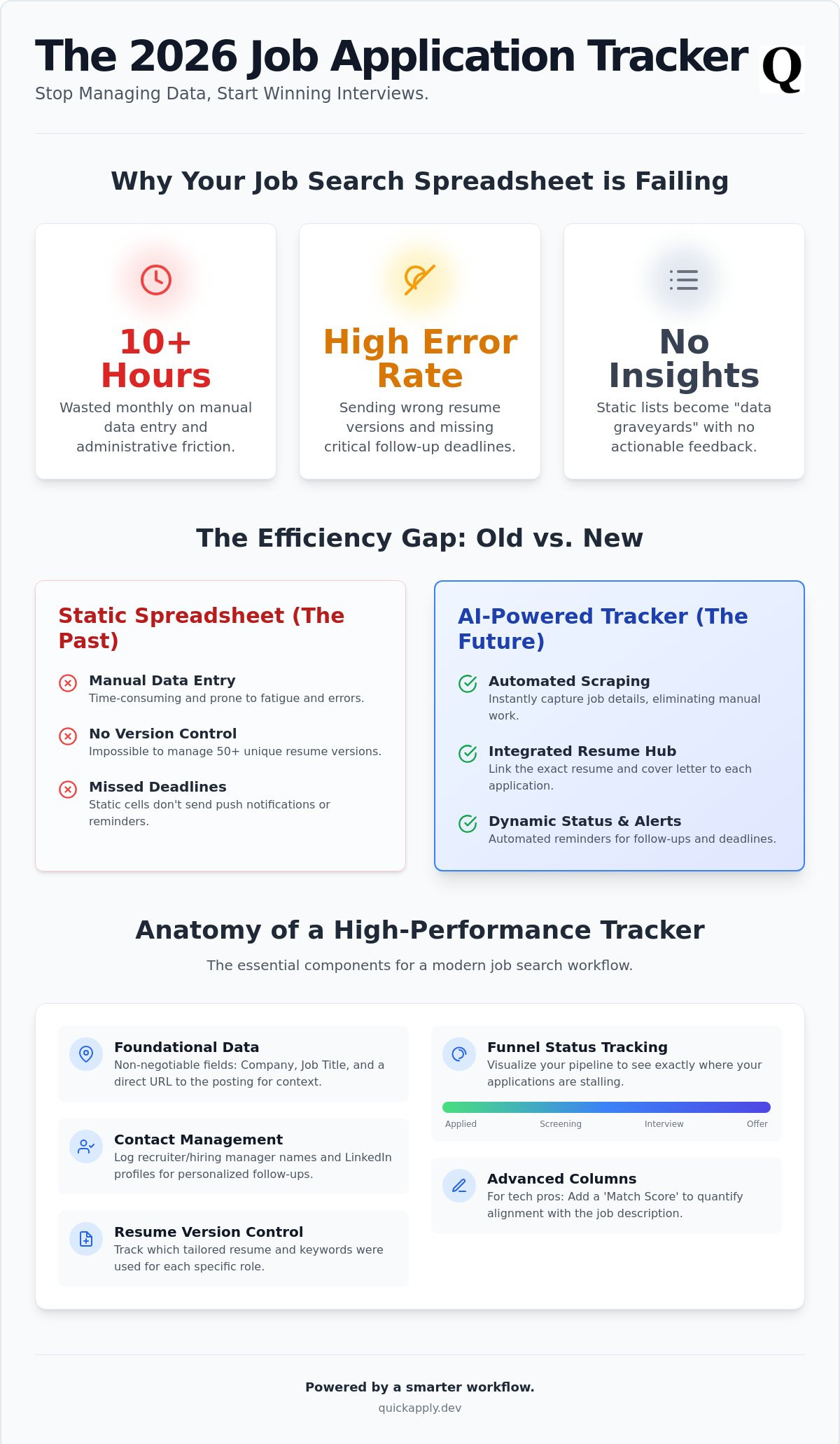
A job application tracker is your strategic command center. It is a centralized database designed to manage every moving part of your search: company names, recruiter contacts, interview stages, and follow-up deadlines. Most professionals start with a spreadsheet because the barrier to entry is zero. It offers total customization for those who want to build their own systems from scratch. However, without automation, these sheets quickly transform into data graveyards that list past rejections without providing any actionable insights for your next move.
In 2026, the tech hiring landscape moves at a pace that manual logging cannot sustain. Companies rely on a sophisticated Applicant Tracking System (ATS) to screen thousands of candidates in seconds. If you spend twenty minutes manually updating a single row in Excel, you're already behind. Learning how to organize job applications in the modern era requires a shift from passive record-keeping to active workflow management. You need a system that works as fast as the algorithms you're trying to beat.
The psychological benefit of organized tracking
Effective tracking is about more than just data; it is about cognitive preservation. High-volume application phases are mentally taxing. Offloading the "who, when, and where" to a system reduces your cognitive load and prevents burnout. By visualizing your funnel, you can see exactly where candidates drop off. Moving a card from "Technical Screen" to "Final Round" creates a sense of momentum that keeps you sharp when the market feels stagnant. It turns a chaotic process into a series of manageable, systemic steps.
To maintain the mental clarity needed for this systemic approach, many candidates also use AI to manage their physical health; you can visit SmartTaste AI to see how automated meal planning can support your career momentum.
When Excel becomes a bottleneck for your career
Your system is broken if you encounter the 10-minute rule. If logging the data for a role takes longer than the actual application, you are wasting valuable time. Static spreadsheets also fail to bridge the gap between tracking and execution. It is nearly impossible to manage 50+ unique resume versions in a single cell. You need a workflow that allows you to tailor resume to job description requirements and instantly record which version was sent to which hiring manager. How to organize job applications effectively means eliminating the friction between finding a role and submitting a high-quality, tailored response.
- Manual Entry: A time-sink that leads to data entry fatigue.
- Version Control: Spreadsheets cannot handle multiple PDF versions and custom cover letters.
- Deadlines: Static cells don't send push notifications for critical follow-ups.
The anatomy of a high-performance job search spreadsheet
Efficiency isn't about working harder; it's about building a framework that removes the guesswork from your daily workflow. A high-performance tracker transforms a chaotic job hunt into a manageable pipeline. At its core, your system must capture three non-negotiable data points: the company name, the job title, and the direct link to the posting. Without the URL, you waste minutes hunting for the original description when a recruiter calls unexpectedly. This foundational layer ensures you never lose the context of an application.
Status tracking is the pulse of your search. You must categorize every role into specific stages: Applied, Screening, Technical Interview, Final Round, Offer, or Rejected. This funnel visualization reveals exactly where your process is stalling. Staffing experts suggest you track your applications on a spreadsheet to avoid embarrassing errors like double-applying or missing a follow-up window. Beyond the basics, you need a dedicated column for contact management. Log the name of the recruiter or hiring manager along with a link to their LinkedIn profile. Personalized follow-ups are significantly more effective than generic inquiries.
Most trackers fail because they lack version control. In a market that demands customization, you must include a "Resume Version" column. This allows you to track which specific keywords and achievements you highlighted for each role. When you prepare for an interview, you'll know exactly which narrative you presented to the hiring team. This level of detail is how you master how to organize job applications for maximum impact.
Advanced columns for tech professionals
Tech-heavy roles require a more granular approach to data. Implement a Match Score column to record the percentage of alignment between your skills and the job description. This helps you prioritize high-value opportunities over long shots. Additionally, track the Tech Stack required for each role. If you notice "Go" or "Kubernetes" appearing in 80% of your target roles, you've identified a critical skill gap to bridge. Finally, add a Referral Status column. Internal advocates are the fastest way to bypass the ATS, and tracking these connections ensures you don't let a warm lead go cold.
Setting up automated follow-up triggers
Static data is useless unless it prompts action. Use conditional formatting to highlight rows that haven't seen a status change in seven days. These "stale" applications are your cue to send a polite follow-up. You should also calculate your conversion rate by comparing total applications to initial screens. If your interview rate is below 10%, your resume isn't hitting the mark. You can use the best ai resume builder 2025 tools to rapidly iterate on your materials based on these insights. For those ready to move beyond manual cells, an automated application tracker can handle these updates for you instantly.
Excel vs. AI-powered trackers: The efficiency gap
Excel is a record-keeper. AI is a processor. The difference between the two determines whether you’re managing a job search or actually landing interviews. Static spreadsheets are silos. They require you to manually bridge the gap between finding a role and applying for it. In contrast, AI trackers function as integrated ecosystems. They don’t just store data; they act on it. Understanding how to organize job applications in 2026 means choosing between a static log and an active command center.
Tech recruiters operate at a velocity that manual logging cannot match. When a role opens, thousands of applications flood in within hours. If you’re stuck alt-tabbing to copy-paste a job description into a cell, you’re losing the race to the top of the pile. AI-powered trackers utilize Chrome extensions to scrape data instantly. They capture requirements, company details, and recruiter info with a single click. This isn’t just about speed; it’s about accuracy. Manual entry is a relic of a slower era.
The hidden cost of Free spreadsheets
"Free" is a deceptive label for a manual spreadsheet. You must calculate the hourly value of your time. If you spend five hours a week on data entry, you're paying a massive "efficiency tax" that could be spent networking or upskilling. Manual entry also invites human error. Sending a resume optimized for Google to a recruiter at Meta is a preventable disaster that happens when your data isn't linked. Adopting a tailor resume to job description ai approach requires a dynamic database that remembers every iteration of your professional narrative.
How AI automation disrupts the traditional search
Automation eliminates the most tedious part of organizing your search: status updates. Modern trackers parse your email inbox to detect interview invites or rejections, updating your board automatically. They also integrate real-time salary benchmarking directly into your workflow. You shouldn't have to leave your tracker to know if an offer is competitive. This systemic approach ensures you are always ahead of the curve.
By utilizing QuickApply's built-in tools, you move from tracking to optimizing. The system provides match scores that tell you exactly where to focus your energy. Don't just build lists. Build a pipeline that moves as fast as the tech industry does. Your career deserves a tool built for the modern web, not a legacy accounting program.
How to set up your 2026 job search workflow
Infrastructure is the backbone of a high-velocity job search. Before you send a single application, you must centralize your Master Resume and core professional data. This is your single source of truth. Stop digging through old folders for that specific project description or technical achievement. When your data is accessible, your speed increases. Next, you must choose your platform. Excel works for basic lists, but QuickApply is built for automation. If you're serious about scaling your output without burning out, choose the tool that does the heavy lifting for you.
Strategy precedes execution. Define your target list of companies and roles before you start the clock. Don't apply to every "Software Engineer" role you see. Identify the firms where your tech stack and career goals align. This focus prevents you from wasting energy on low-probability leads. It’s about precision, not just volume. Once your targets are set, you can move into the active phase of your search with a clear roadmap.
Execution requires a defined rhythm. The most effective way to master how to organize job applications is through a "Batch and Tailor" workflow. Group your applications into focused blocks of time. Apply to similar roles in one sitting to stay in the zone. Review your metrics every Sunday. If your response rate is low, pivot your strategy immediately. Don't wait for a month of silence to realize your resume isn't hitting the mark. Use the data to iterate and improve your conversion rates in real time.
Batching your applications for maximum speed
Speed is a competitive advantage in the 2026 market. Applying to ten jobs in one focused hour is far superior to sporadic applying throughout the day. Context switching is a productivity killer. When you batch your efforts, you maintain a high level of focus and output. You can remove the writing bottleneck by using an ai cover letter generator to handle drafting tasks. This allows you to focus on high-level strategy and networking while the software manages the repetitive paperwork. Always follow the 24-hour response rule. When a recruiter reaches out, respond instantly to keep the momentum on your side.
Weekly audit: Turning data into interviews
Data without analysis is just noise. Use your weekly audit to identify Ghost Jobs. These are postings that haven't responded in 14 days or more. Prune them from your active list so you can focus on fresh opportunities. If your interview rate is below 10% after 20 applications, it’s time to adjust your keywords. Your resume likely isn't clearing the ATS filters for your target roles. As you advance through the funnel, prepare for the final round ai experience. Use real-time copilots to ensure you perform at your peak during high-stakes technical screens. Learning how to organize job applications isn't just about the start of the process; it's about managing the entire pipeline to the offer letter.
Ready to stop manual logging and start winning? Use the QuickApply application tracker to automate your entire workflow today.
Beyond the spreadsheet: Automated career management
Your tracker shouldn't be a temporary file you delete the moment you sign an offer letter. It is the foundation of your professional history. By maintaining a centralized record of every application, technical interview, and recruiter interaction, you create a long-term asset for your career. This data is essential for building a promotion roadmap or preparing for future performance reviews. When you know exactly what skills the market valued during your search, you know exactly what to highlight for your next raise. Data is leverage. Use it.
The QuickApply Advantage
QuickApply is the all-in-one system that replaces your legacy job application tracker excel and elevates your entire strategy. It offers automatic resume tailoring that syncs with your tracker instantly. When you update a skill or achievement, it reflects across your entire pipeline. The system provides match scores that act as a high-precision filter. These scores tell you exactly where to spend your limited energy and time for the highest possible return. This persistent career hub stays with you, serving as a repository for your professional wins and a launchpad for your next transition or promotion.
Stop Building, Start Applying
Setting up a manual spreadsheet is often just a form of productive procrastination. Every hour spent formatting cells and creating dropdown menus is an hour not spent interviewing or networking. Eliminate the setup friction by adopting a smarter, AI-driven system from day one. If you already have a legacy sheet, you can import your existing data to upgrade your workflow instantly. Importing your data is the final step in mastering how to organize job applications for maximum efficiency. Stop building trackers and start winning offers with a tool designed for the modern web.
Ready to reclaim your time? Ditch the spreadsheet and automate your search with QuickApply.
Upgrade to an Automated Command Center
Static spreadsheets were built for accounting; your career deserves a system built for the modern web. You've seen why manual cells fail under the pressure of 2026 hiring speeds. High-performance tracking requires more than just a list of company names. It requires a dynamic hub that links your professional data to your daily output. Mastering how to organize job applications isn't about finding a better template; it's about deploying a smarter system that works while you sleep.
Stop letting manual logging drain your momentum. QuickApply provides the technical edge you need to stay ahead of the curve. You get AI-powered resume tailoring in seconds and integrated application tracking built specifically for tech roles. Use real-time match scores to identify your best opportunities instantly and ignore the noise. It's time to stop managing cells and start managing your professional ascent. Reclaim your time and focus on the technical screens that actually lead to offers.
Stop manual data entry and automate your job search with QuickApply. Your next role is waiting for a candidate who moves as fast as the market.
Frequently Asked Questions
Is Excel or Google Sheets better for a job application tracker?
Google Sheets is the superior manual choice because it allows for cloud access and basic script integrations. However, both platforms require manual data entry that slows down your search. If you are stuck choosing between the two, you are likely over-investing in legacy tools. Shift your focus to automated systems that scrape data directly from job boards to eliminate the manual overhead entirely.
What are the most important columns to include in a job search spreadsheet?
Prioritize Company Name, Job Title, Application URL, Status, and Recruiter Contact. These are the core data points for any professional learning how to organize job applications effectively. Don't clutter your view with unnecessary details. Add a column for the specific tech stack mentioned in the posting to help identify recurring skill requirements across your target market.
How do I track different versions of my resume in Excel?
Create a Resume ID column that matches the filename of your tailored PDF. This ensures you know exactly which narrative you presented to each hiring manager. Manually linking these files is a high-friction process that often leads to version control errors. Automated platforms solve this by storing the specific resume version directly within the job entry for instant retrieval during interview prep.
Can I automate my job application tracker?
You can automate your tracker using browser extensions and email parsing scripts. These tools eliminate the need to copy and paste data points from job boards. For a truly seamless experience, use an integrated platform that handles the tracking, tailoring, and status updates in one ecosystem. Automation turns your tracker from a passive log into an active workflow engine that moves as fast as the market.
How often should I update my job search tracker?
Update your tracker in real-time or at the end of every business day. Information decays quickly in a high-velocity job market. If you wait until the end of the week, you'll likely forget critical details or miss follow-up windows. Consistent updates ensure your dashboard provides an accurate reflection of your search momentum and upcoming deadlines, allowing you to pivot your strategy instantly.
Why is my job application tracker not leading to more interviews?
A tracker only manages data; it doesn't fix a weak application strategy. If your tracker shows a high application volume but zero interviews, your resume isn't clearing the ATS filters. Use your tracking data to identify this pattern early. Once you spot the bottleneck, pivot your strategy by focusing on higher match scores and better keyword optimization for each specific role.
What is a match score and why does it matter for my tracker?
A match score is an AI-driven metric that measures how well your profile aligns with a specific job description. Including this in your tracker allows you to prioritize applications where you have the highest probability of success. Stop wasting energy on roles with low match scores. Focus your efforts on the top roles where your technical skills and experience are a perfect fit for the requirement.
Should I include salary information in my job application tracker?
You must include salary information to maintain leverage during the final stages of the hiring process. Record the range listed in the posting or the number discussed during the initial screen. Tracking this data across multiple roles helps you identify market trends and prevents you from being lowballed. It turns your tracker into a powerful tool for future salary negotiation and offer comparison.


