

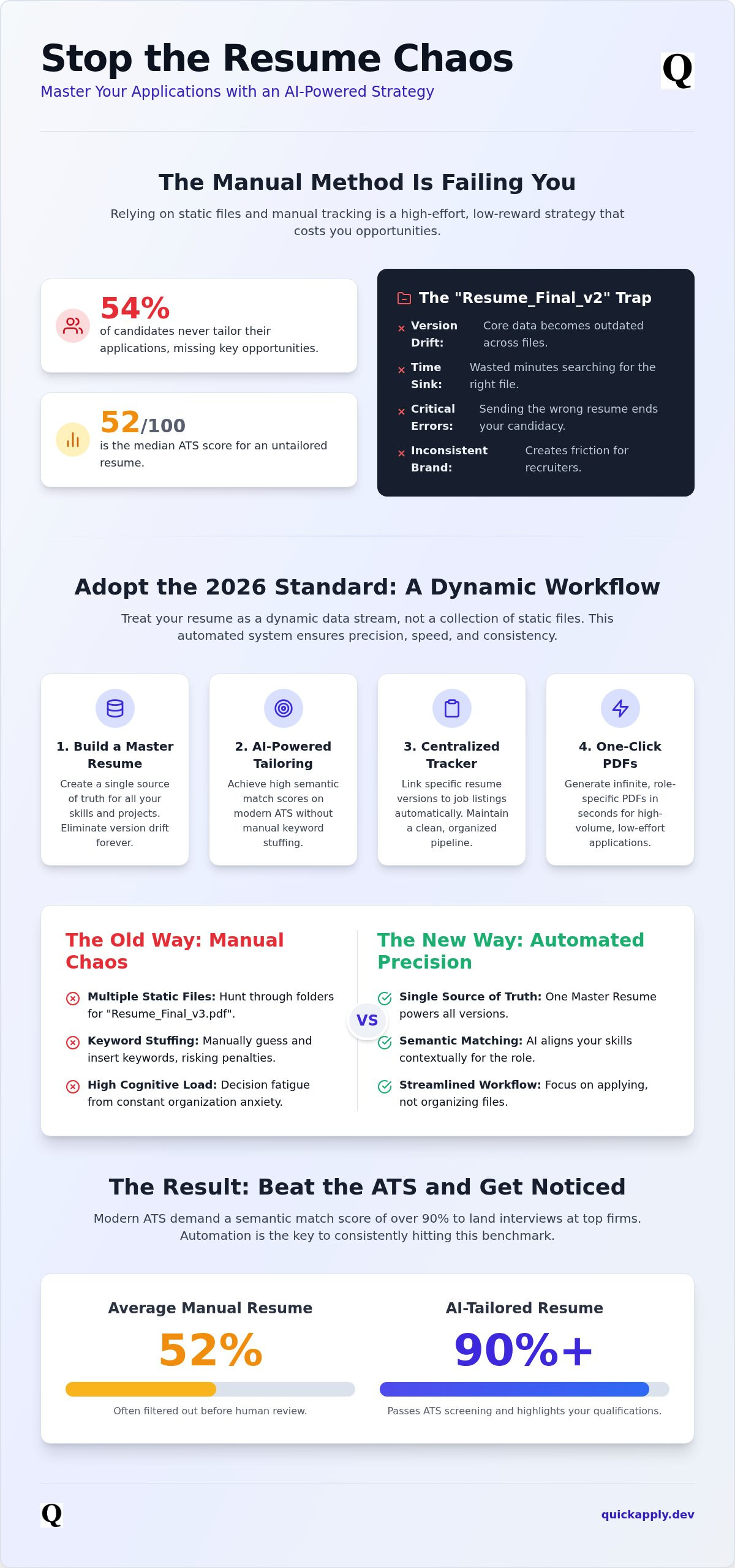
54% of candidates never tailor their applications. This lack of precision leaves the average resume with a median ATS score of just 52 out of 100. If you are still managing multiple versions of a resume by manually renaming PDF files in a cluttered folder, you are operating on legacy logic. You risk version drift. Updates to your latest project might never make it into your secondary drafts. Worse, you might send the wrong file to a recruiter. This ends your candidacy before it begins.
We understand the anxiety of the manual shuffle. It is a drain on your productivity. This guide promises to fix your workflow by deploying a high-performance versioning strategy powered by AI-driven automation. You will learn to stop the file-folder madness. Start treating your resume as a dynamic data stream. We will cover the 2026 standards for machine-readable layouts, keyword gap elimination, and how to use an application tracker to maintain a clean, automated pipeline. Get ready to scale your career goals without the organizational overhead.
Key Takeaways
- Stop the manual folder shuffle and master managing multiple versions of a resume by switching to a dynamic data stream instead of static files.
- Build a Master Resume as your single source of truth to eliminate version drift and ensure every application reflects your most recent projects.
- Deploy AI-powered Resume Tailoring to achieve high semantic match scores on 2026 ATS platforms without the risk of manual keyword stuffing.
- Centralize your workflow with an automated Application Tracker to link specific resume versions to job listings and eliminate organization anxiety.
- Implement a one-click tailoring system to generate infinite, role-specific PDFs in seconds for high-volume output with low-effort input.
The Chaos of Manual Resume Version Control
Managing 50+ PDF files is not just an organizational hurdle. It is a psychological tax. Every time you open a folder to find the "right" version, you drain your cognitive reserves. Manual management forces you to track which file went to which job board across a fragmented digital landscape. This complexity leads to decision fatigue. It is the primary reason candidates stop tailoring their applications altogether. When you spend 20 minutes just locating a file, you have less energy for understanding the modern resume and its specific technical requirements.
Time is your most valuable asset during a job search. Manual version control is a massive time-sink that offers zero ROI. While you hunt for that specific bullet point you wrote last week, the application window for your dream role is closing. Speed matters. If your system relies on manual folder navigation, you are already behind the curve. Fragmented versions also damage your professional brand. If your LinkedIn profile highlights one set of achievements while your application focuses on another, you create friction. This inconsistency signals a lack of professional polish to high-end recruiters.
The 'Resume_Final_v2' Trap
Naming conventions like "Resume_Final_v2_Marketing" fall apart during high-volume cycles. You eventually lose track of what "Final" actually means. Sending a generic resume to a senior role by mistake is a common, avoidable failure that ends your candidacy instantly. Version drift is the silent killer of job search consistency. It happens when you optimize one file for a specific role but leave the core data in your other versions outdated. Effectively managing multiple versions of a resume requires a more robust system than a naming hack or a nested folder structure.
Recruiter Perception of Inconsistent Data
Recruiters are trained to find discrepancies. If they find two different versions of your professional history online, they question your attention to detail. You must maintain a unified narrative while tailoring for specific keywords. Modern systems use an ATS resume checker to detect these inconsistencies instantly. If your data is fragmented, your match score drops. Managing multiple versions of a resume effectively means ensuring your "Source of Truth" remains consistent across every touchpoint. Stop guessing which file is the most recent and start using a centralized data model.
Why Manual Versioning Fails the 2026 ATS Test
Modern Applicant Tracking Systems (ATS) have evolved beyond simple keyword detection. In 2026, 97.8% of Fortune 500 companies utilize sophisticated algorithms that calculate semantic match scores. If you are still manually managing multiple versions of a resume, you are likely failing these invisible benchmarks. Manual tailoring often results in keyword stuffing. This is a legacy tactic. AI filters now flag repetitive, context-less terms as low-quality input. You need a document that maintains structural integrity. A poorly formatted PDF with jumbled columns or non-standard fonts will break the parser. This results in a zero match score before a human ever sees your name.
Static files are too slow for the current market. By the time you manually adjust a bullet point, the role has received 200 applications. You need a system that adapts at the speed of the modern web. If you want to remain competitive, you must move away from the file-folder mindset. Automation ensures your data is parsed correctly every time.
The Rise of Semantic Match Scores
A 90% match score is now the baseline for landing interviews at top-tier firms. An AI resume tailor for tech jobs does more than swap words. It aligns your historical achievements with specific job description requirements through semantic analysis. It contextualizes your impact. Simply mentioning Python is not enough. The system looks for how you applied it to solve a specific problem. Automated tailoring ensures your experience is framed correctly for every unique submission. This precision is impossible to maintain when you are manually editing dozens of separate documents.
Technical Debt in Your Career
Treat your professional data like code. Developers don't manage 50 copies of a source file; they use a single source of truth. Relying on a master resumé prevents technical debt in your career. Older, manual versions often contain zombie data like outdated tech stacks or expired certifications. These errors circulate in recruiter databases, diluting your professional brand. Automation ensures that every version you deploy is pulled from your most recent, verified dataset. You can centralize your versioning to stop these legacy errors from sabotaging your job search momentum.
The Master Resume Framework: Your Single Source of Truth
Static documents are a liability in a high-speed job market. To stop the cycle of version drift, you must shift your mindset from document management to data management. Managing multiple versions of a resume becomes effortless when you treat your professional history as a centralized repository. This framework eliminates the need to rewrite your history for every application. Instead, you deploy a single source of truth that feeds into every submission.
Follow this four-step deployment strategy to regain control of your data:
- Step 1: Build the Repository. Create an exhaustive Master Resume. Include every project, technical skill, and certification you have ever earned.
- Step 2: Segment by Job Family. Categorize your experiences into specific functional areas like Frontend, Fullstack, or Engineering Management. This allows for rapid data retrieval.
- Step 3: Deploy Dynamic Tailoring. Use a tool to extract only the most relevant achievements for a specific role. This ensures your submission is lean and high-impact.
- Step 4: Synchronize with Your Tracker. Link every generated version to a specific job ID in your application tracker. You must know exactly what data was sent to which recruiter.
Building the Master Repository
Documentation is the foundation of your strategy. Your master file should be exhaustive. No detail is too small. If you optimized a database or led a sprint, it belongs in the repository. Focus on impact metrics rather than vague job titles. Quantify your results with percentages and hard numbers. The Master Resume is a database, not a document. It is not meant to be read by human eyes in its entirety; it exists to provide the raw material for your tailored versions.
From Master to Tailored: The Extraction Process
Effective extraction requires a surgical approach to job descriptions. You must identify "must-have" core competencies versus "nice-to-have" secondary skills. The 2026 strategy for tailoring resume to job description involves aligning your master data with the JD's semantic requirements. This is not about changing who you are. It is about shifting the focus of your achievements to match the employer's specific pain points. Managing multiple versions of a resume is simply the act of filtering your master database through the lens of a specific job requirement. This ensures your core professional identity remains intact while your presentation remains hyper-relevant.
Automation vs. Manual Tracking: Comparing Your Options
Manual folder structures and nested directories are relics of a slower era. Managing multiple versions of a resume by hand creates a massive administrative burden that scales poorly. If you apply to three jobs a week, you might stay organized. If you apply to 50, your manual system will fail. You will inevitably lose track of which PDF contains which specific keywords or project highlights. This lack of visibility is a strategic weakness. You need a system that offers clear visibility into your application pipeline.
Consider the efficiency gap. Manual tailoring takes approximately 30 minutes per application. AI-driven generation takes 30 seconds. In a competitive market, this 60x speed advantage is the difference between being the first applicant and being buried under a pile of 200 submissions. Automation provides a clean audit trail. You can see exactly which version led to an interview, allowing you to iterate on your strategy with hard data rather than guesswork. Managing multiple versions of a resume should be a background process, not a full-time job.
The Spreadsheet Limitation
Many candidates rely on Excel or Google Sheets, but these tools lead to data entry fatigue. A manual job tracker requires you to copy and paste every job title, company name, and file path. This process is prone to human error. Broken links and missing files derail your follow-up efforts when a recruiter calls unexpectedly. You cannot filter or search within static PDF attachments stored in a spreadsheet cell. This creates a data silo that prevents you from identifying patterns in your success rate.
High-Volume Application Strategy
Scaling your job search requires a system that handles volume without sacrificing quality. An automated job application tracker syncs your tailored resume versions with specific interview dates and job IDs. This ensures you are always prepared for a screening call. You don't have to guess which experience you highlighted for a particular role. Speed is your competitive advantage. Being the first to submit a perfectly tailored file increases your visibility to recruiters who often prioritize early applicants. Stop wasting hours on administrative tasks and automate your resume management to focus on interview performance.
Eliminate Version Hell with QuickApply
QuickApply ends the era of fragmented file management. It centralizes your professional data into a high-performance hub. You no longer need to hunt through nested folders for a specific draft. The platform maintains your master repository and generates infinite tailored versions on demand. This approach ensures you never lose a high-impact bullet point or send an outdated tech stack to a recruiter. Managing multiple versions of a resume becomes a background operation rather than a manual chore.
The one-click tailoring workflow is designed for speed. You paste a job description. The AI analyzes the requirements and extracts the most relevant data from your master file. You get a perfectly formatted, ATS-compliant PDF in seconds. This systemic automation extends to cover letter generation. Every resume version gets a matching cover letter that maintains your professional narrative. Your application package is always consistent, targeted, and ready for deployment.
Integrated tracking solves the visibility gap. Every resume version is automatically pinned to its specific application within the dashboard. You can see exactly which project highlights you sent to which company. This eliminates the anxiety of the initial recruiter screening call. You will always know exactly what data is in front of the hiring manager. QuickApply turns your job search into a streamlined, high-output pipeline.
The QuickApply Dashboard Experience
The dashboard provides a real-time visualization of your application pipeline. You can monitor every stage of the process from submission to offer. Accessing unlimited resume versions is seamless. You don't have to deal with the file-naming nightmare of legacy systems. Using an AI resume builder allows you to stay ahead of 2026 hiring trends. You can pivot your strategy instantly based on the match scores and feedback provided by the platform.
Closing the Loop: From Application to Interview
The platform does not stop at the submission phase. It prepares you for the interview based on the specific version of the resume you sent. You can practice responses that align with the tailored achievements the recruiter flagged. Once you land the role, you can leverage the promotion roadmap to plan your next vertical move. QuickApply is a complete career optimization engine. Stop managing files and start managing your career. Try QuickApply for free today and experience the power of automated versioning.
Master Your Career Pipeline
The era of the static PDF is over. Relying on manual folder structures for managing multiple versions of a resume is a strategic failure that costs you interviews. You have seen how a Master Resume framework transforms your professional history into a high-performance database. By shifting from manual tracking to systemic automation, you eliminate version drift and technical debt in your career.
Precision and speed are the new standards for the 2026 job market. You need a workflow that scales with your ambition. Stop wasting cognitive energy on file organization and start focusing on high-value interview preparation. Deploy a system that guarantees structural integrity and high semantic match scores for every submission.
QuickApply provides the infrastructure you need to stay ahead of the curve. With unlimited resume versions, an AI-powered Match Score, and an integrated Application Tracker, you can dominate your job search with zero anxiety. It is time to optimize your output and secure your next vertical move.
Tailor your first resume in 30 seconds with QuickApply. Your next breakthrough is just a few clicks away.
Frequently Asked Questions
How many versions of my resume should I actually have?
You need a unique version for every job application. In 2026, generic resumes fail 97.8% of the time at Fortune 500 companies. Managing multiple versions of a resume is no longer about having three static drafts for different roles. It is about generating a tailored document for every specific job description. This ensures your semantic match score remains above the 90% threshold required for competitive tech positions.
Is it okay to use the same resume for different job titles?
No, using the same resume for different job titles is a strategic error. A "Senior Developer" role requires different achievement framing than a "Lead Engineer" or "Architect" position. Each title has specific semantic requirements that ATS platforms use to rank candidates. If your document doesn't align with the specific title and job description, your match score will drop, and your application will be deprioritized by the ranking algorithm.
How do I keep track of which resume version I sent to which company?
Use an automated application tracker to link every resume version to its specific job ID. Manual spreadsheets are prone to data entry fatigue and broken file links. A centralized dashboard allows you to see exactly which project highlights you sent to a recruiter before a screening call. This visibility eliminates the anxiety of inconsistent data and ensures you are always prepared to discuss the specific achievements mentioned in your submission.
Will recruiters know if I'm using multiple versions of my resume?
Recruiters expect you to tailor your application, so using multiple versions is considered a best practice. They only notice if your data is inconsistent across platforms, such as having a LinkedIn profile that contradicts your resume. Professional tailoring focuses on highlighting relevant skills from your master repository, not inventing new ones. As long as your core narrative remains truthful, recruiters view versioning as a sign of high professional intent.
What is the best naming convention for multiple resume files?
Stop using naming conventions like "Resume_Final_v2" entirely. These manual systems fail during high-volume application cycles. The modern standard is to use a centralized platform that handles file versioning in the background. If you must name files manually, use a "Name_Role_Company_Date" format. However, the most efficient path is to link your resume data directly to the job ID in your tracker to eliminate the file-naming nightmare.
Can AI help me manage my resume versions automatically?
Yes, AI is the only way to manage resume versions at scale in 2026. An AI resume tailor extracts data from your master repository and aligns it with a job description in seconds. This systemic automation removes the time-sink of manual editing. It also ensures that managing multiple versions of a resume results in a clean, ATS-compliant PDF every time, maintaining your competitive advantage without the administrative overhead.
Does having multiple resumes confuse the ATS?
No, having multiple resumes does not confuse the ATS because the system treats each submission as a unique entry. The ATS evaluates your document based on its individual match score for a specific role. Confusion only occurs if you submit two different versions to the same job opening. For different roles, the system simply ranks you based on how well that specific version aligns with the individual job requirements.
How do I update all my resume versions at once if I get a new certification?
You update all versions by maintaining a single source of truth in a Master Resume. When you earn a new certification, add it to your master repository once. Any future versions generated by your tailoring tool will automatically pull from this updated dataset. This "database-first" approach prevents version drift and ensures that your latest achievements are reflected in every new application without the need for manual, file-by-file updates.


