

With 88% of companies now using AI to screen your candidacy, fighting back with a manual spreadsheet is like bringing a calculator to a quantum computing race. You're likely exhausted from copy-pasting job descriptions and losing track of which resume version went to which recruiter. It's a massive drain on your time and your competitive edge. You deserve a system that moves as fast as the market does. Efficiency is your only real leverage in a crowded field.
This guide will show you how to leverage a modern job application tracker app to build a high-velocity command center. We're moving beyond basic lists and into full-scale automation. You'll learn how to eliminate manual data entry fatigue and start using a system that handles status updates and resume tailoring for you. We'll cover the exact strategies required to dominate the 2026 tech market, including how to integrate mock interviews and salary negotiation roadmaps directly into your workflow. It's time to stop managing rows and start closing offers with a system designed for precision and speed.
Key Takeaways
- Eliminate manual data entry by identifying why traditional spreadsheets are a single point of failure in the 2026 tech market.
- Discover how a modern job application tracker app functions as a centralized career CRM to automate status updates and data capture.
- Leverage browser extensions to scrape role requirements instantly from LinkedIn and Greenhouse, building a high-velocity application pipeline.
- Compare the total cost of ownership between manual tools and dedicated platforms to maximize your time and data security.
- Learn to integrate your tracking system with automated resume tailoring and interview practice for a seamless, end-to-end search strategy.
Why Manual Tracking is Your Job Search's Single Point of Failure
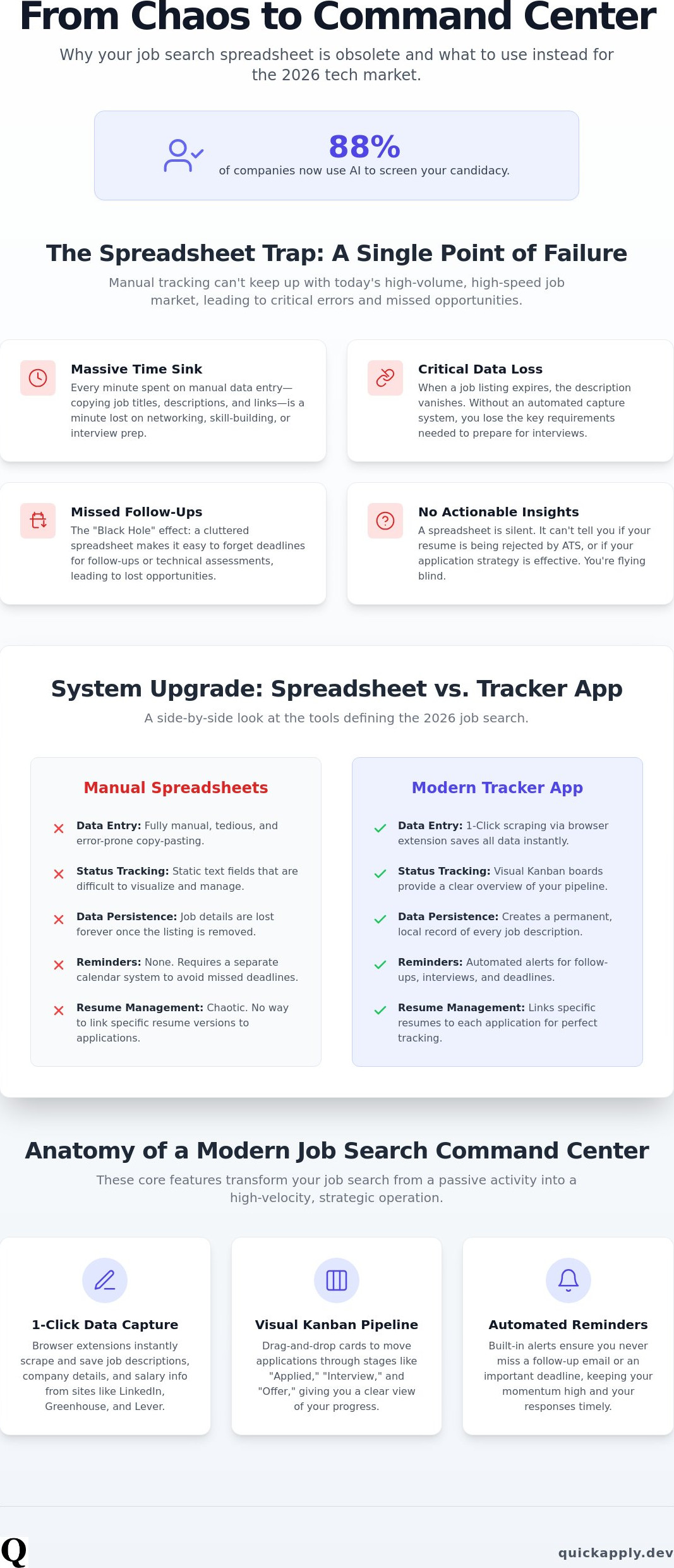
The 2026 tech market is a numbers game where the house always has the advantage. Sending ten applications a week is no longer a viable strategy; it's a recipe for stagnation. Employers are seeing a doubling in applications per opening compared to 2022, according to data from National University. This creates a noise level that manual systems simply cannot pierce. If you're still relying on a spreadsheet, you're building your career on a single point of failure. You need a job application tracker app that functions as a high-velocity engine, not a digital filing cabinet.
The Death of the Job Search Spreadsheet
Spreadsheets are static. They can't manage version control for your resumes or track the specific nuances of your outreach. Tech pros often send multiple versions of a CV, and matching the right file to the right entry in a manual log is a nightmare. This leads to the "Black Hole" effect, where follow-up opportunities vanish because you simply forgot the deadline. Most importantly, a spreadsheet is silent. It provides no feedback. It can't tell you if your profile is being rejected by an Applicant Tracking System (ATS) or if your match score is too low for the roles you're targeting. You need insights, not just rows of text.
High-Velocity Hunting vs. Passive Applying
Modern career management requires a "Command Center" approach. You must transition from passive applying to high-velocity hunting. Using a job application tracker app allows you to maintain a visual pipeline of your progress. This visibility is a massive psychological advantage. It reduces search fatigue by removing the cognitive load of remembering every detail. Automation handles the administrative heavy lifting, preventing the burnout that kills most job searches. By seeing your opportunities move through a structured funnel, you maintain the momentum needed to secure a high-tier tech role in an increasingly competitive landscape.
The Anatomy of a Modern Job Application Tracker App
A modern job application tracker app is not just a digital log. It's a centralized CRM for your career. It automates data capture and provides real-time status updates. This tool acts as the bridge between high-volume opportunity and your specific skill set. It transforms a chaotic search into a structured pipeline. You stop being a passive applicant and start becoming a tactical operator.
Browser extensions are the primary engine of this system. You must stop manually typing job titles and company names. High-end trackers use extensions to scrape data from LinkedIn, Lever, and Greenhouse instantly. One click saves the job description, company name, and salary range before the listing is deleted. This ensures you have a permanent record of the requirements you'll need to reference during the interview phase. Efficiency starts with capturing data at the source without lifting a finger.
Visualizing your progress via Kanban boards is essential for maintaining momentum. You move roles from "Applied" to "Interview" or "Offer" with simple drag-and-drop ease. This provides a tactical overview of your entire search. You can see at a glance where your energy is yielding results and where the bottlenecks are. Automated reminders ensure you never miss a follow-up or a technical assessment deadline. In a market where nearly 70% of employers use skills-based hiring, missing a coding challenge is a fatal error. The tracker keeps your schedule tight and your responses fast.
Cross-Platform Synchronization
You need one unified view for every opportunity. The best apps aggregate roles from niche tech boards and major aggregators into a single dashboard. They use auto-fill technology to slash your time-to-apply. By centralizing job descriptions locally, you protect your data. You'll have the original post even after the employer takes it down. If you want to streamline this process further, consider setting up your command center with QuickApply.
Integrated AI Tailoring
Tracking is useless without optimization. Modern systems link specific resume versions to each application entry automatically. They use Match Scores within the tracker to identify high-probability roles. This allows you to prioritize your effort on the positions where you have a statistical advantage. You can tailor resume to job description requirements directly within the tracking card. This integration ensures that every application in your pipeline is optimized for the specific keywords the ATS is looking for.
Spreadsheets vs. Dedicated Tracker Apps: The 2026 Comparison
Stop treating your job search like a data entry gig. While a spreadsheet costs nothing in licensing fees, its total cost of ownership is staggering when measured in lost time. A job application tracker app eliminates the friction that kills search momentum. Since 2021, mobile job applications have increased by 35% according to MSH Talent. Trying to manage a complex grid on a six inch mobile screen is a tactical error. You need a responsive interface that allows you to update your pipeline between meetings or during a commute. Efficiency requires accessibility.
Data security is another critical differentiator. Storing recruiter contact info, internal salary data, and sensitive resume versions in a local file is risky. Cloud-based platforms offer encrypted storage and multi-factor authentication. This protects your professional network and personal data from local hardware failures or unauthorized access. Beyond security, dedicated apps offer workflow synergy. They connect directly to your calendar and email. This turns your inbox from a cluttered mess into a streamlined feed of actionable updates.
Feature Breakdown: Automation vs. Manual Entry
Manual entry is a relic of a slower era. It takes roughly five minutes to record a single application's details, job description, and contact info. A dedicated tracker reduces this to 30 seconds. If you're managing a high-volume search, this difference is massive. In Q1 2026, active job seekers on the Huntr platform created nearly 140,000 applications. Scaling to that level of output is impossible if you're stuck in a manual loop. Auto-syncing status updates from your email ensures your board is always current without manual refreshing. You focus on the interview while the software handles the log.
The ROI of Career Management Software
View your search as a business operation. A 10% increase in your interview conversion rate easily justifies the cost of professional tools. This isn't just about tracking; it's about the quality of the input. Integrating good resume examples directly into your workflow ensures every tracked application meets modern standards. By organizing follow-ups and centralizing interview prep, you reduce your overall time to hire. The global online recruitment technology market is projected to reach $17.5 billion in 2026. Companies are using high-tech tools to find you; you should use them to find them.
How to Build a High-Velocity Job Search Workflow
Speed is your greatest asset in a competitive market, but speed without structure is just noise. You need a repeatable system that moves you from discovery to offer without manual friction. Using a job application tracker app as your central hub allows you to execute a high-velocity strategy that leaves other candidates behind. This isn't about applying to more jobs; it's about applying with higher precision and faster response times.
- Step 1: Centralize your 'Target Company' list. Don't wait for a job board to show you a listing. Identify the firms where you want to work and track them proactively within your app.
- Step 2: Use a browser extension to 'Quick Save' roles. During your morning industry scroll, use one-click saving to capture interesting roles. This builds your backlog without interrupting your research flow.
- Step 3: Leverage AI for 'Must-Have' roles. For positions that align perfectly with your career goals, use automated tailoring. Generate a resume and cover letter that speak directly to the job description's specific keywords.
- Step 4: Set automated follow-up triggers. Configure your system to alert you five days after submission. This ensures you never forget to check in with a recruiter, maintaining your momentum in their pipeline.
- Step 5: Review your 'Match Score' analytics. Use your weekly data to refine your targeting. If your scores are consistently low, adjust your search parameters to focus on roles where your skills are a statistical match.
Optimizing the 'Applied' Stage
Every application needs a unique, tracked resume version. Sending a generic document is a tactical failure that leads to immediate rejection. You are mastering the job application process when you treat every submission as a distinct project. Store recruiter contact info immediately upon application. Having a name and email address ready for your follow-up trigger saves hours of digging through old emails when the five-day mark hits. Your job application tracker app should hold everything you need to act instantly.
Managing the Interview Pipeline
The work intensifies once you secure the interview. Move your tracking cards to the 'Interview' column and attach specific prep notes. Link your interview practice tools directly to the job description stored in your tracker. This ensures your practice sessions are relevant to the actual role requirements. Track your post-interview thank you notes and any feedback loops. This data informs your future strategy and keeps you organized through multiple rounds. Build your high-velocity workflow today by launching your command center at QuickApply.
QuickApply: The AI-Powered Command Center for Tech Professionals
QuickApply is the definitive architecture for the modern tech professional. It is the only job application tracker app built to handle the high-velocity requirements of the 2026 market. Most tools stop at data entry; QuickApply starts at optimization. It bridges the gap between tracking a role and winning it. This platform integrates your entire search into a single, high-performance dashboard. You move from a reactive candidate to a proactive career manager. Efficiency is the foundation of every feature we build.
The synergy within the platform is its core strength. Your tracker isn't a silo. It feeds data directly into our AI Resume Tailor and Cover Letter Generator. When you save a role, the system immediately analyzes the job description against your profile. This isn't just about keeping a record. It's about generating the exact assets you need to clear the ATS and secure the interview. The software handles the administrative burden so you can focus on the technical nuances of your candidacy.
The QuickApply Advantage: Speed + Precision
Speed is meaningless without accuracy. QuickApply allows you to generate high-impact outputs using our ai cover letter generator directly from your tracker card. You don't need to switch tabs or re-upload documents. The 'Match Score' algorithm provides a statistical preview of your odds before you even hit submit. This data-driven approach ensures you spend your energy on high-probability roles. Automated status syncing for major tech boards means your pipeline stays updated while you focus on technical prep. You stay ahead of the curve without active effort.
Your 2026 Career Roadmap
Your journey doesn't end with a signed contract. QuickApply is designed for long-term career dominance. When a tracker card moves to the 'Offer' stage, the platform unlocks integrated salary negotiation guides. These tools provide the tactical scripts and data points needed to maximize your compensation package. You've done the work; now ensure you're paid your market value. Beyond the hire, you can transition to using our Promotion Roadmap to track your internal growth and professional milestones.
The 2026 job market demands a sophisticated approach. Join the thousands of tech pros who have replaced their spreadsheets with a job application tracker app built for results. Stop wasting hours on manual logs and start using a system that accelerates your career trajectory. Dominate your market, optimize your time, and secure your future with a command center that works as hard as you do. The most efficient path to your next role starts here.
Own Your Career Trajectory
The era of the passive job search is over. Manual spreadsheets are a liability that slows your momentum and hides critical data. By transitioning to a dedicated job application tracker app, you reclaim your time and gain a visual pipeline for your professional future. You've learned how to automate data capture, synchronize status updates, and build a high-velocity workflow that operates at the speed of modern tech hiring. Efficiency isn't just a goal; it's your primary competitive advantage.
It's time to stop managing rows and start closing offers. QuickApply provides the technical edge you need to dominate. Leverage our AI Match Score for every role and generate auto-tailored assets in less than 30 seconds. With integrated interview practice and salary negotiation guides, you aren't just tracking applications; you're engineering a career. Scale your job search and track every win with QuickApply. Your next high-tier role is waiting for the candidate who uses the right tools. Build your command center today and watch your conversion rates soar.
Frequently Asked Questions
What is the best free job application tracker app?
Teal and Prentus offer the most robust free tiers for 2026 job seekers. Teal's "Free Forever" plan includes unlimited tracking, while Prentus provides unlimited job tracking on its free tier as of May 2026. These tools are superior to manual logs because they include browser extensions for instant data scraping from major boards like LinkedIn and Greenhouse.
How do I track job applications in Notion vs. a dedicated app?
Notion is a versatile database, but it lacks the native automation of a dedicated job application tracker app. You'll spend hours building templates and manually updating statuses in Notion. Dedicated apps offer one-click saving and automated status syncing that Notion simply can't match without complex, third-party integrations that often break.
Is it worth paying for a job search tracker?
Can a job tracker app help me beat the ATS?
A tracker doesn't beat the ATS on its own; it gives you the data to navigate it. By centralizing job descriptions before they expire, you can analyze specific keywords for resume tailoring. Modern trackers often include match scores that tell you exactly how well your profile aligns with the employer's automated filters before you hit submit.
How many job applications should I be tracking at once in tech?
Tech professionals in 2026 should maintain a pipeline of 40 to 60 active applications. With Huntr reporting over 139,000 applications created in Q1 2026 alone, the market volume is high. Tracking this many leads manually is impossible. A high-velocity system allows you to manage this volume without sacrificing the quality of your follow-ups or interview prep.
Does a job tracker app automatically update when I get an email from a recruiter?
Most professional platforms offer automated status updates via email synchronization. When a recruiter reaches out, the app parses the data and moves your tracking card to the "Interview" or "Follow-up" stage. This ensures your dashboard remains accurate without you having to log in and update entries manually after every communication.
How do I organize my job search when applying to different roles like SWE and Product Manager?
Use tags or separate pipelines within your job application tracker app to categorize different career paths. You can create one board for Software Engineering roles and another for Product Management. This allows you to link specific resume versions and interview prep notes to the correct path, ensuring your strategy remains targeted and organized.
Can I export my data from a job application tracker app to Excel?
Most platforms allow you to export your data to a CSV file, which opens in Excel or Google Sheets. This is useful for long-term archiving or custom data analysis. However, you'll lose the live automation and AI integration once the data leaves the app environment, so use exports only for secondary backups or personal records.


