

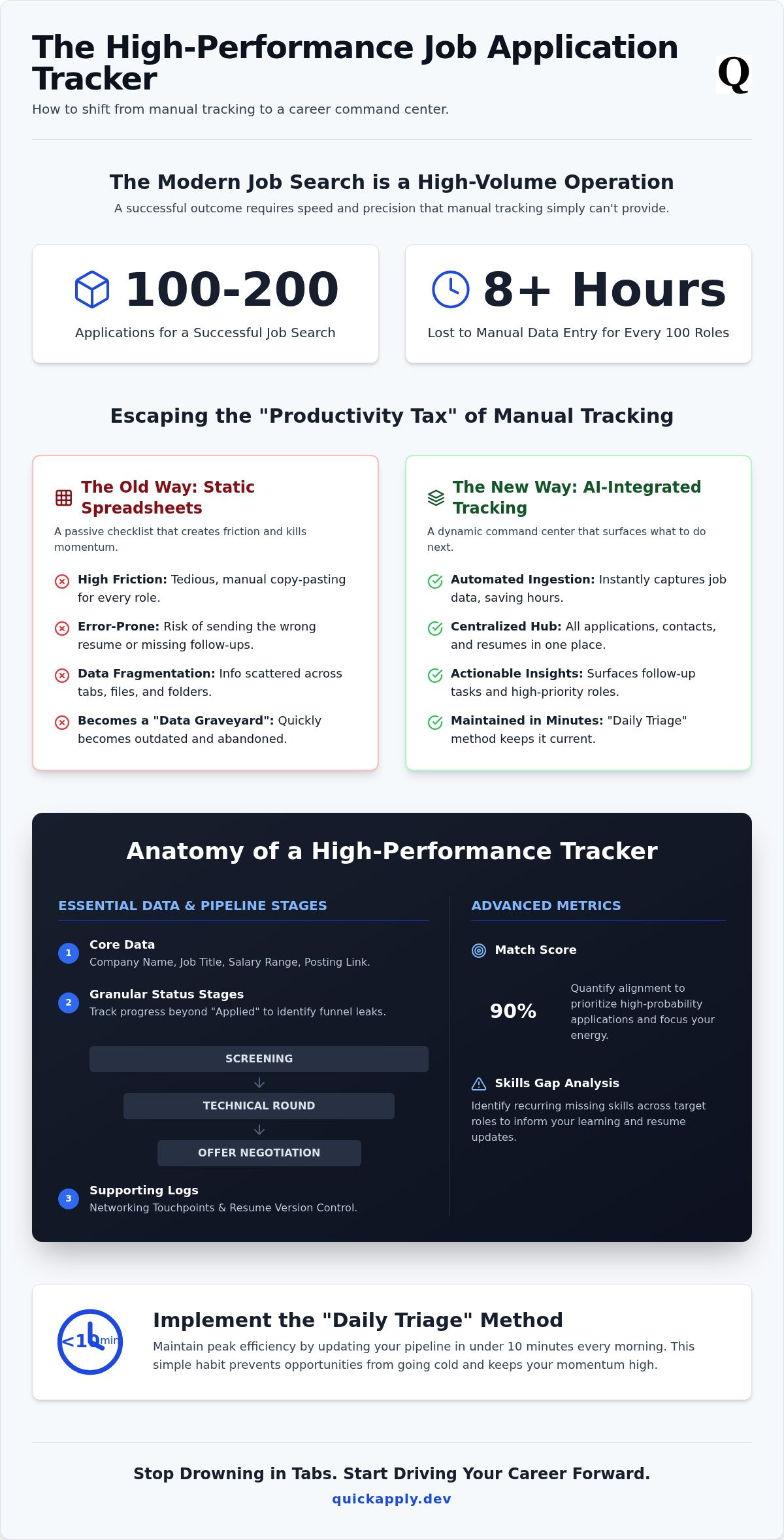
In 2025, the average successful job search required submitting 100 to 200 applications. If you're still manually managing that volume, you're bleeding time and missing opportunities. A standard spreadsheet won't cut it anymore. You need a high-performance job application tracker template that functions like a mission control for your career.
We get it. Copying and pasting job descriptions into a static table is tedious work that kills your momentum. It's easy to lose track of which resume version you sent to which recruiter or miss a follow-up deadline that could have landed the interview. You're fighting against a system that demands speed and precision, yet your current tools are holding you back.
This guide promises to end that frustration. You'll learn how to build a centralized command center that handles automated status updates and organizes your career pipeline with surgical accuracy. We'll explore the transition from manual entry to AI-driven workflows that maximize your efficiency. Get ready to transform your search into a streamlined, high-conversion engine that puts you ahead of the competition.
Key Takeaways
- Eliminate the manual "productivity tax" by shifting from static spreadsheets to a dynamic, automated career pipeline.
- Identify the essential data columns and status stages required for a high-performance job application tracker template.
- Compare the limitations of manual maintenance against AI-integrated tracking that ingests job data instantly.
- Implement the "Daily Triage" method to update your entire pipeline in under 10 minutes every morning.
- Transform your tracker into an execution engine that automatically syncs tailored resumes with every tracked role.
Why Your Job Application Tracker Template Is Failing You
A job application tracker template is not just a list of names and dates. It is a database designed to manage every critical stage of your career transition. In the 2026 job market, volume is the primary lever for success. If your tracking system relies on manual labor, you are already behind. Most templates fail because they create a massive productivity tax. This tax slows down your application speed and drains your mental energy before you even reach the interview stage.
Static templates lead to data fragmentation. When information is scattered across tabs and folders, you miss follow-up opportunities. You lose the "versioning war" when you can't remember which resume variant went to which company. Success now requires a pipeline approach. You are no longer checking boxes on a list; you are managing a high-speed funnel that demands surgical precision.
The Cost of Manual Data Entry
Manual data entry is a silent killer of career momentum. It takes roughly three to five minutes to manually log a single job posting, salary range, and contact person. If you target 100 roles, you waste over eight hours on clerical work. That is a full workday lost to copy-pasting. This friction is why most manual trackers become data graveyards after the first ten applications. The effort to maintain the sheet exceeds the perceived value of the data.
The risks go beyond wasted time. Manual systems are prone to human error. In a high-volume search, the risk of sending the wrong tailored resume to a high-priority recruiter is high. When your system is a mess, your professional brand suffers. You cannot afford to appear disorganized when dealing with sophisticated Applicant Tracking Systems (ATS) that recruiters use to filter talent. Your internal tools must match the technology used by the companies you want to join.
From Checklist to Command Center
Stop using your tracker as a passive log. You must shift from a checklist mindset to an active command center. A checklist only tells you what you did in the past. A command center tells you what to do next. This transition reduces the cognitive load of your search. Instead of trying to remember which hiring manager to nudge, your system should surface that task automatically. Centralizing your data is the only way to maintain a competitive edge.
Integration is the final piece of the puzzle. Tracking your progress is useless if it is disconnected from your actual output. You need a system that bridges the gap between organization and action. This means mastering the job application process by linking your tracker directly to your resume tailoring and submission workflow. Efficiency is not about working harder; it is about eliminating the distance between finding a role and applying for it.
The Essential Columns for a High-Performance Tracker
A standard job application tracker template often lacks the depth required for a modern, high-volume search. You need more than just a list of companies. Your tracker must function as a diagnostic tool. Start with core data: company name, job title, salary range, and the direct link to the posting. These are non-negotiable. However, the real power lies in the status stages. Stop using "Applied" as a catch-all. Segment your pipeline into granular phases: Screening, Technical Round, and Offer Negotiation. This level of detail identifies exactly where your funnel is leaking.
Add a networking log to track recruiter names and the date of your last touchpoint. This prevents you from appearing disorganized or forgetful. For tech professionals, resume versioning is critical. You likely have multiple versions of your resume tailored for specific niches. Dedicate a column to the specific file version sent. This ensures you are prepared for the specific skills mentioned in that version when the call comes. If you want to move faster, using an automated application tracker can sync these versions to your pipeline without manual entry.
Advanced Metrics: The Match Score Column
The most effective trackers include a Match Score column. This metric quantifies how well your profile aligns with the job description. By assigning a percentage to each role, you can prioritize high-probability applications. This prevents you from wasting hours on long-shot roles while high-match opportunities go cold. Tracking "skills gaps" within this column also informs your next resume update. If you notice a recurring missing skill across five roles, you know exactly what to learn or highlight next. Use this data to decide where to spend your limited networking energy for the highest return on investment.
Follow-up Latency and Deadline Tracking
Speed is a competitive advantage. Set up alerts for a 48-hour post-interview thank you note. Tracking follow-up latency ensures you stay top-of-mind without being a nuisance. Additionally, log application "expiration dates" to clear ghosted postings from your view. This keeps your job application tracker template clean and actionable. Every row should also have space for interviewer feedback. Recording these notes immediately after the call allows you to refine your pitch for the next round. Don't let valuable data vanish into the void; log it, analyze it, and move to the next stage of the pipeline.
Static Spreadsheets vs. AI-Integrated Tracking
Relying on a static job application tracker template is a legacy approach. Google Sheets and Notion are excellent for general organization, but they require 100% manual maintenance. Every job title, company name, and URL must be hand-typed. This creates a friction point that slows your application velocity. In a market where speed wins, wasting 10 minutes per entry is a strategic error. AI platforms like QuickApply eliminate this friction by ingesting job data automatically. You don't just log data; you deploy it.
The real power of an integrated tracker is the connection between data and action. A spreadsheet is a passive graveyard for links. An AI-integrated tracker links specific tailored resumes to each individual entry. When a recruiter calls, you aren't hunting through folders. You see the exact version used for that specific role instantly. This is the difference between looking at data and acting on insights. You move from a reactive state to a proactive command center.
The Version Control Problem
Static sheets fail the moment you hit scale. If you're a Software Engineer applying for "Full Stack," "Backend," and "Frontend" roles, you likely have 15 different resume variants. Managing these in a spreadsheet is a nightmare. You might link to a folder, but you won't know which PDF went to which portal. AI trackers solve this by storing the exact file sent to each recruiter. This version control is your best defense against interview confusion. You'll never walk into a technical round prepped for the wrong tech stack again.
Automation and API Integrations
2026 is the year we stop filling out spreadsheets by hand. Modern tracking utilizes browser extensions that "clip" jobs directly from boards like LinkedIn or Indeed. One click captures the company, role, and description. These tools go beyond simple storage. They use API integrations to pre-fill application forms, slashing your "time-to-apply" by significant margins. Your tracker should be an engine, not a diary. If your current system doesn't automate the boring parts, it's time to upgrade your tech stack.
How to Maintain Your Tracker for Maximum Efficiency
Maintenance isn't optional. It is the engine that keeps your search from stalling. If you treat your job application tracker template as a static log, it will become a burden. Use the "Daily Triage" method to stay ahead. Spend exactly 10 minutes every morning updating your statuses. Move stagnant entries to the archive. Mark new responses for immediate action. This rapid update cycle ensures your data stays fresh and your focus remains on active leads.
Stop applying in real-time. It kills your productivity. Save interesting roles to your tracker throughout the day as you find them. Then, enter a "Deep Work" block to batch your applications all at once. This workflow maximizes your output while minimizing the cognitive cost of context switching. You'll apply faster and with higher quality when you aren't constantly jumping between searching and writing.
Audit your pipeline every Sunday. Identify where you are getting stuck. If you have a high application volume but zero screens, your resume is the bottleneck. If you're getting screens but no offers, your interview technique needs a pivot. Clean out "Dead Leads" during this audit. If a company hasn't responded in 14 days, move it to the "Ghosted" category. Clear the clutter so you can focus on opportunities that actually have momentum.
Analyzing Your Application-to-Interview Ratio
Your tracker data acts as a diagnostic tool for your career strategy. If your conversion rate is low, your resume isn't hitting the right keywords. Conversion Rate is the percentage of total applications that result in a first-round interview invitation. Use this metric to identify "red flag" companies that consistently ghost candidates. If a specific industry is ignoring you, use your data to justify a strategic pivot immediately. Don't guess why you're failing; let the numbers tell you.
Leveraging Your Tracker for Interview Prep
Your tracker is your pre-game briefing. Review the original job description you saved before every call. Recruiters often delete postings once they start interviewing; having that data stored locally is a massive advantage. Use the "Notes" column to record specific questions for the hiring manager based on their requirements. Seeing a full pipeline also provides a critical psychological boost. It reminds you that one rejection is just a single data point in a much larger, optimized system.
Stop managing your search manually and automate your career pipeline today to gain a competitive edge.
QuickApply: The Automated Job Tracker Built for Tech
QuickApply isn't just another job application tracker template. It is an execution engine designed for high-velocity career moves. While spreadsheets act as passive logs, QuickApply functions as a centralized command center. It bridges the gap between discovery and submission. Every role you track is immediately actionable. You don't just record a job; you conquer it.
The platform automatically syncs your tailored resume with AI precision to every entry in your pipeline. There is no manual file management. No versioning hell. Native Match Scores provide instant triage. They tell you exactly which roles deserve your focus and which are a waste of bandwidth. From AI cover letter generation to strategic salary negotiation, every tool is integrated into one high-performance workflow.
Tailor, Apply, and Track in One Click
The transition from finding a job to tracking the interview is seamless. Most systems treat these as separate tasks. QuickApply treats them as a single, unified motion. This eliminates the need for messy third-party spreadsheets or fragmented Notion boards. Consider the advantages of a unified system:
- Instant Data Ingestion: Clip jobs from any board and watch the details populate automatically.
- Linked Interview Preparation: Access your interview practice tools directly from the specific job row.
- Versioned Documentation: See exactly which PDF was sent to which recruiter without searching folders.
The integration goes deeper than just data entry. You can review the specific resume version and job description while running simulated technical rounds. This level of preparation is only possible when your tracking and execution live in the same ecosystem. Stop fighting with disconnected tools and start using a system built for the modern web.
Ready to Upgrade Your Job Search?
Tech professionals are ditching generic productivity apps for purpose-built AI tools. Notion is great for notes, but it isn't an execution engine. Purpose-built platforms provide a managed application history that offers long-term career value. You can track your growth, analyze your conversion rates over years, and refine your strategy with actual data. A job application tracker template is a starting point, but a platform is a destination.
Your time is your most valuable asset. Stop spending it on clerical work that an AI can handle in seconds. Efficiency is the only competitive advantage that matters in a crowded market. Take control of your career pipeline with a system that works as hard as you do. Start tracking your applications with QuickApply's AI platform today.
Deploy Your Career Command Center
The 2026 job market leaves no room for manual inefficiency. A traditional job application tracker template is a useful starting point, but it shouldn't be your final destination. You've learned how to identify the essential data columns that drive decisions and how to implement the "Daily Triage" method to keep your pipeline moving. The shift from passive logging to active execution is what separates top-tier candidates from the rest of the pack.
It's time to stop fighting with spreadsheets and start using a system built for the modern web. By leveraging AI-powered Match Scores and integrated resume tailoring, you can eliminate the clerical friction that slows down your career growth. A unified, automated application pipeline ensures you never miss a follow-up or lose track of a high-priority opportunity again.
Don't let manual data entry hold you back from your next big role. Stop manual tracking and automate your job search with QuickApply today. You have the tools and the strategy. Now, go execute.
Frequently Asked Questions
What is the best way to track job applications in 2026?
The most efficient method in 2026 involves using an automated career command center instead of a static job application tracker template. High-volume searching requires real-time data ingestion and match scores to prioritize leads. Manual entry is a productivity tax you can't afford. Modern tools automate the logging process; this allows you to focus on interview performance rather than clerical work.
Should I use Excel or Notion for my job application tracker?
Excel and Notion are functional for basic organization but lack native automation. They require manual updates for every status change, which creates a significant bottleneck. Tech professionals need systems that link directly to resume tailoring and application history. While these platforms work for simple lists, they fail to provide the execution speed necessary for a competitive and fast-paced job market.
What columns should I include in a job search spreadsheet?
Your job application tracker template must include company name, role, salary range, and posting URL. Beyond basics, add a Match Score column to quantify alignment and a Resume Version column to track specific tailoring. Include a "Last Touchpoint" date to manage follow-up latency. These granular details transform a passive list into a diagnostic tool that identifies exactly where your funnel is failing.
How do I track different versions of my resume for different jobs?
Stop hunting through local folders to find the PDF you sent. Effective tracking requires linking the exact resume version directly to the job row in your database. Automated platforms handle this by storing the specific tailored file within the application record. This prevents versioning hell. It ensures you're prepped for the specific skills you highlighted when the recruiter calls.
Is there a way to automate my job application tracking?
Automation is the standard for 2026. Use browser extensions that "clip" job data directly from boards like LinkedIn or Indeed into your tracker. This eliminates manual copy-pasting. Advanced platforms go further by automatically updating application statuses based on recruiter emails. Transitioning to an automated system saves hours of administrative work and ensures your pipeline remains accurate without any active effort.
How many job applications should I be tracking at once?
A successful job hunt in 2025 often required submitting 100 to 200 applications. You should track every single one of these in your pipeline. High volume is the only way to overcome the statistical challenges of modern hiring. An organized system allows you to manage this scale without feeling overwhelmed. It prevents you from losing track of high-priority interview deadlines.
Can an AI job tracker help me get more interviews?
AI trackers increase interview conversion rates by identifying high-probability matches. Instead of spraying and praying, you use Match Scores to focus your energy on roles where you have a competitive advantage. These tools also ensure you never miss a follow-up deadline. Consistent, organized persistence is the most effective way to turn a cold application into a live screening call.


