

Your static color-coded spreadsheet isn't keeping you organized; it's actively killing your interview pipeline. If you're trying to figure out how to organize my job search effectively, opening another row in Excel won't solve the underlying problem. Juggling dozens of browser tabs, losing track of customized resume versions, and missing critical recruiter follow-ups is an exhausting administrative trap. You feel burned out by manual data entry long before you even reach an initial phone screen, and that friction costs you momentum.
You can eliminate that drag entirely. In this guide, you'll learn how to build an automated, high-velocity tracking engine that transforms application chaos into repeatable interview invites. We'll walk through the full pipeline architecture, from establishing modular document version control to managing a dynamic workflow that surfaces high-yield applications with zero wasted effort.
Key Takeaways
- Treat your job hunt like an active sales pipeline to eliminate scattered browser tabs and the friction of static spreadsheets.
- Master how to organize my job search effectively using a centralized command center that separates rapid sourcing from deep application execution.
- Deploy a modular document architecture to build tailored resumes and cover letters in seconds without losing version control.
- Diagnose pipeline drop-offs with conversion analytics that pinpoint exactly where your applications stall before the interview stage.
- Integrate workflow automation tools to handle manual requisition logging, reclaiming valuable hours for technical prep.
Deconstructing the Job Search Pipeline: Why Traditional Tracking Fails
Most job seekers treat their search like a lottery ticket. They fire off resumes into the void, save job links in messy browser bookmarks, and wait. That approach guarantees failure. If you want to know how to organize my job search effectively, you must view your search as an agile sales pipeline. You're sourcing leads, qualifying opportunities, pitching a product (your technical skills), and closing deals. Treating it like an administrative chore ruins your conversion rates before you ever talk to a hiring manager.
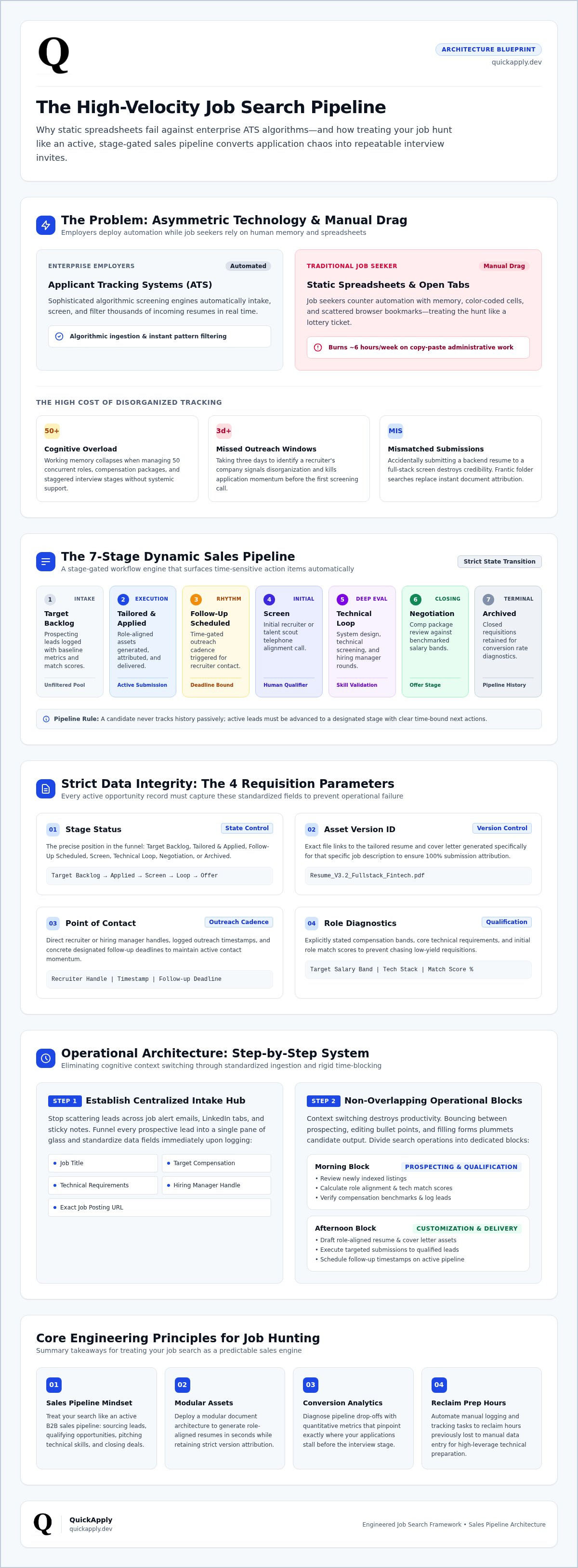
The core problem lies in asymmetric technology. Enterprise employers deploy sophisticated applicant tracking systems to intake, screen, and filter thousands of resumes automatically. Job seekers, meanwhile, attempt to counter this enterprise automation using static spreadsheets and memory. Manual tracking can't scale against algorithmic screening. When you spend six hours a week copying URLs, pasting salary snippets, and updating color-coded cells, you lose precious time that belongs in technical interview preparation.
The High Cost of Disorganized Job Hunting
Managing fifty concurrent job applications manually creates immediate cognitive overload. Human working memory cannot track multiple custom resume iterations, varying compensation packages, and staggered interview stages without systemic support. Missed recruiter outreach windows kill momentum. When a talent scout contacts you for a screening call and you take three days to identify which company they represent, you signal disorganization.
Worse, manual logging leads to mismatched resume submissions. Sending a backend-focused resume to a full-stack screen instantly destroys your credibility. You need instant document attribution, not frantic folder searches while on the phone with a recruiter.
Moving from Static Spreadsheets to Dynamic Pipelines
Static sheets record history; dynamic pipelines drive action. To understand how to organize my job search effectively, replace passive rows with a stage-gated workflow engine. A dynamic tracking setup surfaces time-sensitive tasks automatically, ensuring you never drop an active lead.
Every active requisition record must maintain strict data integrity across specific parameters:
- Stage Status: Target Backlog, Tailored & Applied, Follow-Up Scheduled, Screen, Technical Loop, Negotiation, or Archived.
- Asset Version ID: Exact file links to the tailored resume and cover letter generated specifically for that job description.
- Point of Contact: Direct recruiter or hiring manager handles, outreach timestamps, and the designated follow-up deadline.
- Role Diagnostics: Stated salary bands, core technical stack, and initial match scores.
Centralizing these records turns application chaos into an actionable, repeatable operational engine.
Step-by-Step Architecture: How to Organize Your Search System
Execution beats intention every time. To implement a system that answers how to organize my job search effectively, you must replace chaotic browsing with a disciplined operating model. The U.S. Department of Labor highlights the importance of a structured job search plan to keep candidates focused, and in modern hiring markets, that structure must be programmatic. That means building a clear progression: capture opportunities rapidly, tailor assets deeply, and automate your outreach rhythms.
Step 1: Establish Your Centralized Intake Hub
Stop scattering leads across job alert emails, LinkedIn tabs, and sticky notes. Funnel every prospective lead into a single intake repository. Standardize the data fields immediately upon logging: job title, target compensation, technical requirements, hiring manager handle, and the exact posting URL. If you need a complete breakdown of execution frameworks, review our guide to mastering the job application process. Establishing this single pane of glass prevents dropped opportunities and cleans your intake funnel.
Step 2: Allocate Dedicated Time Blocks for Pipeline Stages
Context switching destroys productivity. When you bounce between prospecting roles, editing bullet points, and filling out submission forms, your output plummets. Split your workday into non-overlapping operational blocks:
- Morning Block (Prospecting & Qualification): Review newly indexed listings, calculate role alignment scores, verify compensation benchmarks, and log leads into your tracker.
- Afternoon Block (Customization & Delivery): Draft role-aligned materials, submit materials through primary company portals, and record submission timestamps.
Cap your output at three to five high-conviction submissions daily. Quality beats spraying hundreds of generic submissions into black-box portals. A disciplined cap ensures you preserve rigorous version tracking for every single application.
Step 3: Implement Systematic Follow-Up Triggers
Most candidates send an application and simply wait. Proactive applicants build automated touchpoint cadences. If you haven't received a status update within five business days, initiate your first outreach directly to the internal technical recruiter or engineering manager. Reference a concrete project or technical achievement relevant to their current architecture.
Set a secondary alert at ten business days. If twenty-one calendar days pass with zero response, transition that requisition to your archive stage to prevent clutter. To streamline your intake and monitor every pipeline stage automatically, deploying a dedicated application tracker ensures your active leads move forward on schedule without manual overhead.
Managing Application Assets: Resumes, Cover Letters, and Portfolios
Relying on a single static resume is a structural flaw. Enterprise ATS parsers evaluate applications against dense role requirements, scoring candidates based on contextual alignment and technical density. Submitting an uncustomized document dilutes your relevance score instantly. If you want to know how to organize my job search effectively, you must build an agile asset architecture that lets you assemble, track, and deploy tailored documents without introducing version confusion.
Application hygiene separates organized candidates from those who get screened out early. When managing multiple live opportunities, manual file handling introduces severe risks, such as uploading a document tailored for an infrastructure engineer role to an application for an engineering manager role. To eliminate that vulnerability, establish strict naming protocols (such as First_Last_TargetRole_Company.pdf) and link every single asset directly to its corresponding requisition record.
The Master Asset Repository Framework
Never write an application from scratch. Maintain an exhaustive master repository: an unformatted, five-page compilation containing every metric, technical stack, architecture migration, and business outcome of your career. Group your raw data into clear, modular components:
- Core Architecture Blocks: Detailed descriptions of systems designed, scaling limits managed, and deployment pipelines engineered.
- Quantified Impact Metrics: Precise numbers detailing latency reductions, AWS cost optimizations, and sprint throughput improvements.
- Domain Toolkits: Specific technical keywords grouped logically (languages, databases, frameworks, containerization tooling).
When you spot an opening, you do not write new content; you simply select and compile the exact modules required for that profile.
Precision Document Versioning and AI Customization
Generating tailored derivatives must take seconds, not hours. For a granular breakdown of modern alignment techniques, master how to tailor your resume to a job description using contextual parsing engines. Every resume should have a matching cover letter that reflects the company's technical stack, and exploring the best AI cover letter builders helps accelerate this pairing process while protecting factual accuracy.
Maintain complete synchronization across every asset pair you submit. When understanding how to organize my job search effectively, your pipeline database must store the exact resume version, the targeted cover letter, and a snapshot of the original job posting together. When a recruiter reaches out two weeks later, you can pull up the precise document they're looking at and speak directly to the points you emphasized.
Tracking Key Metrics to Diagnose and Fix Pipeline Bottlenecks
You can't optimize what you don't measure. When candidates ask how to organize my job search effectively, they often focus entirely on intake volume and forget diagnostic data. A pipeline without conversion tracking is just a black hole. Treating your search like an iterative engineering funnel lets you pinpoint failure modes mathematically. When interview invites dry up, guessing won't help you fix the issue; stage-gate metrics will.
Industry recruiting benchmarks establish baseline expectations for inbound cold submissions: typical cold board conversions land around 2% to 3% for initial interview screens, while referrals can jump 8x to 11x higher. If your metrics diverge from expected ratios, your funnel is leaking. You need real numbers to isolate whether the breakdown stems from ATS keyword parsing, recruiter screening fatigue, or technical round execution.
The Four Vital Health Metrics of an Effective Search
Monitor these four conversion indicators weekly to maintain pipeline visibility:
- Application-to-Screen Rate: Target a minimum 5% to 10% conversion. This measures document relevance and keyword indexing strength against ATS filters.
- Screen-to-Technical Rate: Target 50% to 60%. This gauges how well your spoken elevator pitch and career narrative align with recruiter expectations.
- Technical-to-Final Rate: Target 40% to 50%. This evaluates your live coding, system design, and architectural problem-solving under pressure.
- Final-to-Offer Rate: Target 25% to 30%. This reveals your competitive positioning, culture alignment, and executive presentation value.
Troubleshooting Funnel Drop-offs with Targeted Fixes
Use metric drops as automated diagnostic signals. If your Application-to-Screen conversion drops below 5%, stop applying. Your resume is either failing parsing checks or lacking the hard technical keywords required for the role. Audit your master bullet points immediately, emphasizing quantifiable metrics and core tools.
When you pass initial screens but stall out in technical rounds, the issue isn't your resume. Pivot your afternoon blocks away from submitting new applications and redirect that bandwidth toward deep system design review and live coding mock sessions. Similarly, track response cycle latency across company tiers. Seed-stage startups often advance candidates within four to seven business days, whereas enterprise giants using complex ATS workflows frequently average two to four weeks just to schedule an initial screen.
Pinpointing these leaks manually across dozens of applications consumes critical energy. Streamline your search with an automated application tracker to monitor pipeline velocity and diagnostic metrics in a unified dashboard.
Scaling Your System: Automation Tools and Workflow Integration
Manual pipelines break down under load. Copying job descriptions, logging requisition IDs, and cross-referencing contact details eats up bandwidth that belongs in deep interview preparation. When you analyze how to organize my job search effectively, the ultimate objective is replacing repetitive data entry with programmatic automation. Modern workflows demand software-level integration that captures, filters, and logs opportunities in seconds.
Eliminating Manual Data Entry Across Applications
Browser extensions solve the browser-tab crisis instantly. Instead of running dozens of open tabs and manually copy-pasting requisitions into a database, automated ingestion tools parse structured data straight from company career portals into your tracker. You eliminate manual friction while ensuring pristine data integrity.
Automate these critical pipeline touchpoints to save hours each week:
- Requisition Ingestion: Capture posted salary thresholds, technical requirements, and recruiter profiles with one click.
- Status Synchronization: Move applications across pipeline stages automatically when confirmation emails arrive.
- Match Scoring Triage: Run role descriptions through match-scoring algorithms to filter out low-probability roles before you invest tailoring effort.
Filtering noise at the intake gate guarantees that you only spend time tailoring assets for positions that match your exact stack and compensation target.
Accelerating Your Pipeline with Unified Platforms
Fragmenting your job search across isolated point solutions introduces version drift and tracking fatigue. Switching between one application for document generation, another for kanban tracking, and a third for communication logs reintroduces administrative drag. Every context switch chips away at your daily output.
A unified operating system consolidates your pipeline tracker, match score filtering, role-specific asset tailoring, and cover letter generation inside a single command center. Automated tools generate aligned resume derivatives and cover letters in seconds, letting you perform a focused human review for factual accuracy before hitting submit. Streamline your career management workflow today with QuickApply to maintain maximum velocity and take total control of your interview pipeline.
Automate Your Pipeline and Accelerate Your Search
Treating your career search like an agile pipeline changes the math in your favor. Figuring out how to organize my job search effectively doesn't mean building bigger spreadsheets. It requires eliminating administrative drag, deploying modular document versioning, and fixing funnel leaks with diagnostic data. When you stop updating static rows, you reclaim dozens of hours for live interview preparation.
Take command of your pipeline instead of fighting scattered browser tabs and forgotten follow-ups. You deserve an engine built for modern hiring velocity. Using an integrated application tracking dashboard designed for tech talent gives you total visibility over every submission. Accurate match scoring pinpoints your strongest software opportunities immediately, while automated tools generate custom-tailored resumes and cover letters in seconds. Maintain pristine data hygiene, keep your documents synchronized, and stop letting high-value opportunities slip through the cracks. Build your automated job search pipeline with QuickApply and take control of your career trajectory today.
Frequently Asked Questions
How many hours a day should I spend organizing my job search?
Spend no more than 60 to 90 minutes per day on administrative tracking and sourcing. If you're learning how to organize my job search effectively, pouring entire days into scrolling job boards leads straight to burnout. Cap your morning intake window to one hour, spend two hours tailoring high-probability submissions, and dedicate the rest of your day to technical interview preparation and coding practice.
What is the best way to track multiple customized resume versions?
Tie every tailored document directly to a specific requisition record in your tracking dashboard. Use a strict naming convention, such as your full name, the target title, and the company. Storing the exact PDF export alongside a snapshot of the original job description ensures you never enter a recruiter screen guessing which project metrics or architectural competencies you highlighted in that submission.
How often should I follow up on submitted job applications?
Execute your first follow-up after five business days, followed by a final outreach touchpoint at ten business days. Send concise, value-focused messages directly to internal technical recruiters or hiring managers. If twenty-one calendar days pass with zero response, move that requisition to your archive stage. Purging non-responsive leads keeps your active pipeline clean and prevents mental clutter.
Should I use a spreadsheet or a dedicated application tracker?
Use a dedicated application tracker to eliminate manual copy-pasting and maintain clean asset versioning. Static spreadsheets lack dynamic stage triggers, require tedious maintenance, and fail to link resume variants directly to job descriptions. When deciding how to organize my job search effectively, software-driven pipelines automate repetitive data entry so you can focus your energy on landing interviews.
What conversion rate should I expect from applications to first-round interviews?
Target a baseline conversion rate of 5% to 10% for tailored applications. Standard cold inbound submissions often convert at just 2% to 3%, while employee referrals convert at much higher rates. If your application-to-screen rate stays below 3% across thirty submissions, pause your outreach immediately and refactor your master resume bullets to improve technical keyword density.
How do I organize networking contacts alongside direct job applications?
Nest networking contacts directly inside the corresponding company requisition record instead of scattering them across separate address books. Store the contact's name, LinkedIn URL, engineering team, and conversation timestamp right beside the target role. Tracking contacts within the application card ensures you see your entire communication history whenever you check that role's status.
Can applicant tracking systems detect if I use automated tools?
Applicant tracking systems parse standard document formats into structured text data; they evaluate contextual alignment, experience density, and skill keywords, not the tool used to draft the document. As long as your tailored materials present accurate technical achievements in a clean layout without non-standard parsing tables, ATS platforms process them smoothly. Always run a final human check to verify technical claims before applying.


